Analyzing and Reverse Engineering - WannaCry Ransomware
Reversing and analyzing wannacry ransomware sample.

NOTE: This post is supposed to be a writeup on analyzing and reversing “Wannacry ransomware”. Aim is to show the process and explain things in between, not just to publish a report.
FEW WORDS FROM ME
Hey visitor this is my first blog on malware analysis. I will analyze one of the most infamous malware sample ever created WannaCry Ransomware.
This was something on my bucket list for a long time.
We will analyse it’s behavior, both dynamically and statically. How it tries to spread across the network and reverse engineer it’s code.
This would be a challenge for me too, seeing how far I can reverse engineer it’s code. And that’s the best part.
REMEMBER: Always do this stuff in an isolated environment.
A BIT OF HISTORY
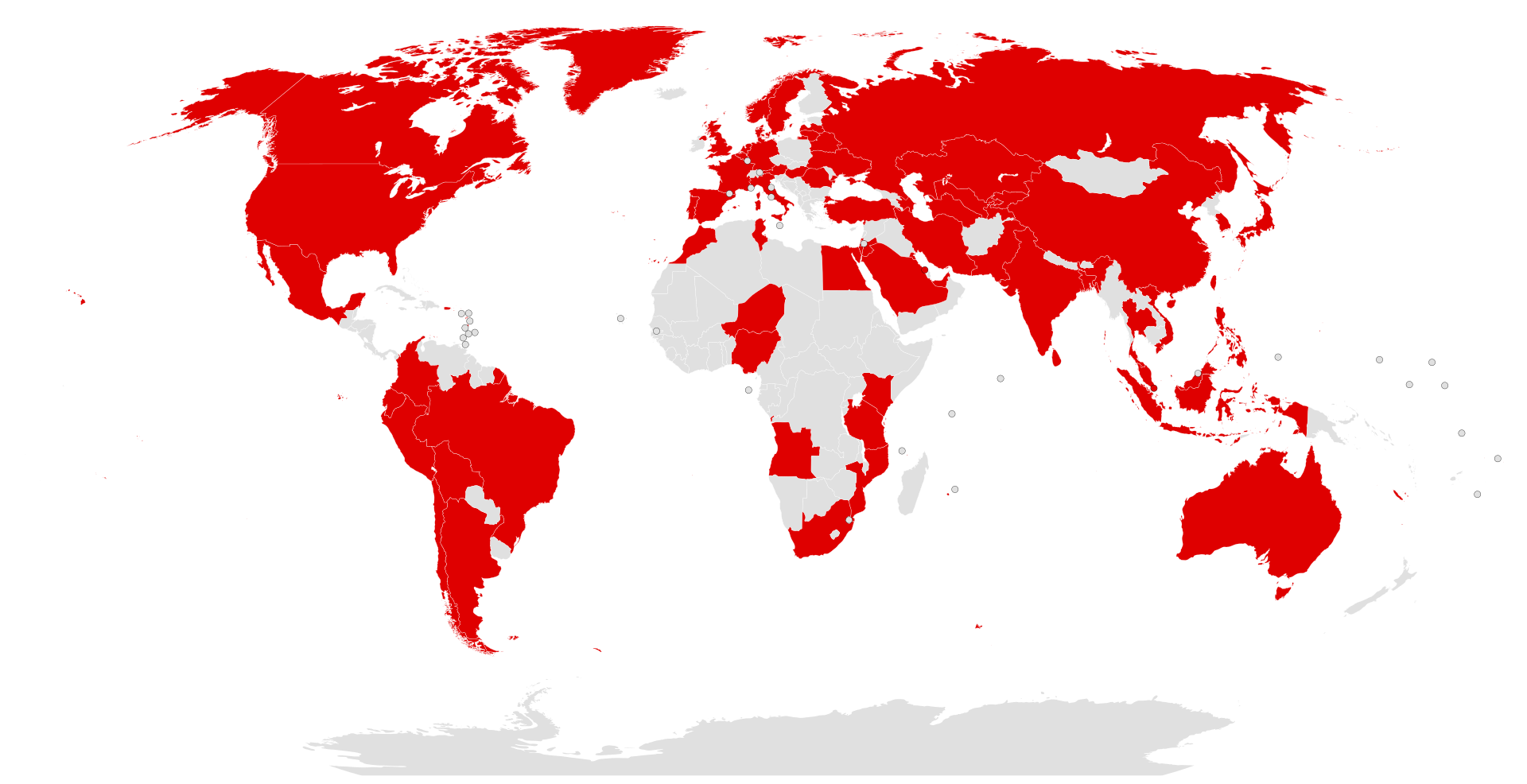
WannaCry was one of the most widespread ransomware attacks in history. It began on May 12, 2017, and quickly spread across the globe, infecting more than 300,000 computers in over 150 countries.
The malware targeted Microsoft Windows systems by encrypting users’ files and demanding a ransom payment in Bitcoin to restore access. It spread automatically using EternalBlue, a vulnerability exploit originally developed by the U.S. National Security Agency (NSA). After the exploit was leaked online by a hacking group known as The Shadow Brokers, cybercriminals used it to launch the WannaCry attack.
Later investigations by the United States and the United Kingdom attributed the attack to North Korean state-backed actors, although North Korea has denied any involvement.
SETTING THE STAGE
If we drop a possibly malicious sample on our machine, we do it in an air-gapped / disposable environment.
The setup I use (might also be the most common setup).
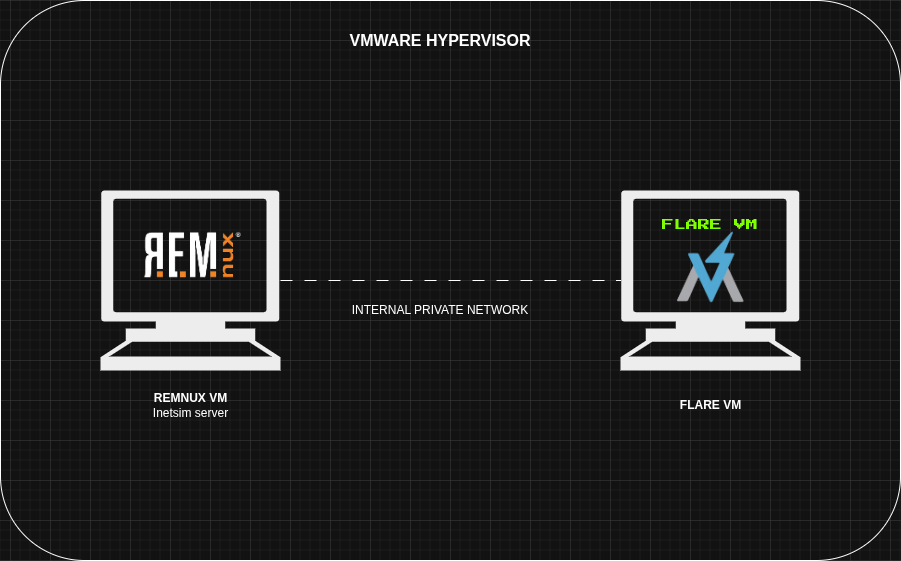
Quite a simple setup.
Two VMs running connected by an air gapped network. One is Flare VM the windows go-to malware analysis machine, second is Remnux VM the linux go-to malware analysis machine.
The remnux machine will have an inetsim (internet simulator) server running, to analyse the network behavior of the samples.
Say we are analyzing a PE sample, Powershell script or an excel macro. We will detonate in the flare VM and run wireshark on remnux, where we can analyse / capture the network artifacts.
A DRY RUN
First of all, simply run the sample just to see what capabilities it have and what can it do.
with inetsim running the sample won’t do anything.
I will talk about it later, for now flush the DNS cache and stop inetsim.
1
ipconfig /flushdns
BASIC STATIC ANALYSIS
Analyzing Strings
A trained eye can spot a lot of things about malware just by looking at the strings. But I’m still new at this so this is what I spotted.
1
λ FLOSS.exe -n 8 Ransomware.wannacry.exe.malz > strings.txt
Generally there is a single string like this in one PE executable, but here it’s repeated 4 times indicating multiple binaries.
1
!This program cannot be run in DOS mode.
1
http://www.iuqerfsodp9ifjaposdfjhgosurijfaewrwergwea.com
strings related to commands, these are for hiding a file / folder and granting a full permission to everyone.
1
2
3
4
5
cmd.exe /c "%s"
tasksche.exe
icacls . /grant Everyone:F /T /C /Q
attrib +h .
diskpart.exe
PE ANALYSIS
| sha256 hash | 24D004A104D4D54034DBCFFC2A4B19A11F39008A575AA614EA04703480B1022C |
| md5 | db349b97c37d22f5ea1d1841e3c89eb4 |
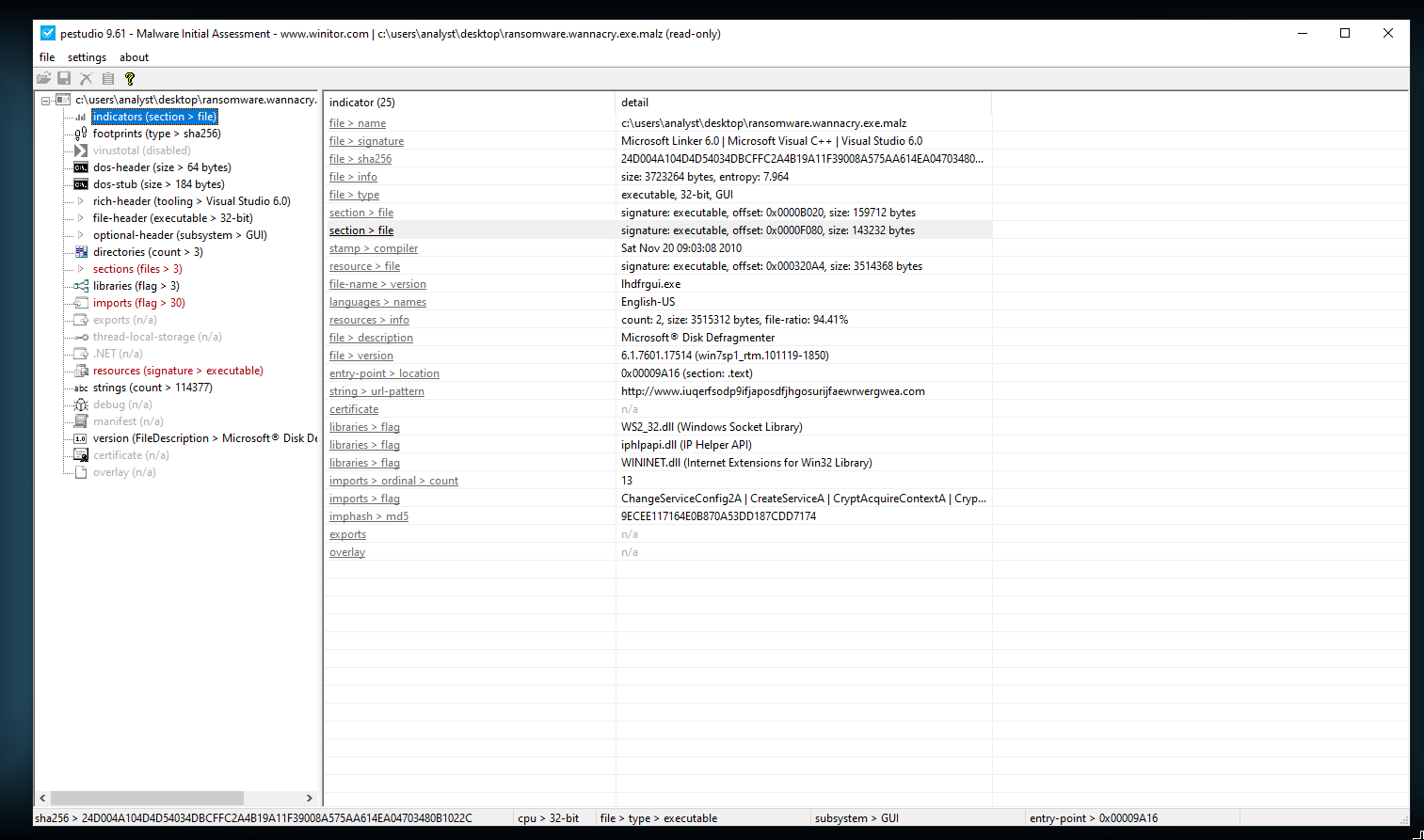
Using PE Studio
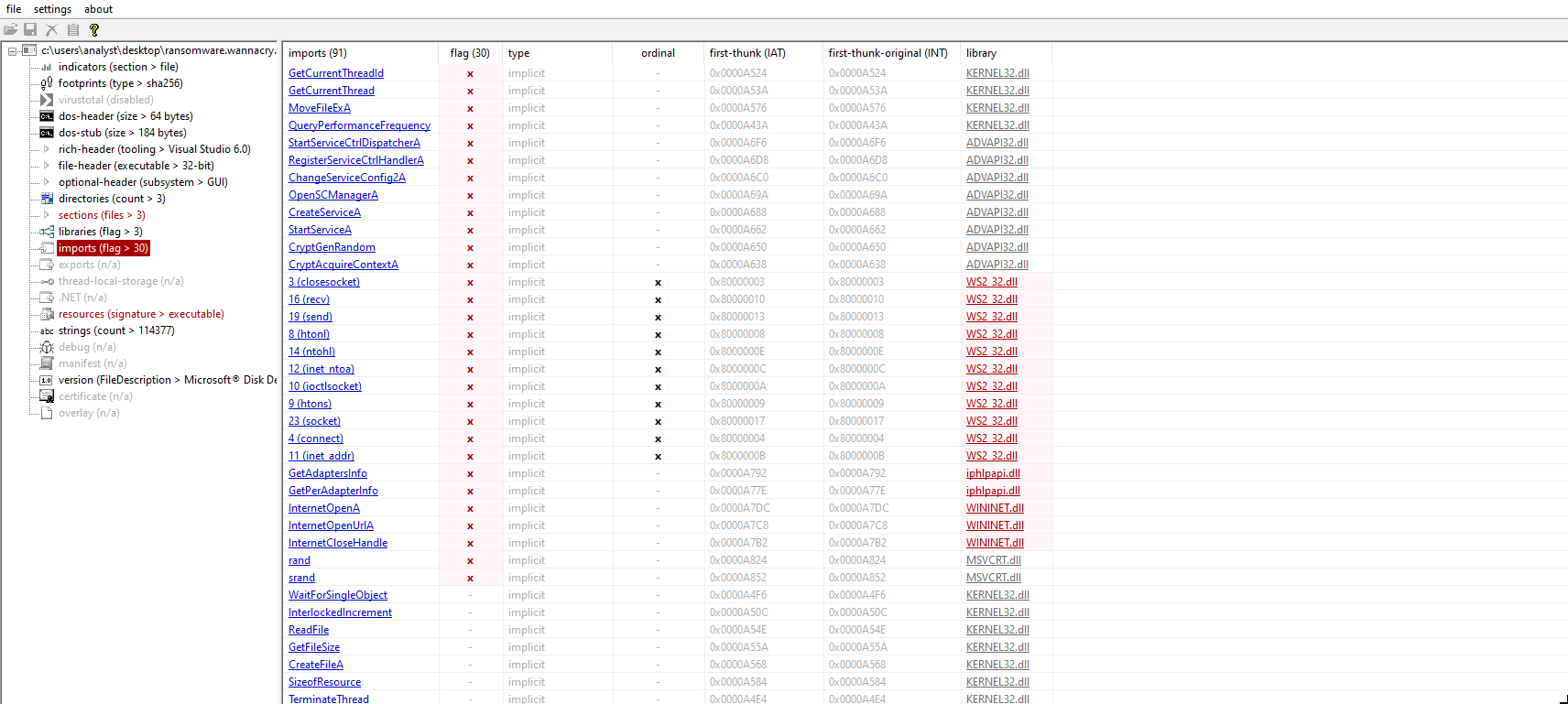
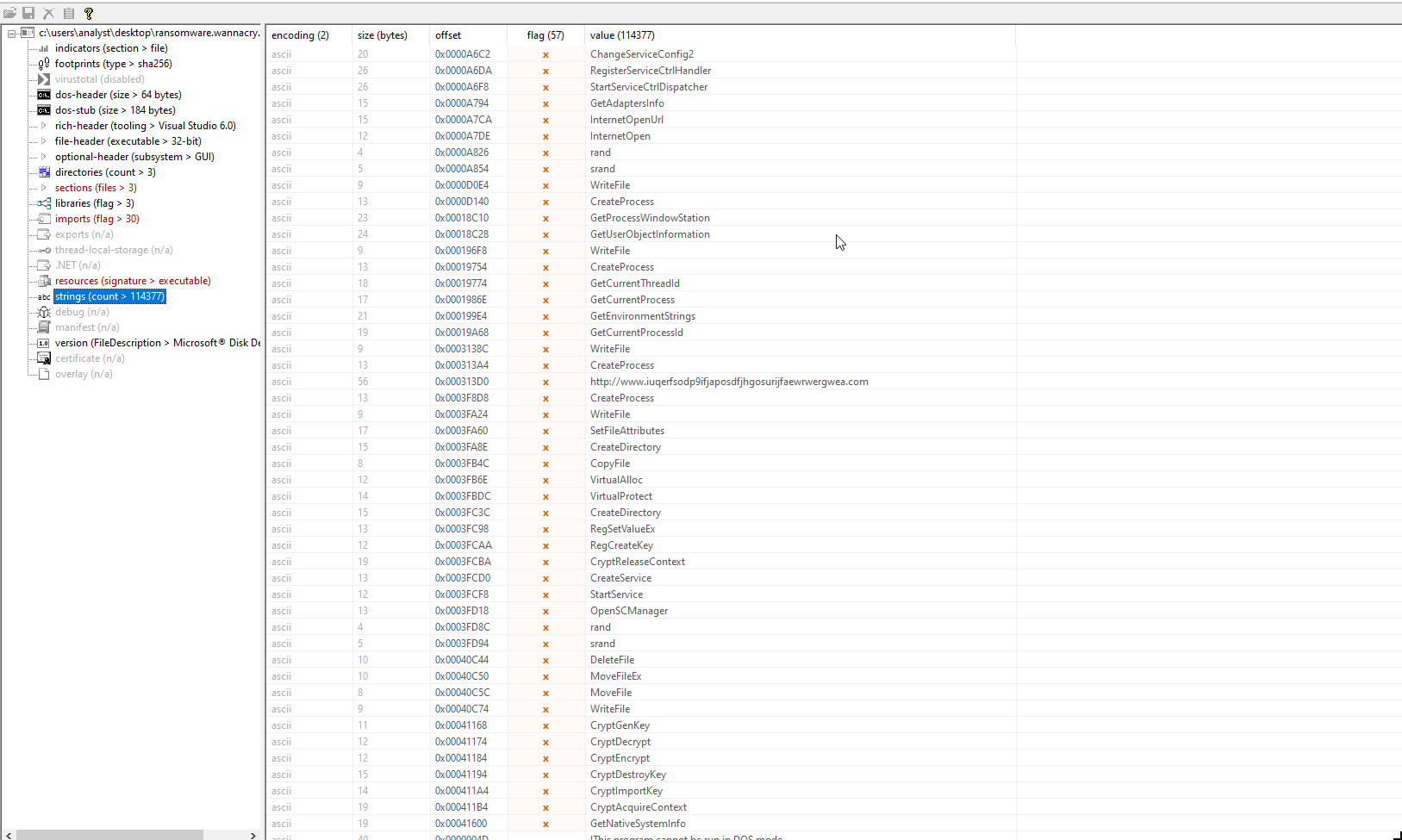
In strings we can see more windows API names, CreateProcess, WriteFile, CryptGenKey, CryptDecrypt, etc.
These were not visible in the IAT above, so these functions are being imported in some other way.
CHECKING FOR PACKING
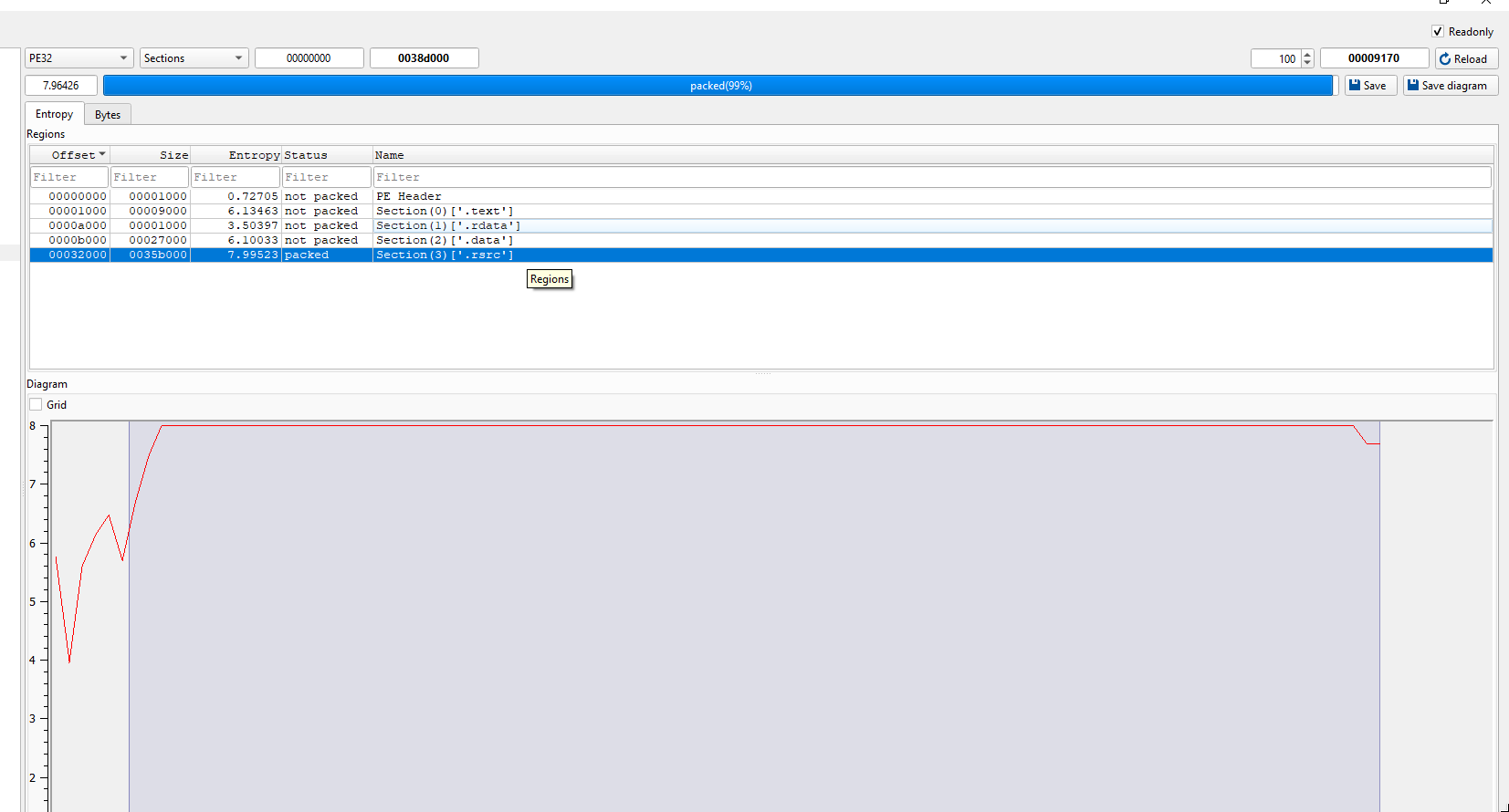
Using DIE (detect it easy) we can see that the .rsrc section has an entropy almost 8, showing it’s packed.
BASIC DYNAMIC ANALYSIS
Visible infection
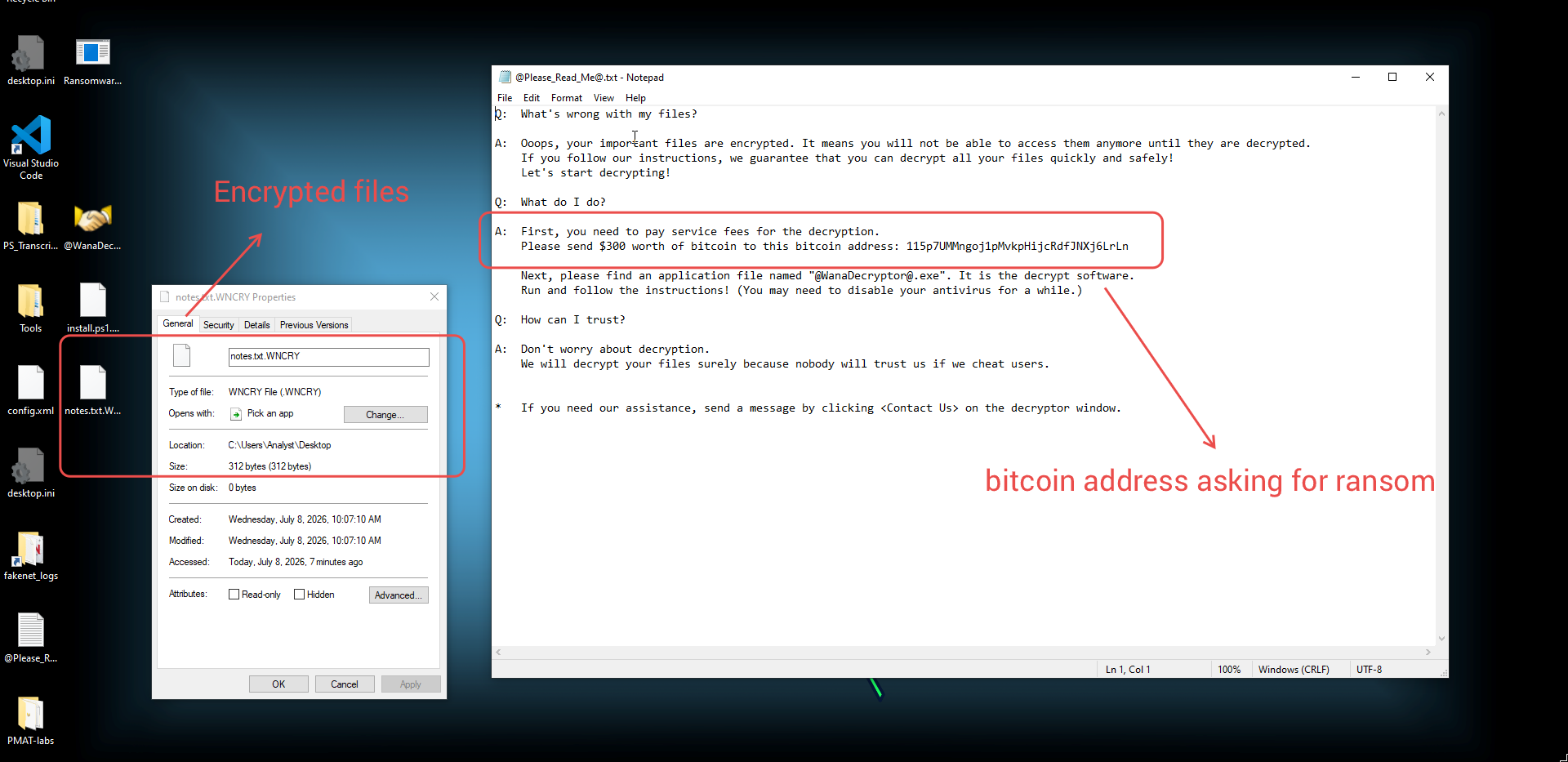
Other notable thing is our files just got encrypted with a note left on desktop.
Wait some more and this GUI screen with a threatening wallpaper will be visible on the screen.
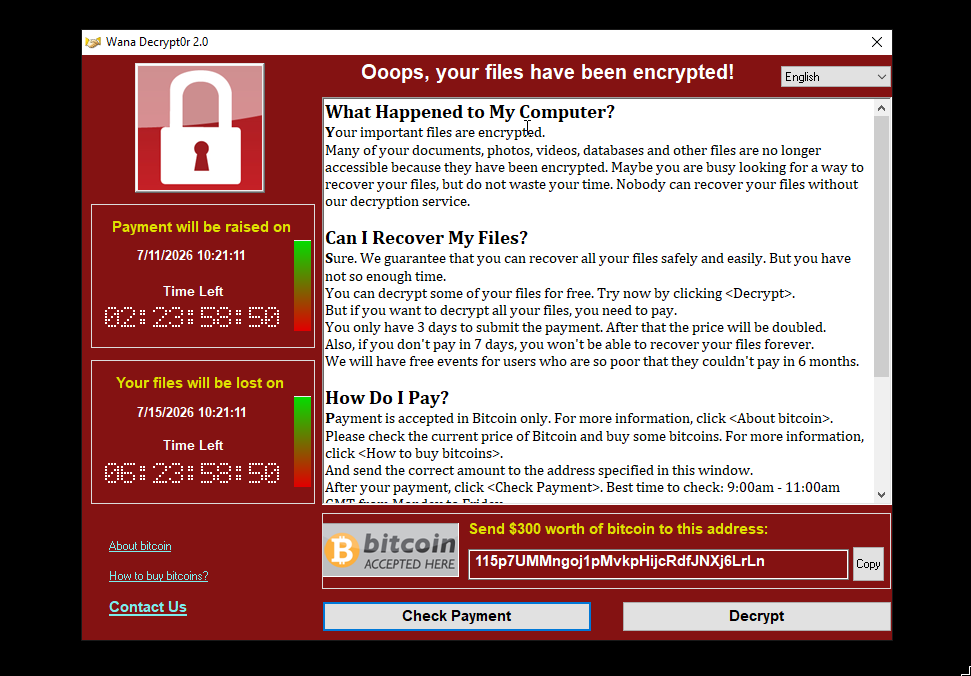
115p7UMMngoj1pMvkpHijcRdfJNXj6LrLn
Network Signatures
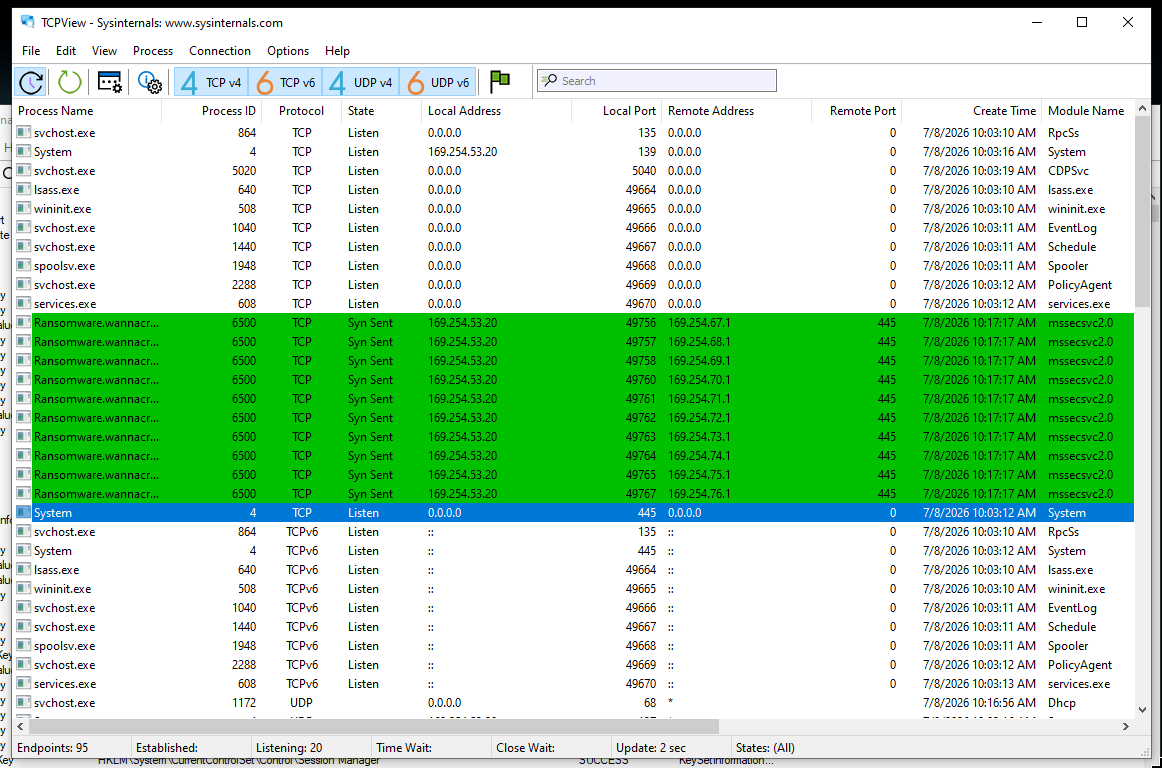
Looking at the network activities using tcpview , we can see it trying to connect to port 445 (SMB) on random IP addresses from valid range (169.254.67.0/16). Definitely the worm behaviour.
This malware propagates on the network and exploits Eternal Blue (MS17-010) vulnerability in SMB protocol. This must be signatures of that.
As the DHCP is turned off on my network, windows hosts take and IP from range 169.254.X.X/16. So these are all valid destination IPs.
Process Monitoring
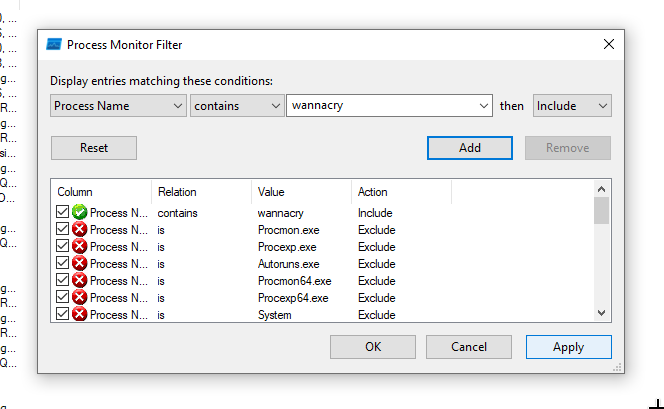
The process tree will tell if these are responsible for running any more child processes.
Wannacry.exe ran tasksche.exe.
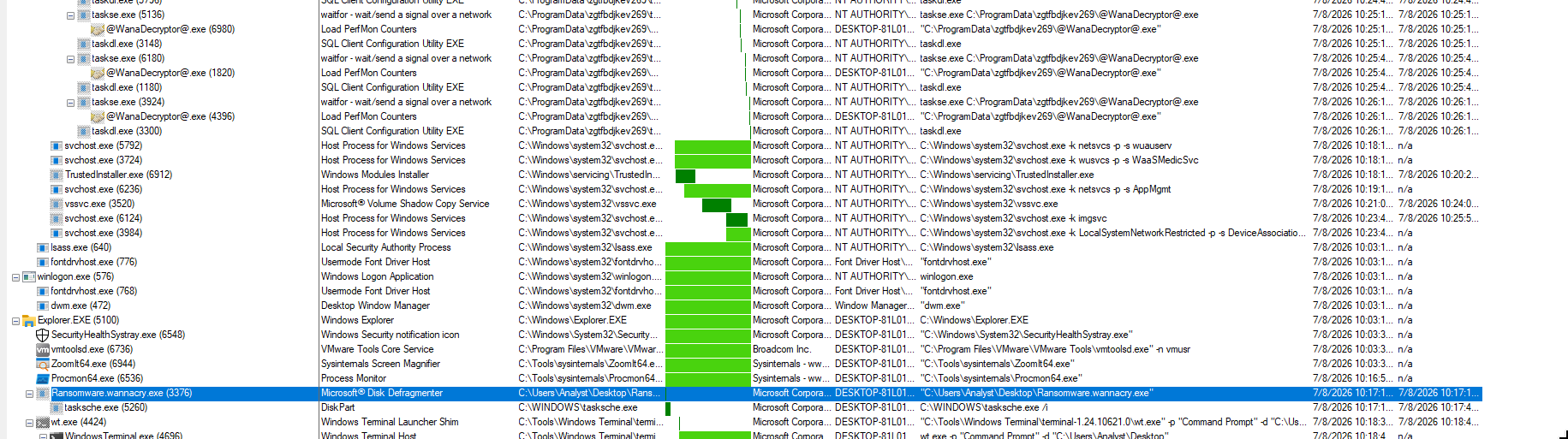
every 30 seconds taskse.exe runs and spawns @WanaDecryptor@.exe , that’s why it keeps popping on screen even if we disable it.
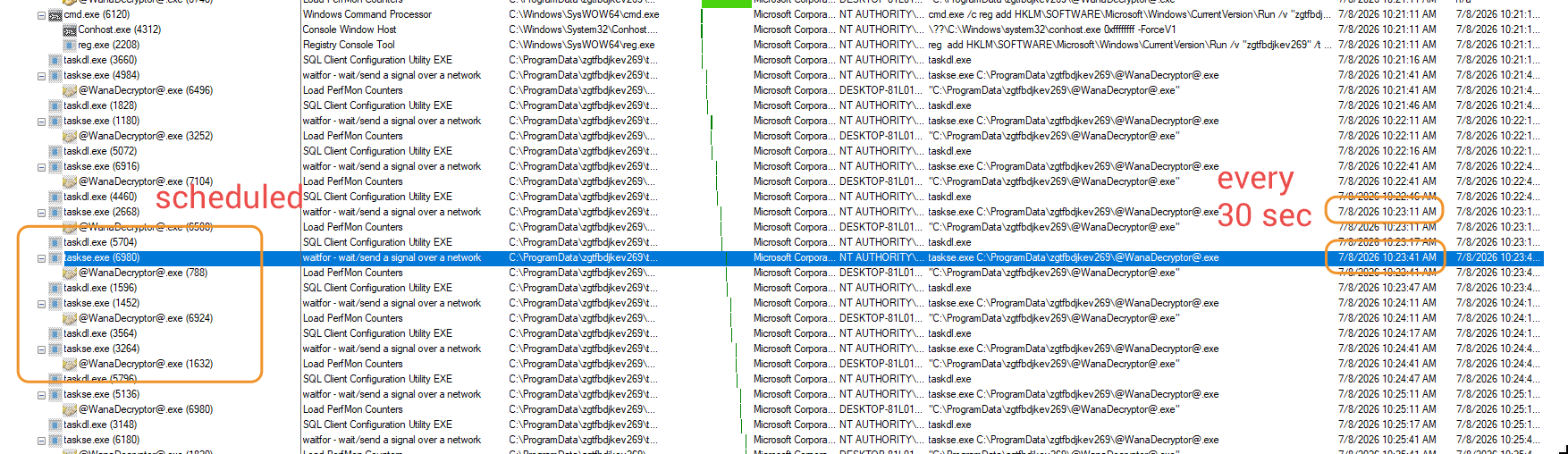
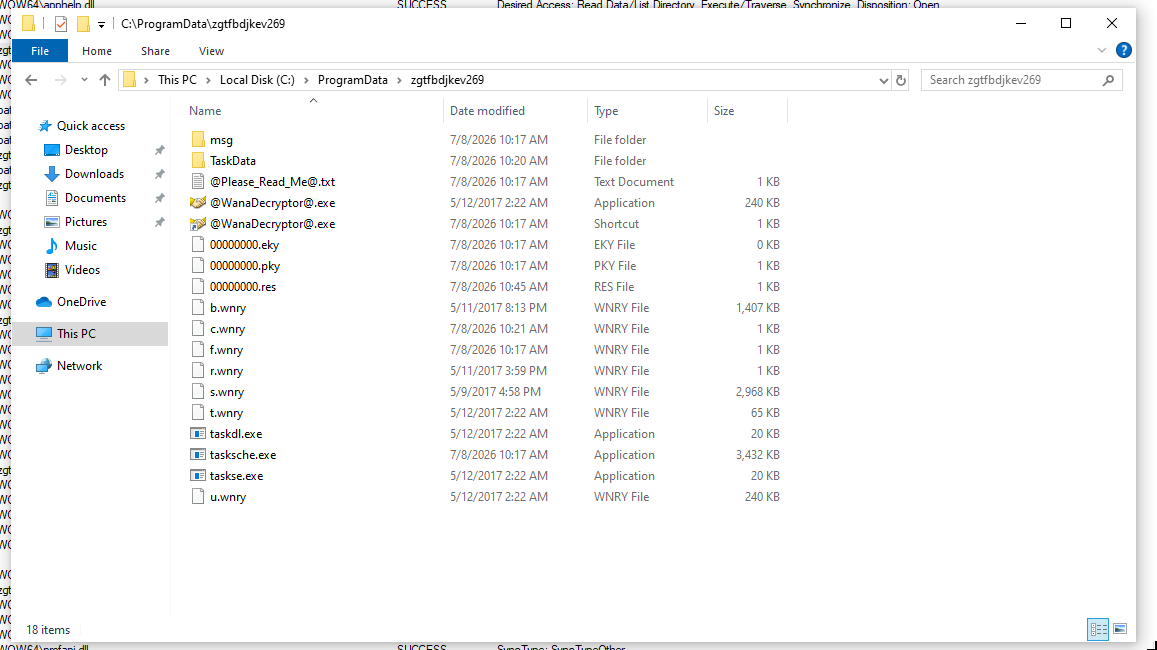
filtering taskse in process name we can find another folder.

A folder was created somewhere in the process
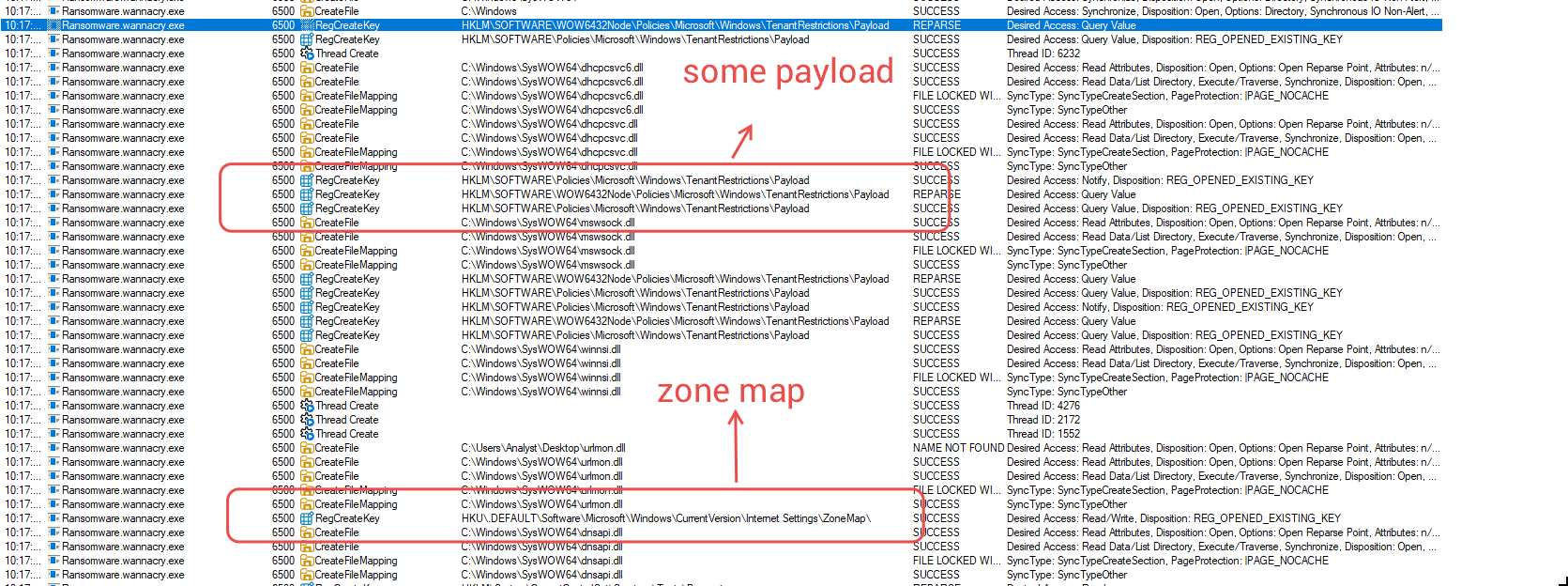
Looking at wannacry.exeactivities, it saved some kind of payload and the IP range on the network.
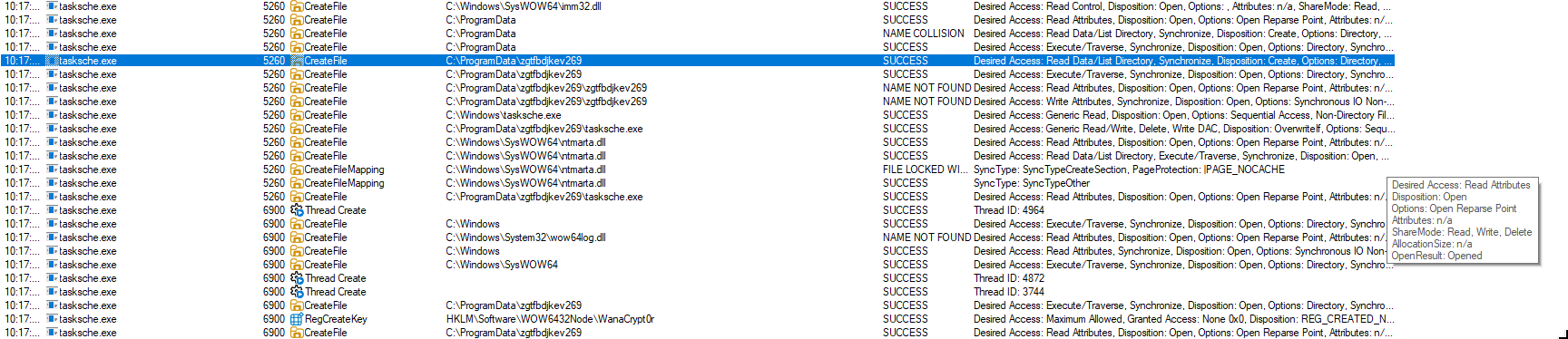
Looking at the tasksche.exeactivities, I think it’s behind the encryption and deletion of the system files.
MOVING FILES TO REMNUX
Start a python HTTP server on windows.
1
python3.exe -m http.server
save the names to a file.
1
2
3
4
5
6
7
8
9
10
11
12
13
14
15
16
17
18
19
remnux@remnux:~/wannacry$ cat files2.txt
msg
TaskData
00000000.eky
00000000.pky
00000000.res
@Please_Read_Me@.txt
@WanaDecryptor@.exe
@WanaDecryptor@.exe.lnk
b.wnry
c.wnry
f.wnry
r.wnry
s.wnry
t.wnry
taskdl.exe
tasksche.exe
taskse.exe
u.wnry
bash one liner to iterate through the names and download them:
1
while IFS= read -r file; do wget http://flare_VM_IP:8000/$file; done < files2.txt
All will be saved in remnux.
1
2
3
4
5
6
7
8
9
10
11
12
13
14
15
16
17
18
19
20
rem3nux@remnux:~/wannacry/files$ file *
00000000.eky:            data
00000000.pky:            b.out separate pure segmented object file V2.3 V3.0 286 Large Text Large Data
00000000.res:            data
b.wnry:                  data
c.wnry:                  data
f.wnry:                  ASCII text, with CRLF line terminators
msg:                     HTML document, ASCII text
@Please_Read_Me@.txt:    ASCII text, with CRLF line terminators
r.wnry:                  ASCII text, with CRLF line terminators
s.wnry:                  Zip archive data, at least v1.0 to extract
TaskData:                HTML document, ASCII text
taskdl.exe:              PE32 executable (GUI) Intel 80386, for MS Windows
tasksche.exe:            PE32 executable (GUI) Intel 80386, for MS Windows
taskse.exe:              PE32 executable (GUI) Intel 80386, for MS Windows
t.wnry:                  data
u.wnry:                  PE32 executable (GUI) Intel 80386, for MS Windows
@WanaDecryptor@.exe:     PE32 executable (GUI) Intel 80386, for MS Windows
@WanaDecryptor@.exe.lnk: MS Windows shortcut, Item id list present, Points to a file or directory, Has Relative path, Archive, ctime=Tue Jun 16 17:04:15 2026, mtime=Tue Jun 16 17:04:15 2026, atime=Fri May 12 01:52:56 2017, length=245760, window=hide
This file contains the Data/Tor (Tor client) for ransomware operations.
1
2
3
4
5
6
7
8
9
10
11
12
13
14
15
16
17
18
remnux@remnux:~/wannacry/files$ unzip -l s.wnry
Archive:  s.wnry
  Length      Date    Time    Name
---------  ---------- -----   ----
        0  2000-01-01 00:00   Data/
        0  2017-05-09 16:58   Data/Tor/
        0  2000-01-01 00:00   Tor/
  3197106  2000-01-01 00:00   Tor/libeay32.dll
   719217  2000-01-01 00:00   Tor/libevent-2-0-5.dll
   417759  2000-01-01 00:00   Tor/libevent_core-2-0-5.dll
   411369  2000-01-01 00:00   Tor/libevent_extra-2-0-5.dll
   523262  2000-01-01 00:00   Tor/libgcc_s_sjlj-1.dll
    92599  2000-01-01 00:00   Tor/libssp-0.dll
   711459  2000-01-01 00:00   Tor/ssleay32.dll
  3098624  2000-01-01 00:00   Tor/tor.exe
   107520  2000-01-01 00:00   Tor/zlib1.dll
---------                     -------
  9278915                     12 files
Revert the machine to pre-detonation.
ADVANCED STATIC / DYNAMIC ANALYSIS
Now comes the reverse engineering part, combining the de-compilation with debugging will help us understand the binary better.
For reversing I will use cutter, occasionally alongside IDA to verify the results cutter is showing.
For debugging, I think x32 dbg is enough.
There are at least 3 executable we are interested in main wannacry executable, tasksche.exe and taskse.exe.
So far from the dynamic analysis we can conclude:
- The
wannacry.exeis the worm component. - The
tasksche.exemight be behind the encryption component. - The
taskse.exeseems to be running the wanna-decryptor only.
There is just too much stuff in this ransomware to reverse it all. So, I will try to find some of the best parts.
REVERSE ENGINEERING THE MAIN EXECUTABLE
THE KILL SWITCH
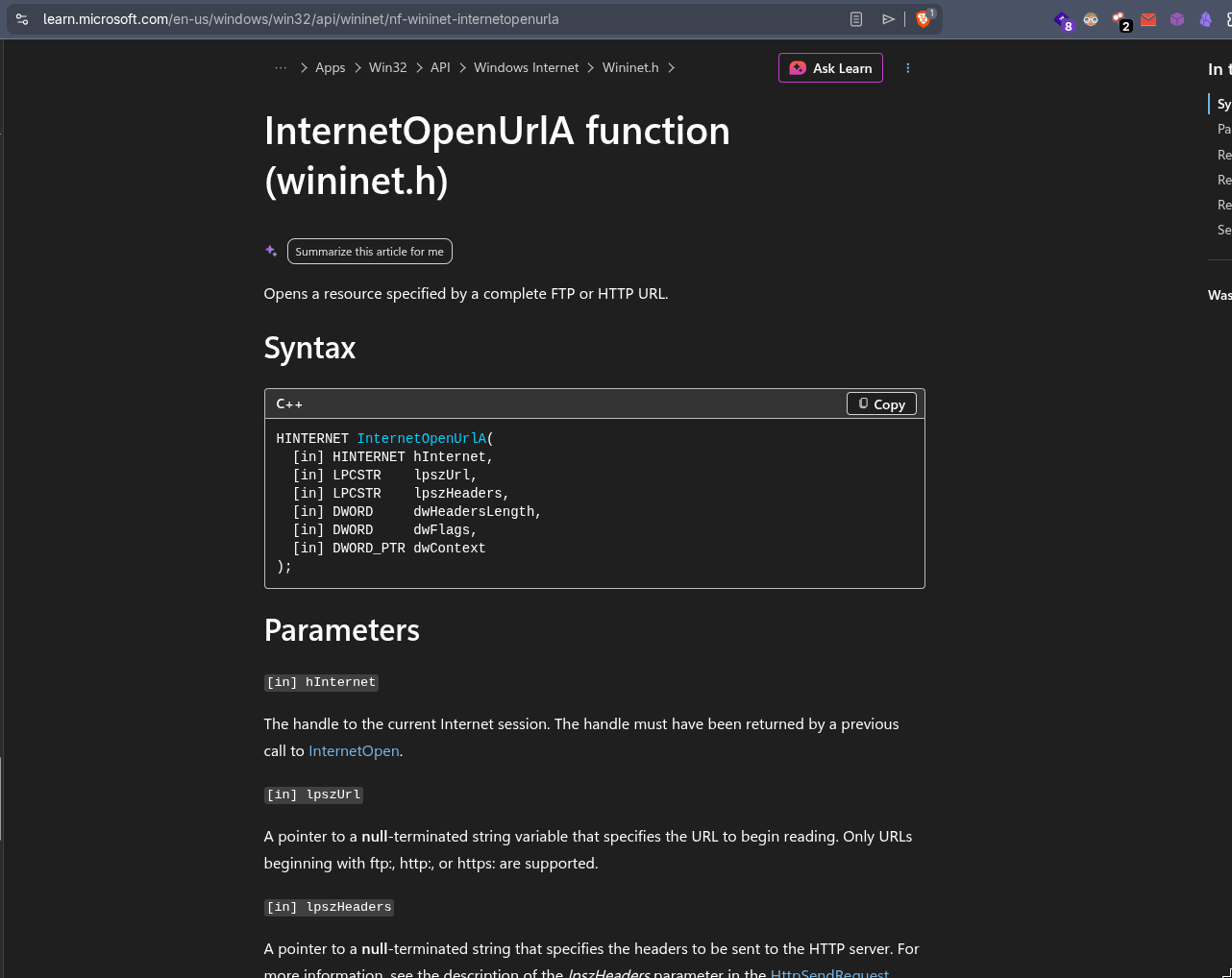
In the main function there is a code trying to connect to the URL str.http:__www.iuqerfsodp9ifjaposdfjhgosurijfaewrwergwea.com.
Why is this a kill switch?
As a random URL like this not exists on internet (at that time ofc, right now would find a sinkhole if we visit this URL).
The InternetOpenUrlA will return a valid handle only in lab environments with something like intesim.
So it’s suppose to not execute in sandboxes or lab environments.
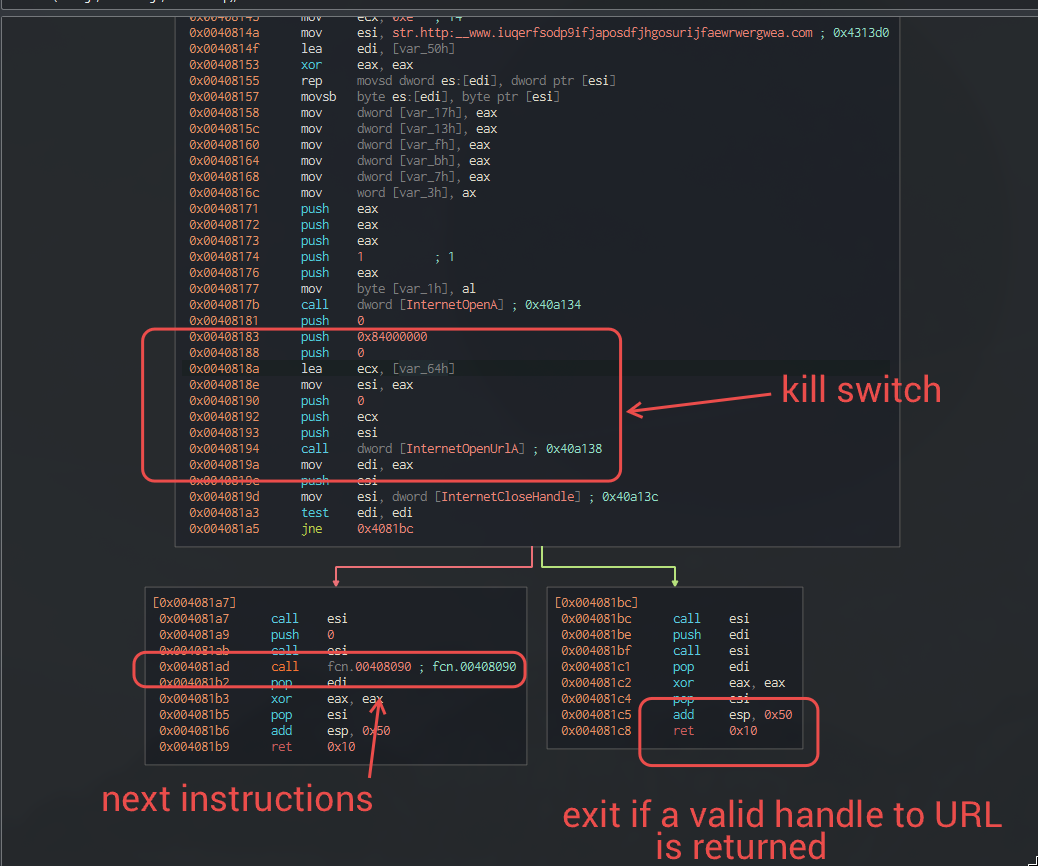
When in doubt with windows API use the microsoft documentation and AI, these are a lifesaver
let’s call the next function kill_switch_success()
FIRST RUN OR A SERVICE?
NOTE: The GetModuleFileNameA() returns the exact path of our wannacry’s executable in 0x0070f760, this will be used later on.
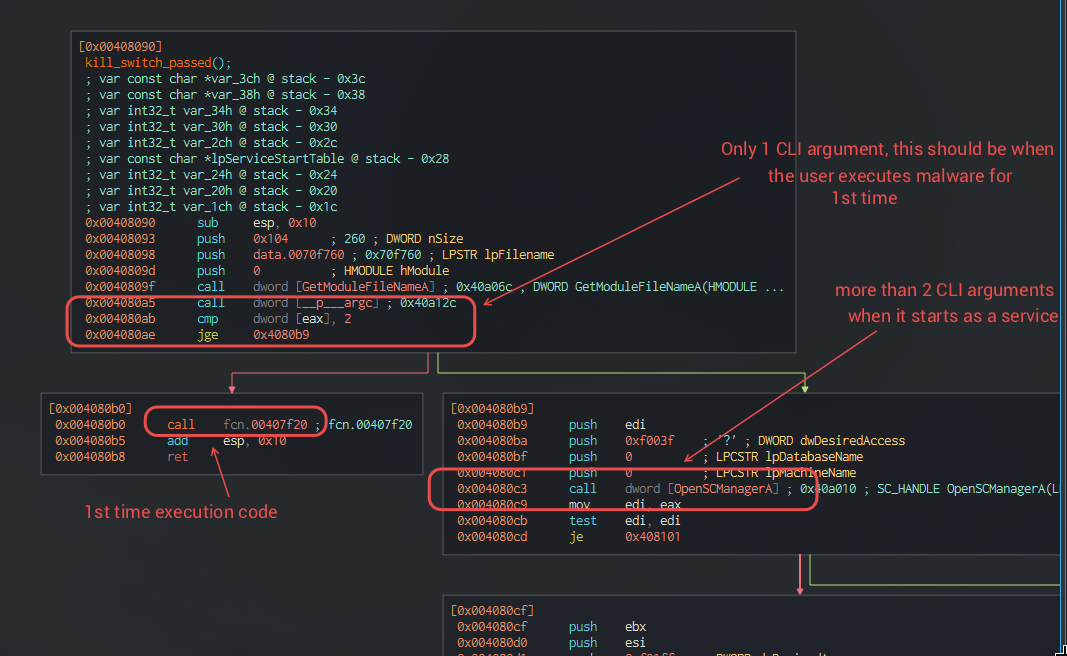
More than 2 command line arguments
This path is only taken when it’s ran my the SC manager
This path will attempt to open a service named mssecsvc2.0 with SERVICE_ALL_ACCESS (0xF01FF) access rights , and a handle to it can be obtained.
I will call the next function service_exists( 0x3c, service_handle ) for now.
If we check in the service_exists function the service’s configuration is being set, configuring how the SC manager should handle it in case of failure or restarts.
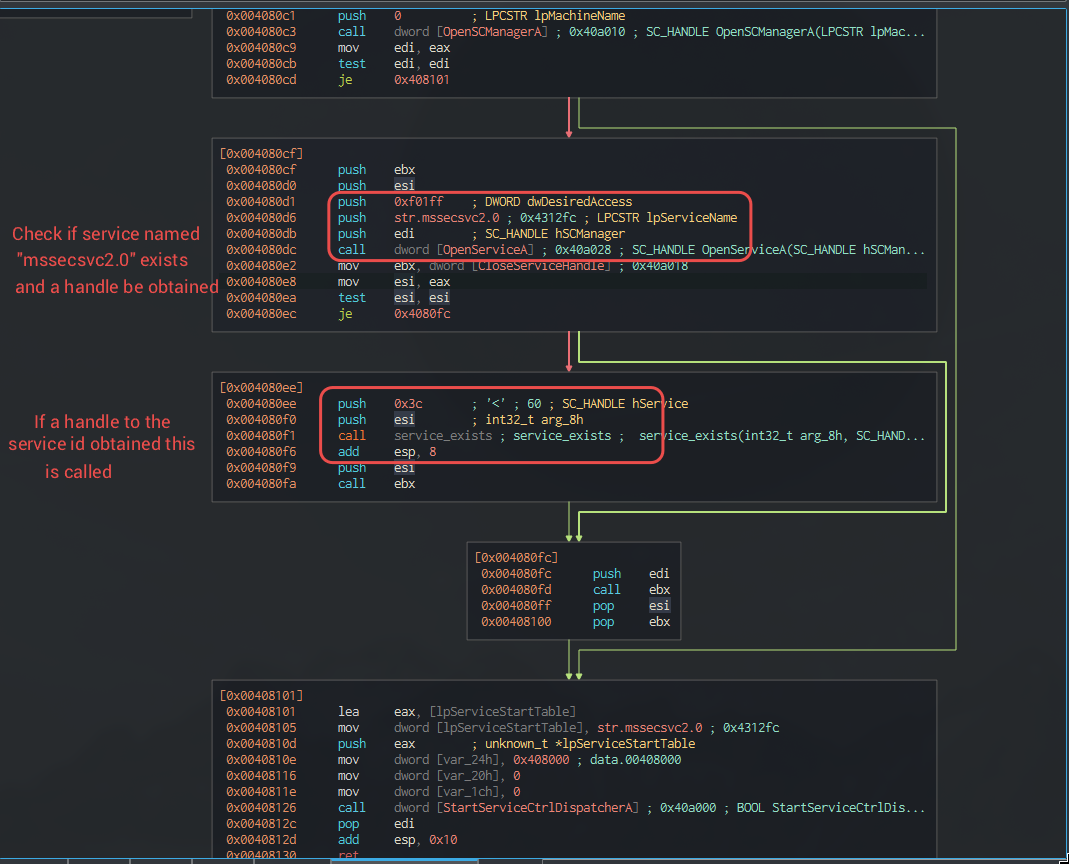
Either way StartServiceCtrlDispatcherA() is called in the end.
What’s happening??
This binary is supposed to be used both as a service installer and a service.
If it’s ran by SC manager than it expects to have 2+ arguments, so it verifies whether it’s started by SC manager or not.
When this executable is ran as a service StartServiceCtrlDispatcherA() will call ServiceMain() function.
1
2
3
4
5
6
7
8
9
10
11
12
main()
   |
   +--> StartServiceCtrlDispatcher()
             |
             +--> ServiceMain()
                      |
                      +--> RegisterServiceCtrlHandler()
                      +--> SetServiceStatus(SERVICE_START_PENDING)
                      +--> Initialize service
                      +--> Start worker thread(s)
                      +--> SetServiceStatus(SERVICE_RUNNING)
                      +--> Wait until service stops
We will talk about this later on.
One command line argument
This is where the first path of malware execution continues.
We will head over to the create_malicious_service() function.

Remember the wannacry’s executable path stored in 0x0070f760, we will pass it to sprint() and generate the command to execute the malicious service.
PERSISTENCE MECHANISM
This will persist the worm component of wannacry ransomware, using windows services.
The service will start this executable using -m security flag. As we saw above with 2+ CLI args the execution will follow a different path.
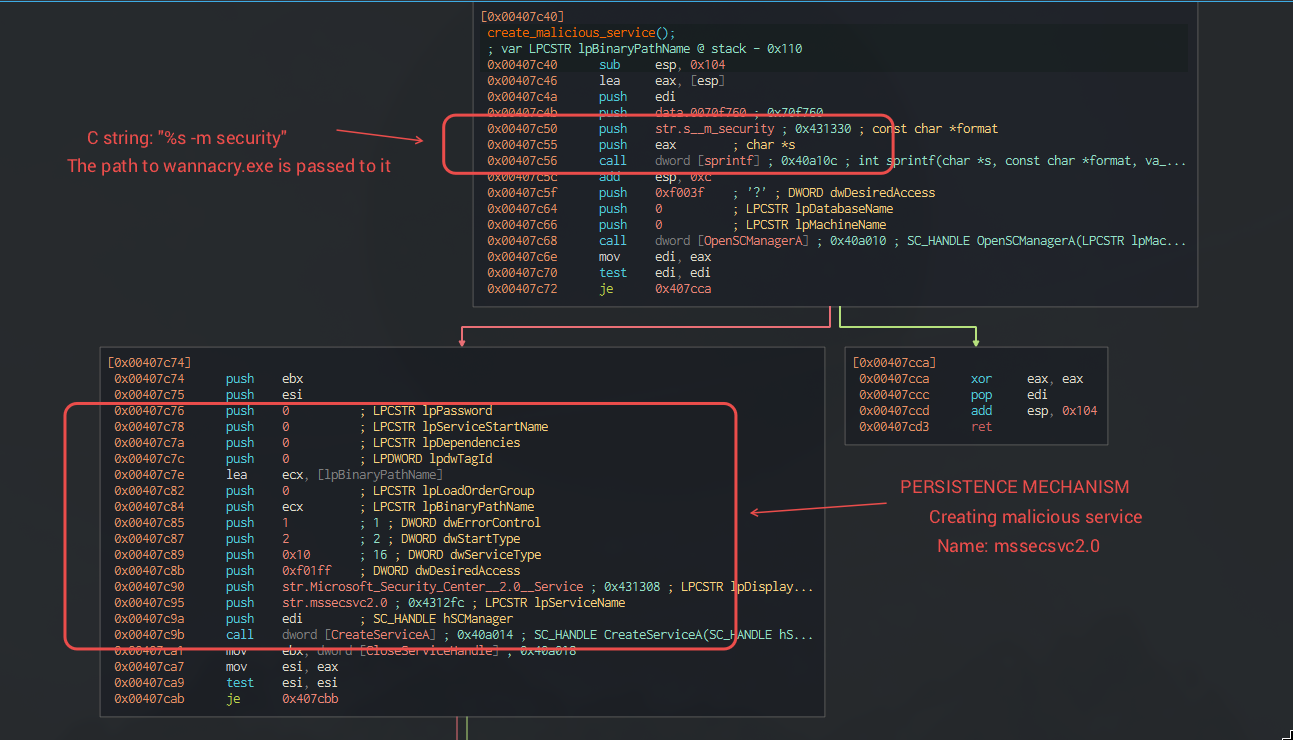
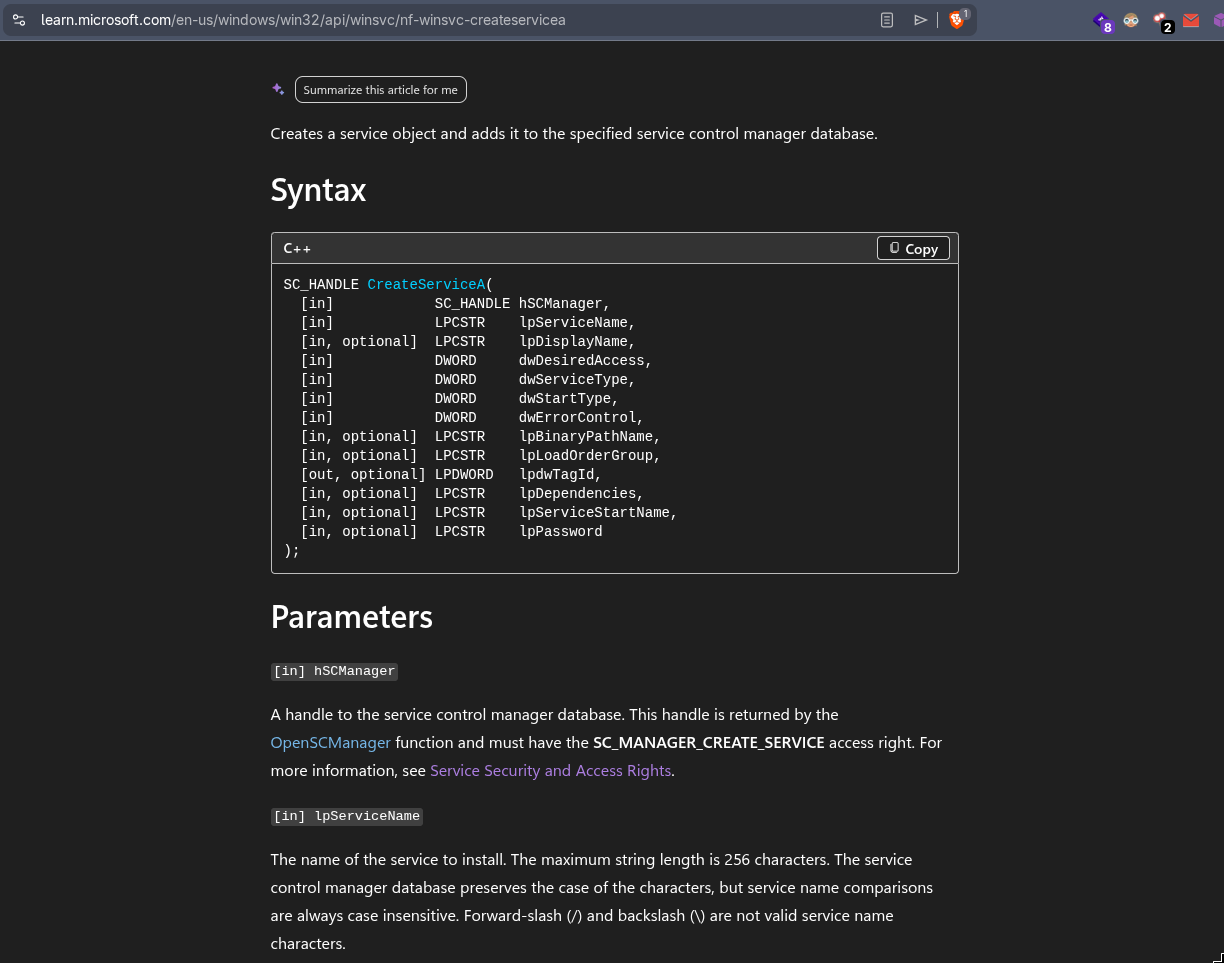
service desired access: SERVICE_ALL_ACCESS (0xF01FF), Giving the service all possible access.
Service type : SERVICE_WIN32_OWN_PROCESS 0x10 , Windows will launch it as its own process.
Start type : SERVICE_AUTO_START (2), Windows starts it automatically every boot.
This is the persistence mechanism.
CREATING TASKSCHE.EXE EXECUTABLE
There are some API which the malware author wouldn’t want to be seen in the IAT.
The Kernel32.dll module is already loaded in every windows process, we can dynamically load other APIs not present IAT, just by using names with GetProcAddress.
Called as Dynamic API resolution.
1
2
3
4
GetProcAddress(
    kernel32_base,
    "CreateProcessA"
);
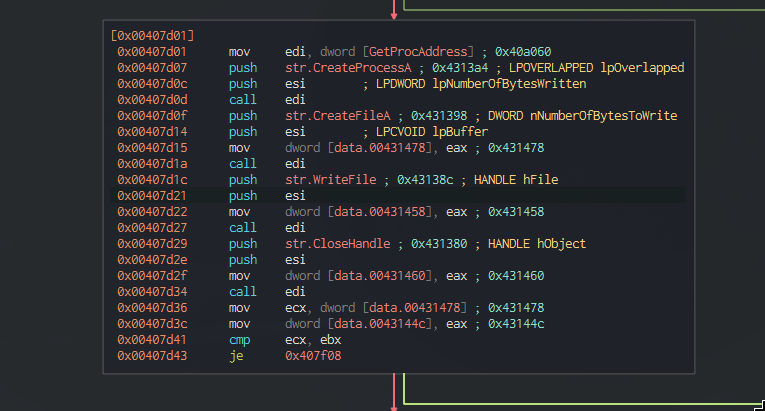
We can see it dynamically resolving some APIs and storing them in variables.
next the program will try to load a resource with ID 1831 (0x727) and a type.
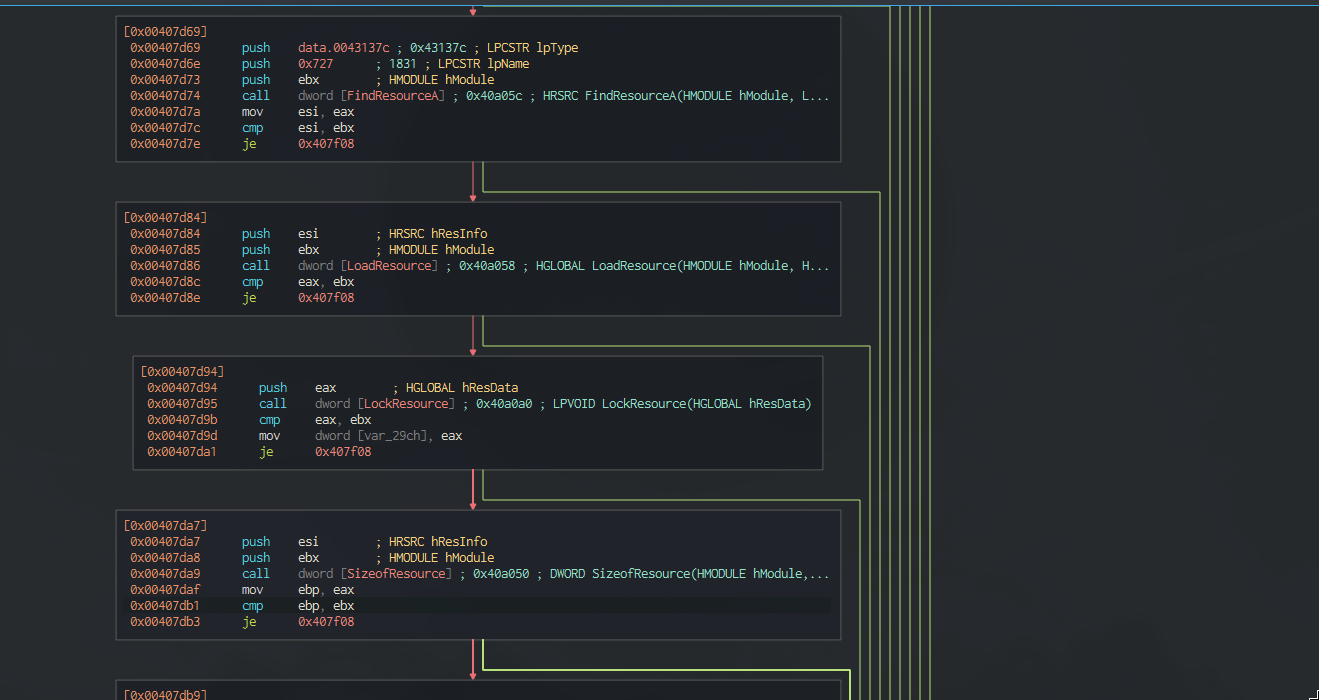
Usually programs store data in their .rsrc (resource section) like a bitmap, dialog box, menu, etc. They need to be loaded for using, see how to finding a loading resources.
1
2
3
4
5
6
7
8
9
10
11
12
13
+----------------------+
| DOS Header           |
+----------------------+
| PE Header            |
+----------------------+
| .text                | <- Code
+----------------------+
| .data                | <- Global variables
+----------------------+
| .rdata               | <- Read-only data
+----------------------+
| .rsrc                | <- Resources
+----------------------+
We may give resources some type and ID, for example:
1
2
3
4
5
6
7
8
9
10
11
12
Resources
│
├── Icons
│     ├── ID 1
│     └── ID 2
│
├── Bitmaps
│     └── ID 15
│
└── RCDATA
      ├── ID 727
      └── ID 900
I think a similar technique is being used by wannacry, to store tasksche.exe and other files in itself.
We can find similar names like tasksche.exe and something C:\Windows\qeriuwjhrf.
Any existing tasksche.exe is renamed to qeriuwjhrf .
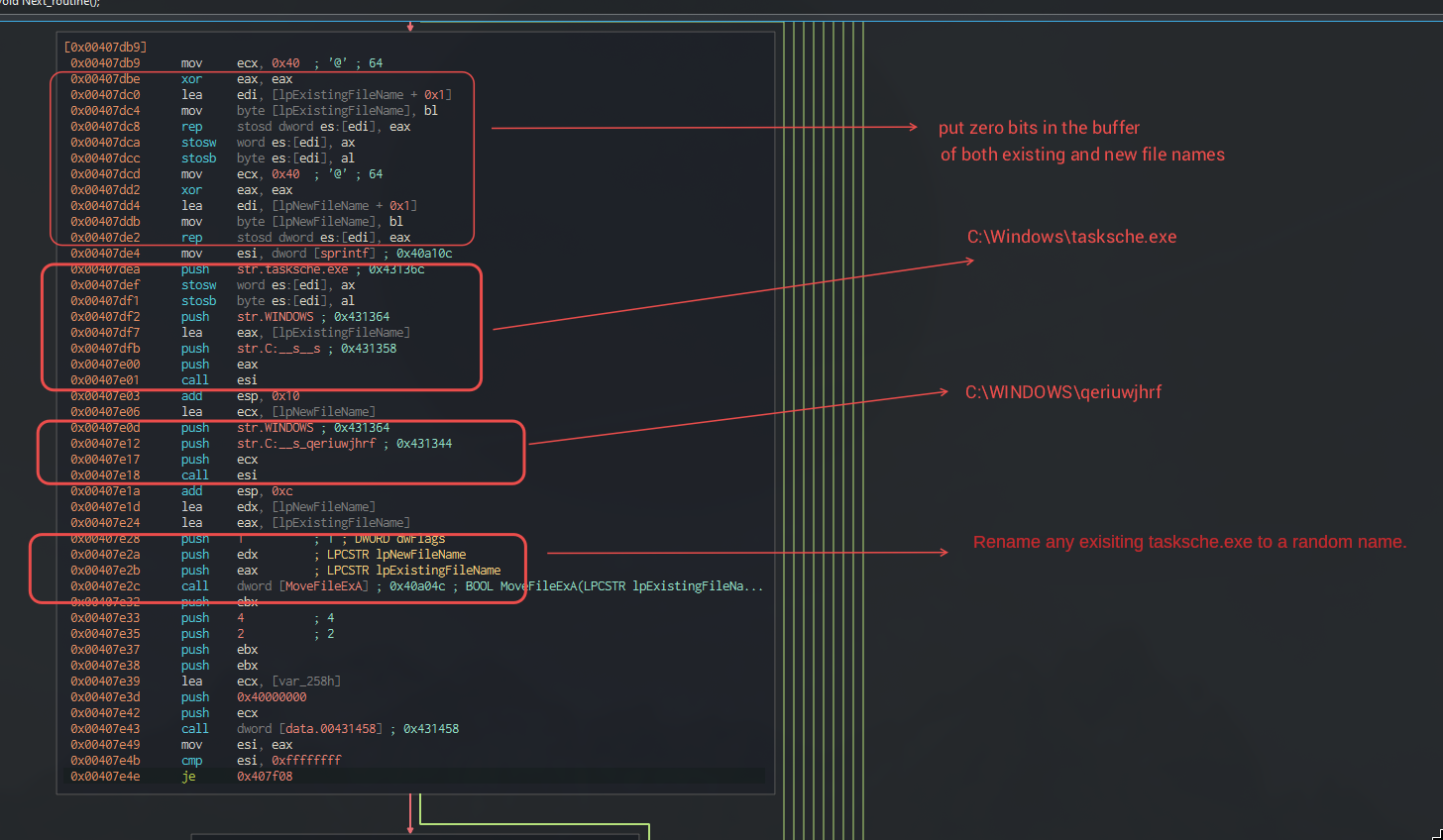
The 0x431458 is CreateFile() that will open or create the file, most likely the tasksche.exe
push 0              ; hTemplateFile
push 4              ; dwCreationDisposition
push 2              ; dwShareMode
push 0              ; lpSecurityAttributes
push 0              ; dwFlagsAndAttributes
lea  ecx, [var_258h]
push 0x40000000     ; dwDesiredAccess
push ecx            ; lpFileName
call [0x431458]
The next sequence of functions is like.
1
2
WriteFile()
CloseHandle()
This should be to write the buffer to tasksche.exe and close the file handle.
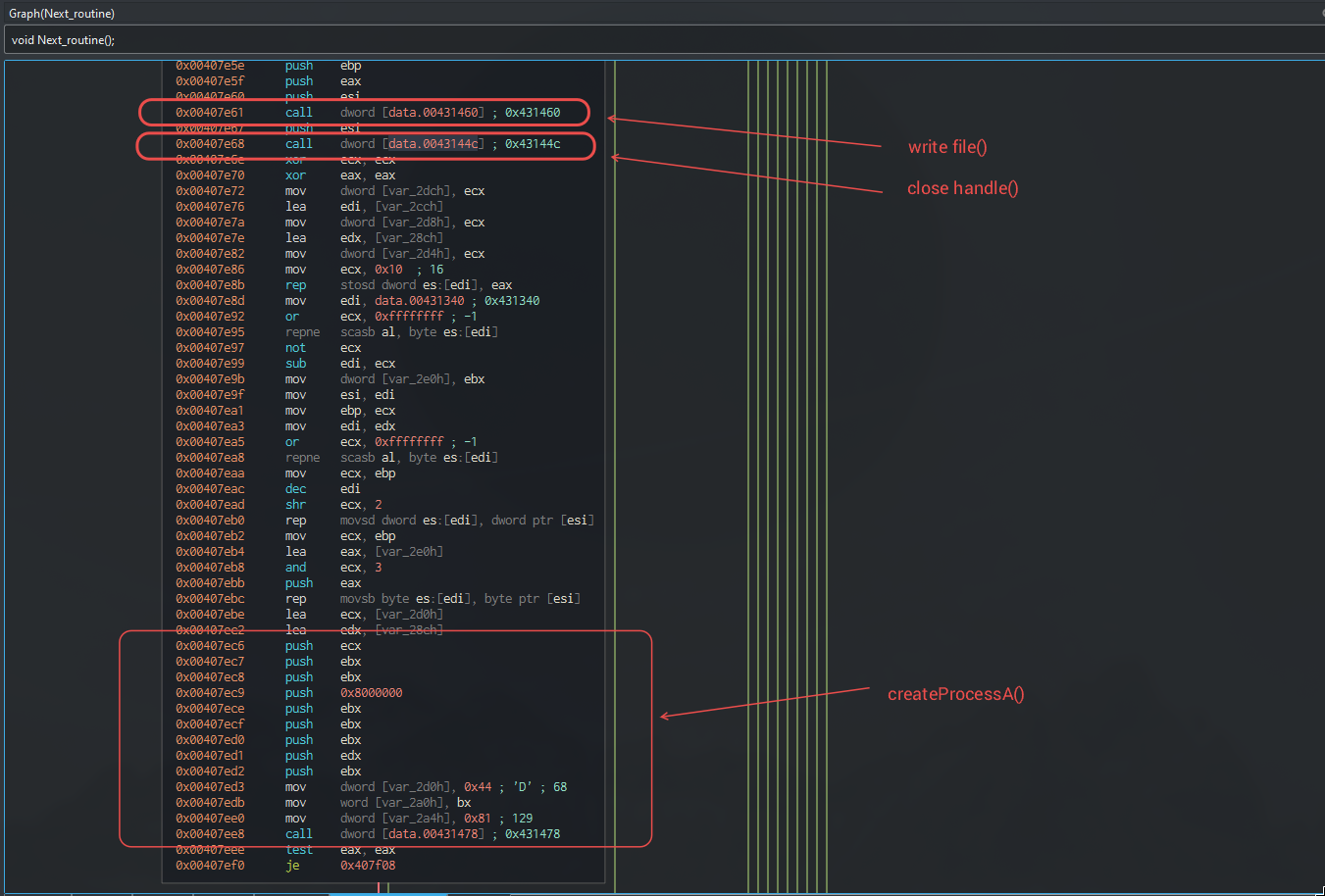
We might start calling this main executable as the dropper executable.
WHERE IS THE WORM LOGIC?
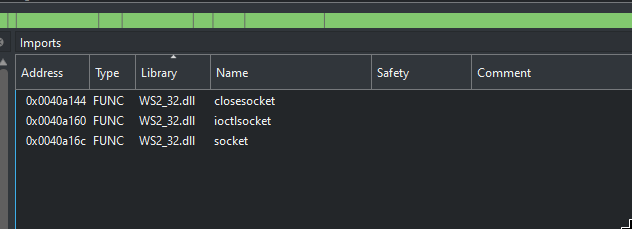
In tcpview it was visible that the main executable was responsible for propagating to port 445 on random IPs.
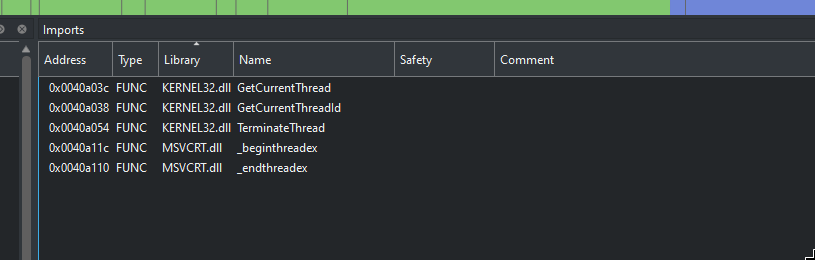
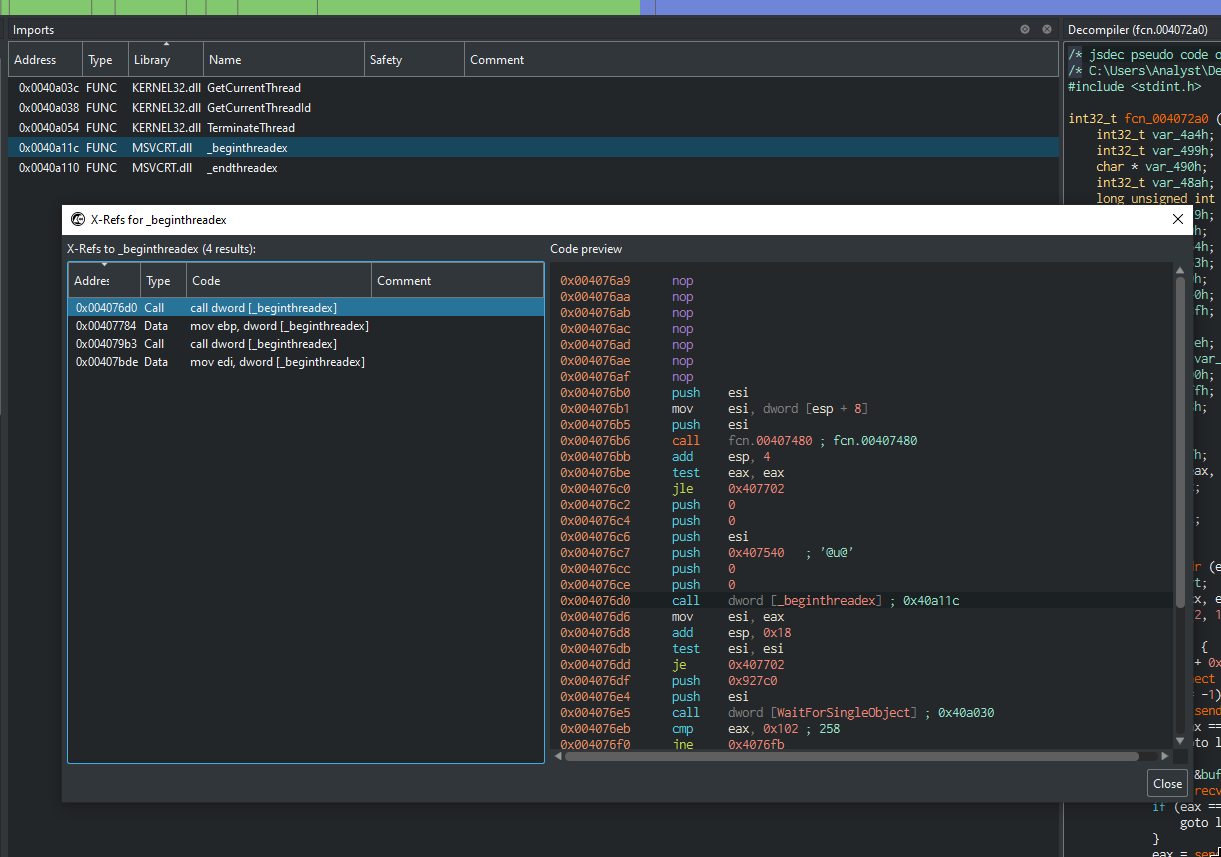
This code might be executed by another thread.
finding the signatures.
in IAT, socket exists (required by worm)
Code required to make threads is present too.
Looking at the X-refs for _beginthreadex there are atleast two calls (obviously more).
Another interesting assumption, as we know the other binaries are in the .rsrc section.
So the encryption / decryption functions like CryptGenKey or CryptDecrypt should be in .rsrc too and they are:
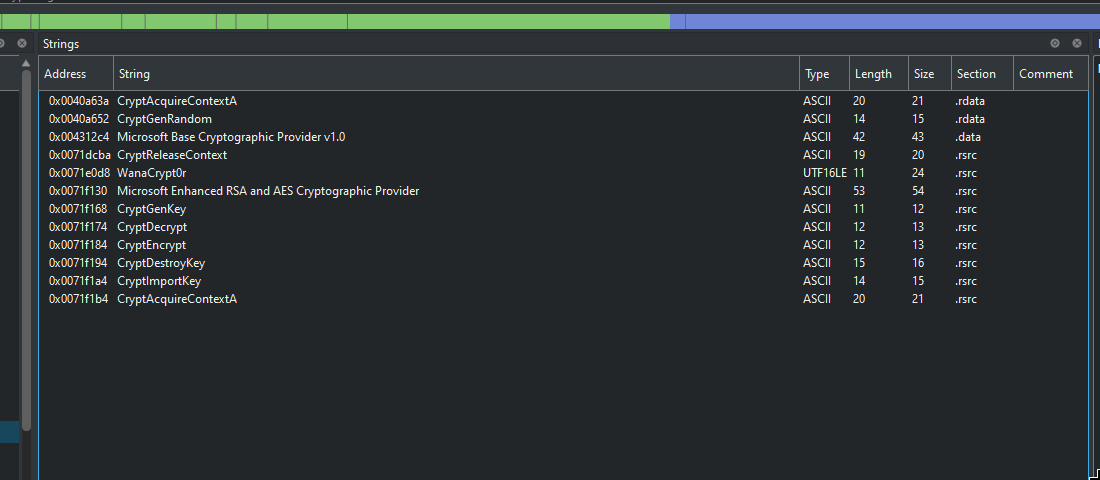
This dropper’s logic didn’t end here, this can be launched as a service too. So we will try to analyze the service path.
Remember the StartServiceCtrlDispatcherA() ? We will try to find the SeviceMain().
REVERSING THE SERVICE PATH AND DEBUGGING
From microsoft docs.
When the service control manager starts a service process, it waits for the process to call the StartServiceCtrlDispatcher function. The main thread of a service process should make this call as soon as possible after it starts up (within 30 seconds). If StartServiceCtrlDispatcher succeeds, it connects the calling thread to the service control manager and does not return until all running services in the process have entered the SERVICE_STOPPED state
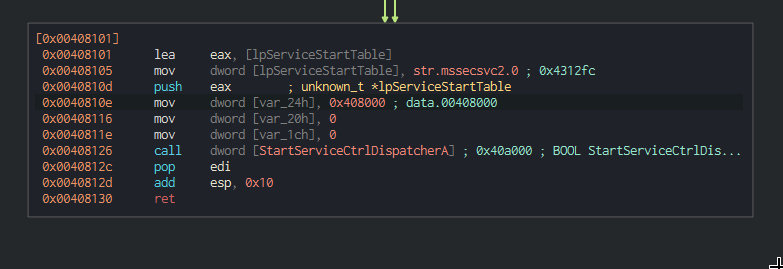
this will take lpserviceStartTable as an argument, which specifies the serviceMain.
1
2
3
4
typedef struct _SERVICE_TABLE_ENTRYA {
  LPSTR                    lpServiceName;
  LPSERVICE_MAIN_FUNCTIONA lpServiceProc; // Pointer to service main function
} SERVICE_TABLE_ENTRYA, *LPSERVICE_TABLE_ENTRYA;
Now I will use dynamic analysis with x32dbg.
search > all modules > string references > follow the kill switch URL in disassembler.
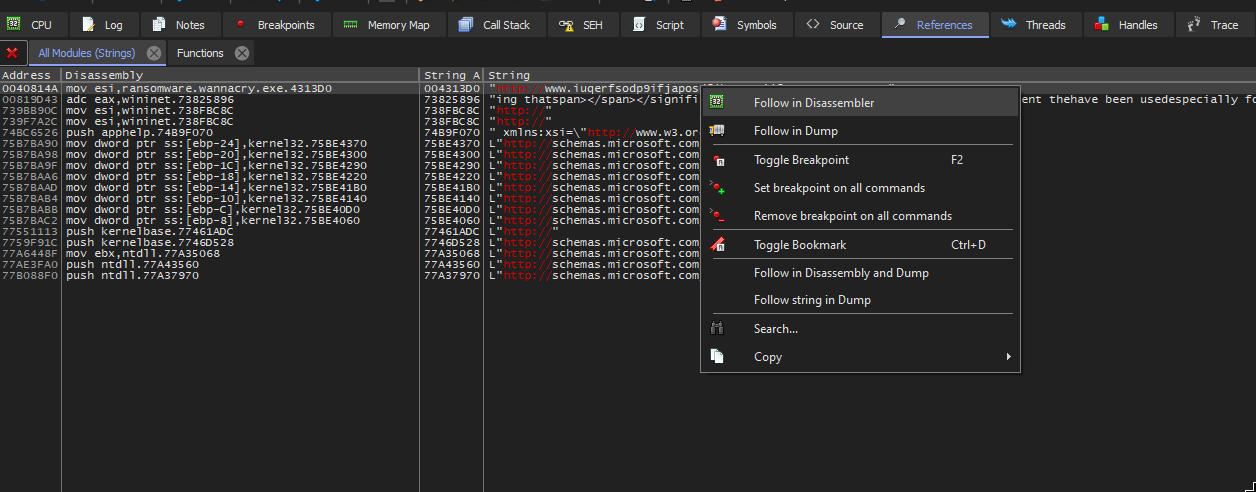
set breakpoint where the CLI arguments are compared to 2. We will manipulate the flags, for JGE to be taken the OF == SF make the SF 0.

And yes, the execution was manipulated.
These skills will be useful for me later on.
CONCLUSION AND TBD
Until now, I had analysed:
- Network signatures of worm.
- More binaries being dropped by the dropper (wannacry.exe)
- A folder containing all the files, executable and tor client required by this ransomware.
- The WCRY files being created.
- Reversing the dropper executable.
- Researching about the persistence of wannacry worm component.
Important things that remain:
- finding the service main function and reversing the worm logic.
- reversing the
tasksche.exeand researching on the encryption logic.
I have too much on my plate right now, and writing a blog post is time consuming in itself. So, I might have to delay my research on this, but I will definitely be back in reverse engineering with more skills.
https://reverseengineering.stackexchange.com/questions/15310/how-to-debug-servicemain-function-of-a-service