ECN Lab 6: Deploying an Active Directory Environment - Windows Server 2025 Administration
Windows server 2025 Administration and configuring services like DNS, DHCP and AD DC. And deploying an active directory environments using best practices for managing OUs, Groups and users with AGDLP.
The aim of this lab is not just to deploy and Active Directory environment. But also look at the best practices to while setting up and Active directory environment. From Organizational Units, permissions, groups to the domain name selection and many more.
INTRODUCTION
SCENARIO: We are appointed as security engineer to secure a virtual company named samyak.org. Currently there have 50+ employees in the company and there are no security measures, no network management, no AD, nothing just all connected to a LAN.
Welcome to the sixth installment in my “Enterprise Cyber Security and Networking Lab” (ECN Lab) series.
So far we had:
- Isolated the WAN network from Clients using a firewall server and a switch.
- Designed a HA firewall fail-over architecture (for the sake on simplification I will remove that from here).
- Designed a multi WAN fail-over and load balancing architecture.
- Installed a wazuh server in the network and connected hosts and IDS to it.
- Deployed an incident response and threat intelligence platform using containerization.
Now the owner of samyak.corp had asked up to setup an active directory environment on the internal LAN network.
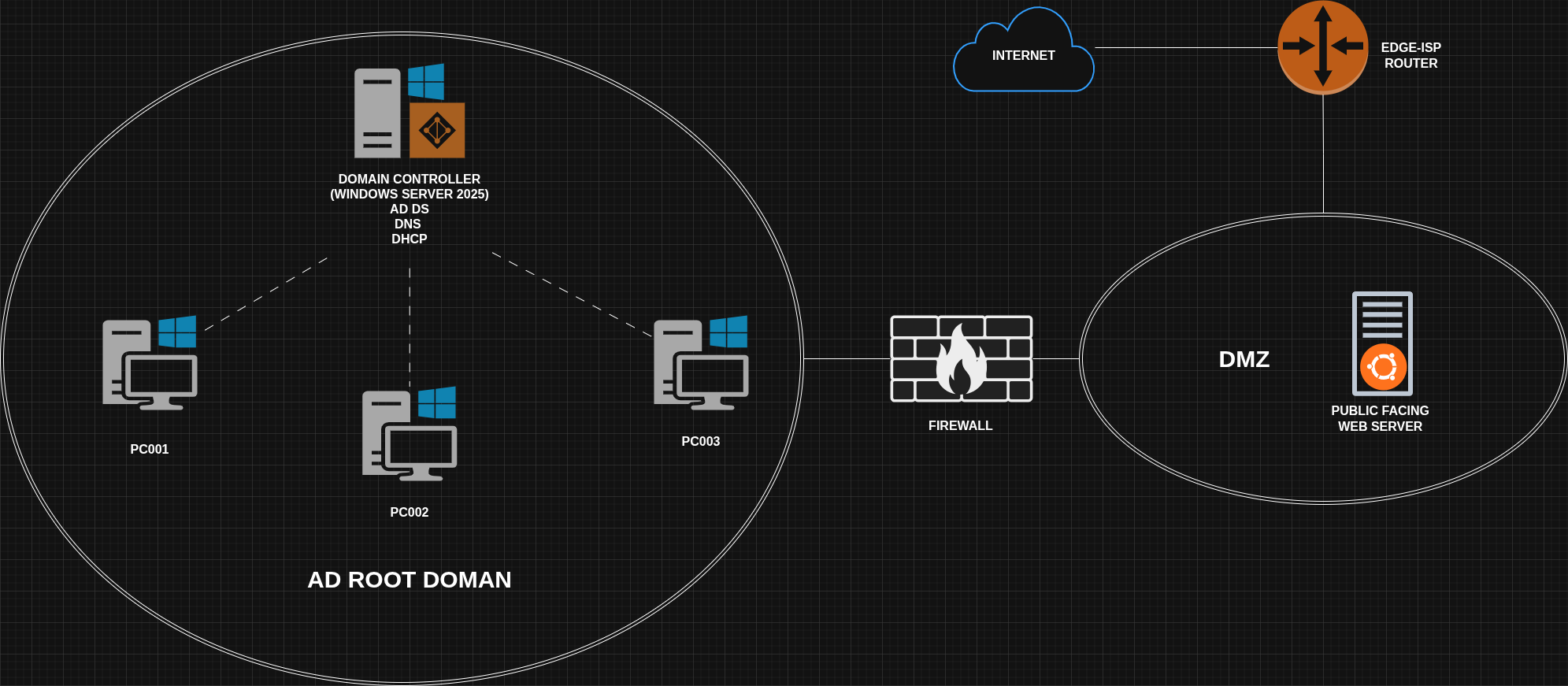
We will setup a windows server, promote it to a domain controller, add some windows hosts to the domain and configure some users and groups.
INSTALLING WINDOWS SERVER 2025
Just to make installation experience close to actual hardware one from a drive.
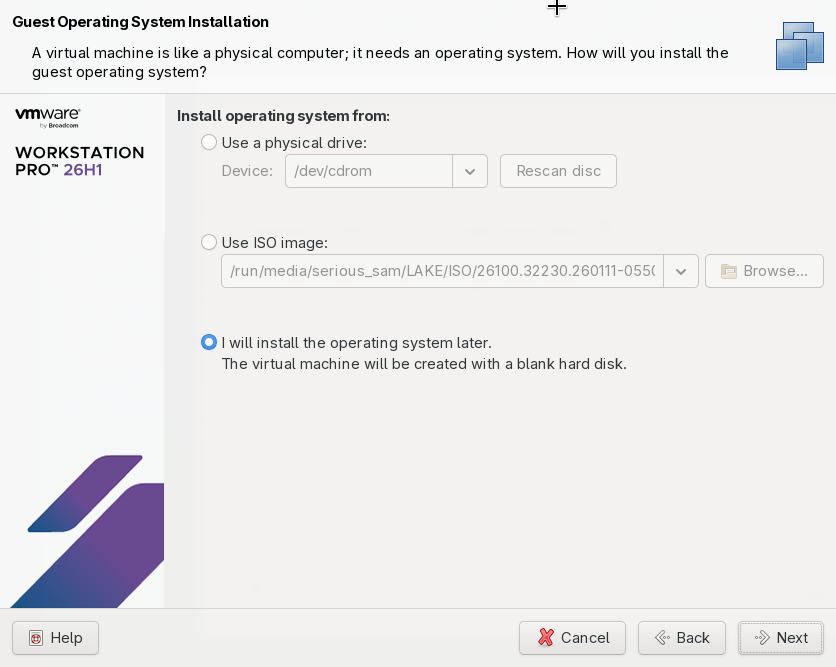
Mount the ISO
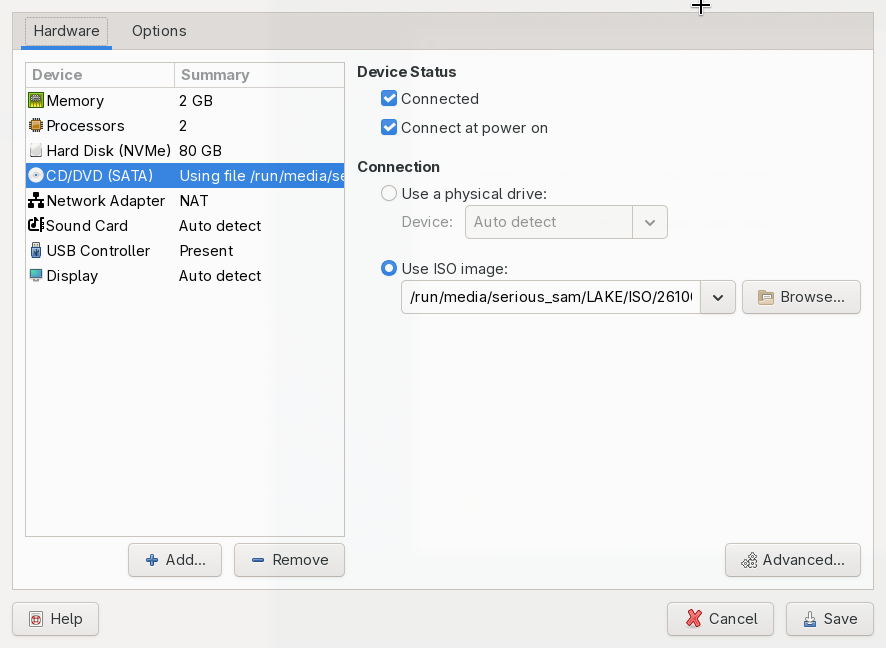
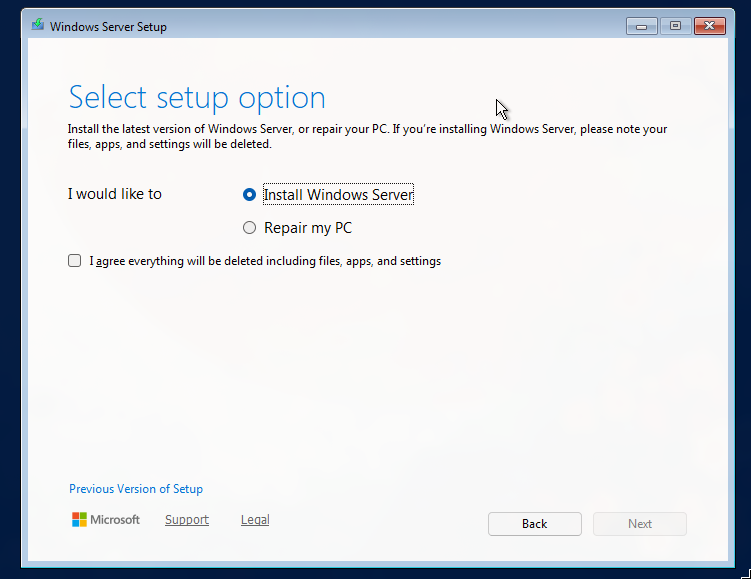
- Use windows server 2025 (Desktop experience),
- select the full virtual hardisk we allocated in vmware.
- Make a stong password for the default administrator account
NOTE: In a production environment disable the default accounts, and make another Administrator account like DC01_admin.alex. As the default accounts can easily be enumerated by the attackers.
ADMINISTRATION OF WINDOWS SERVER 2025
rename computer: ROOT_DC01, keep in WORKGROUP as right now there’s no environment in our domain, Reboot.
We need to give the Domain controller a static IP, without it DHCP and DNS services will not work correctly. (Turn of the DHCP from the virtual LAN network too)
Assign a static IP : 10.0.0.124, gateway : 10.0.0.251 (firewall) and DNS server (this server itself)
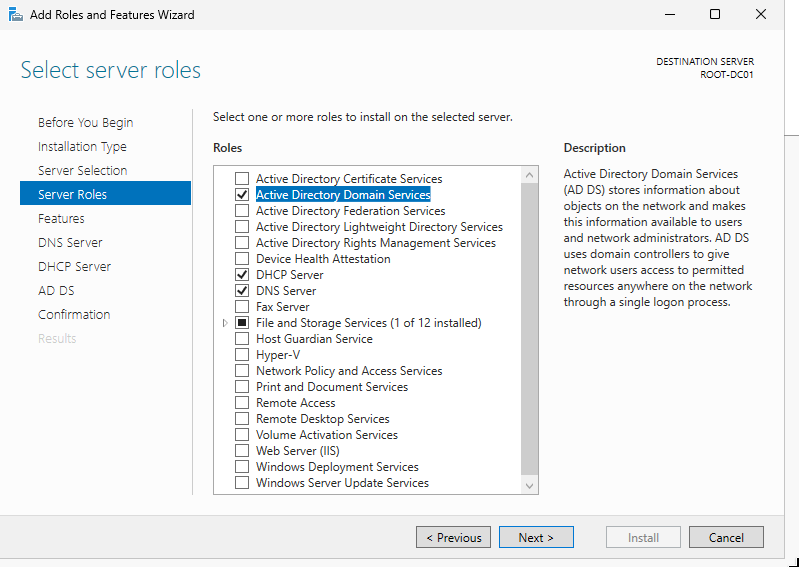
Manage > add roles and features
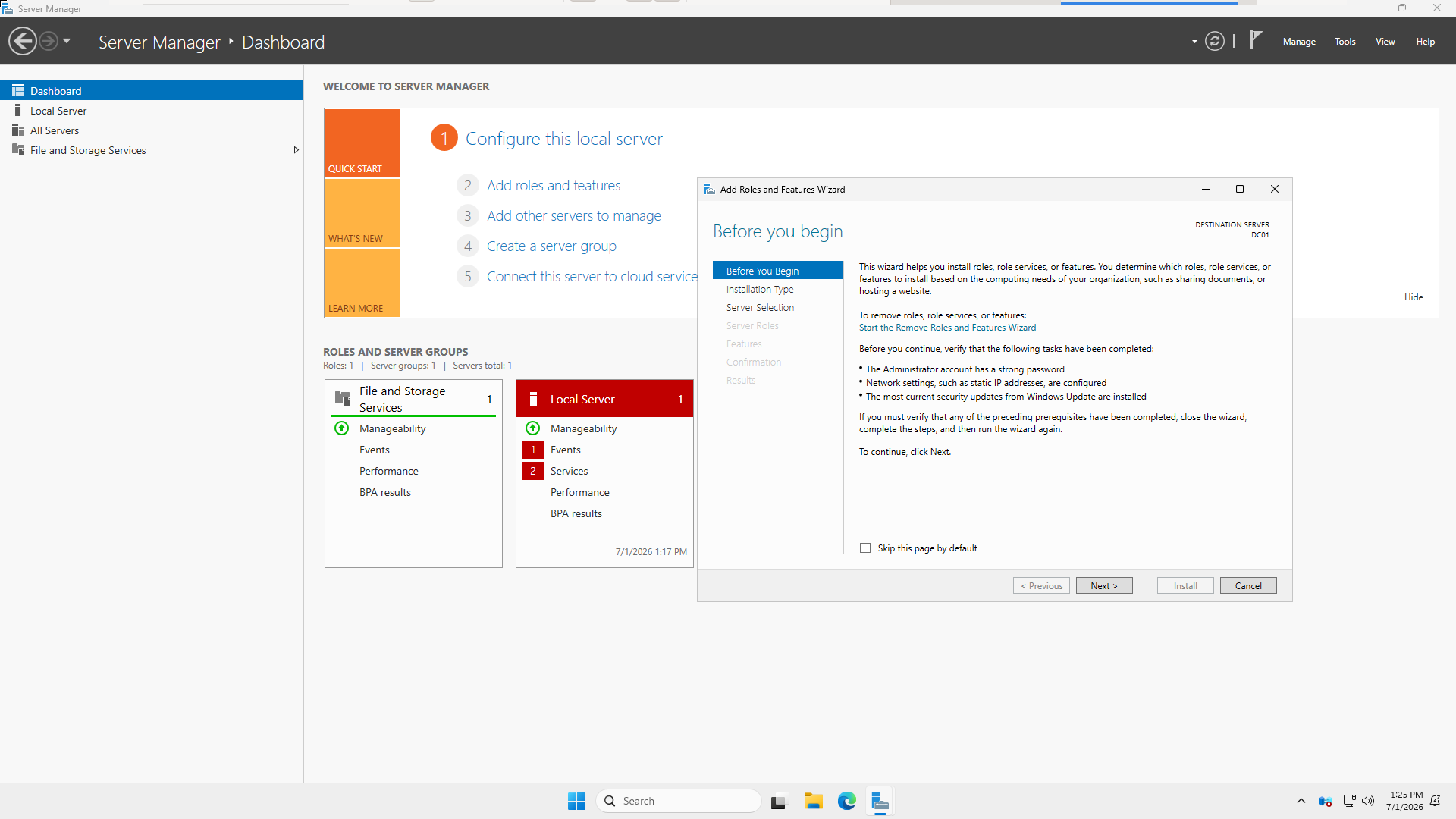
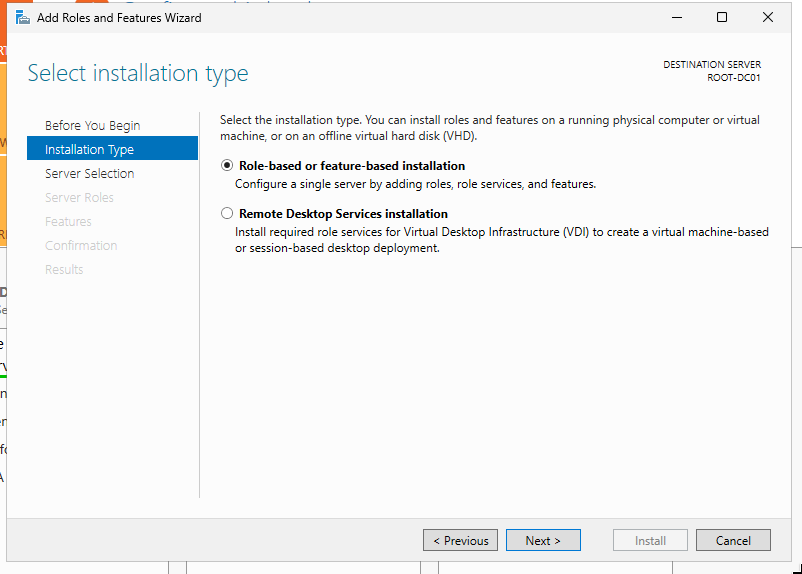
Select role based feature deployment as AD, DNS and DHCP would be configured through this. The second one is for Remote work environment / using published applications (eg. MS office)
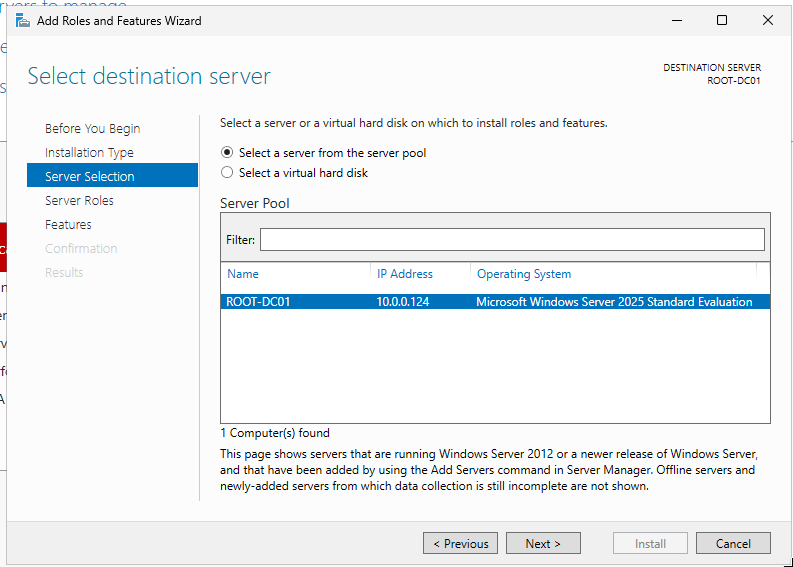
We can also use server manager to manage other servers on the domain. But we want to configure this server only.
1
2
3
4
5
6
7
Windows Server
│
├── Server Roles
│   ├── Role Services (Sub-roles)
│   └── Management Tools
│
└── Features
- Roles = The primary job(s) the server performs.
- Role Services (sub-roles) = Optional components that extend a role.
- Features = Supporting capabilities that aren’t a server’s primary job but add functionality.
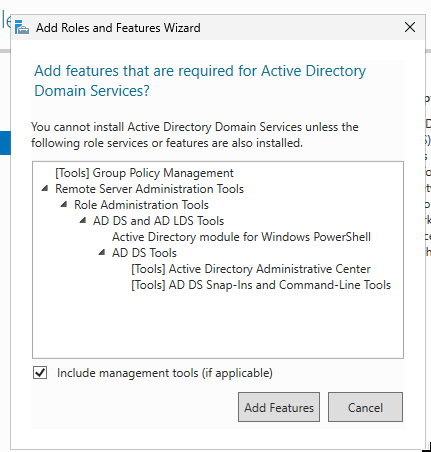
The installation will take some time.
ACTIVE DIRECTORY DOMAIN SERVICES
Go to promote this server to a domain controller
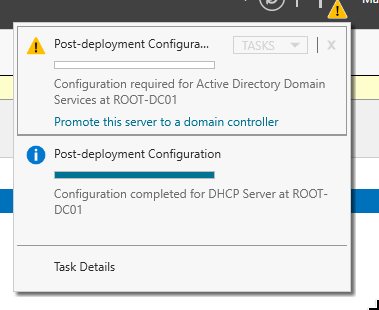
This promotion will make a zone in our DNS server role, Do NOT create a zone
ad.samyak.orgmanually. It will hinder crucial DNS entries to be configured.
Some critical Deployment configurations:
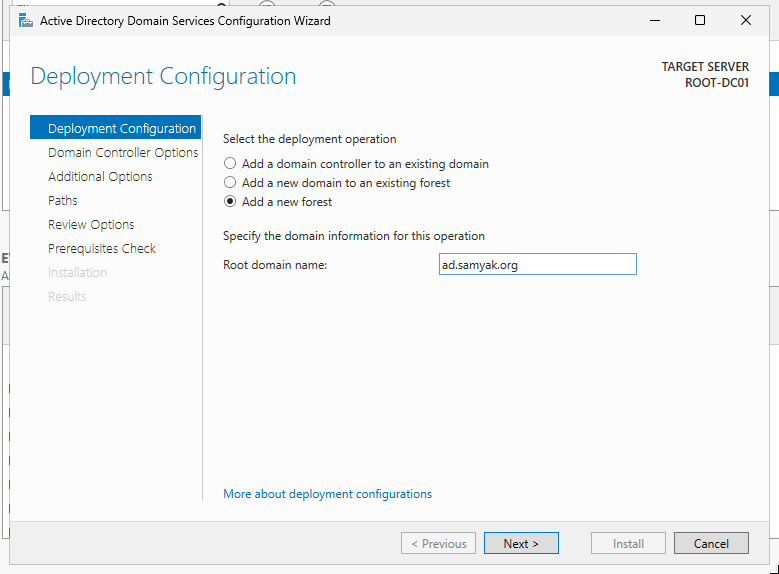
The very heart of our lab:
Functional Level: The oldest version of a windows server that is allowed. On Forest level and this domain level
If your lab / enterprise would be like:
1
2
3
4
5
6
7
8
9
Forest
└── ad.samyak.org (Root Domain)
    │
    ├── DC1 - Windows Server 2025
    ├── DC2 - Windows Server 2022
    │
    └── Child Domain
        ├── child.ad.samyak.org
        └── DC3 - Windows Server 2016
We will set it to server 2016.
DNS server: keep it checked as this DC will be the DNS server too.
GLOBAL CATALOG: The master index of active directory, this server will answer search for any domain in the forest.
RODC: Allow auth but cannot neither modify AD nor replicate passwords by default. Best for insecure branch offices where the server is physically insecure.
ZONE NAMING
Now this is a debatable topic, let’s explore this:
Remember whichever zone name we create, this domain controller will be the authoritative name server of that domain (for any client using this server as the default DNS server).
Lets talk about the options.
- Create a zone same as
samyak.org. - Create a zone for a subdomain like
ad.samyak.orgorcorp.samyak.org. - Another popular option is to use
samyak.local. - For a lab use anything found in documentations
contoso.com,fabricam.comorexample.com.
OPTION 1
Suppose samyak.org has a websitehttps://samyak.org, and authoritative DNS server has records:
1
2
3
4
5
6
A RECORDS

samyak.org -> 203.0.113.10
webmail.samyak.org -> 203.0.113.10
contact.samyak.org -> 203.0.113.10
employee.samyak.org -> 203.0.113.10
The ROOT-DC01 has records:
1
2
3
4
5
6
A RECORDS

root-dc01.samyak.org
root-dc02.samyak.org
app01.samyak.org
kerberos.samyak.org
- If clients asks for
reddit.com, and the ROOT-DC01 not have that record we can make it ask on the internet. - If clients asks for
employee.samyak.com, it will not relay that request on internet. (it’s an authoritative server for zonesamyak.com).
We can always add the public facing DNS records on the domain controller. But, updating them locally will be another challenge.
Solution is OPTION 2
We will make the domain controller an authoritative DNS server of domain ad.samyak.org or corp-in.samyak.org.
Now it will relay and request to internet like webmail.samyak.org or samyak.org.
OPTION 3
Making a domain name like samyak.local is also a bad idea.
Domain names like .local are reserved for MULTICAST in RFC 6762 .
Say we have a printer on our LAN, we can set it’s name as printer.local, So device on the LAN will know that this printer is on the same network.
Apple calls it Bonjour, Linux calls this Avahi.
OPTION 4
domains like Contoso.com or Fabricam.com are very common in tutorials and docs, So using them in a lab with no internet is okay.
NEVER in production.
WHAT WE DO??
Let’s use ad.samyak.org.
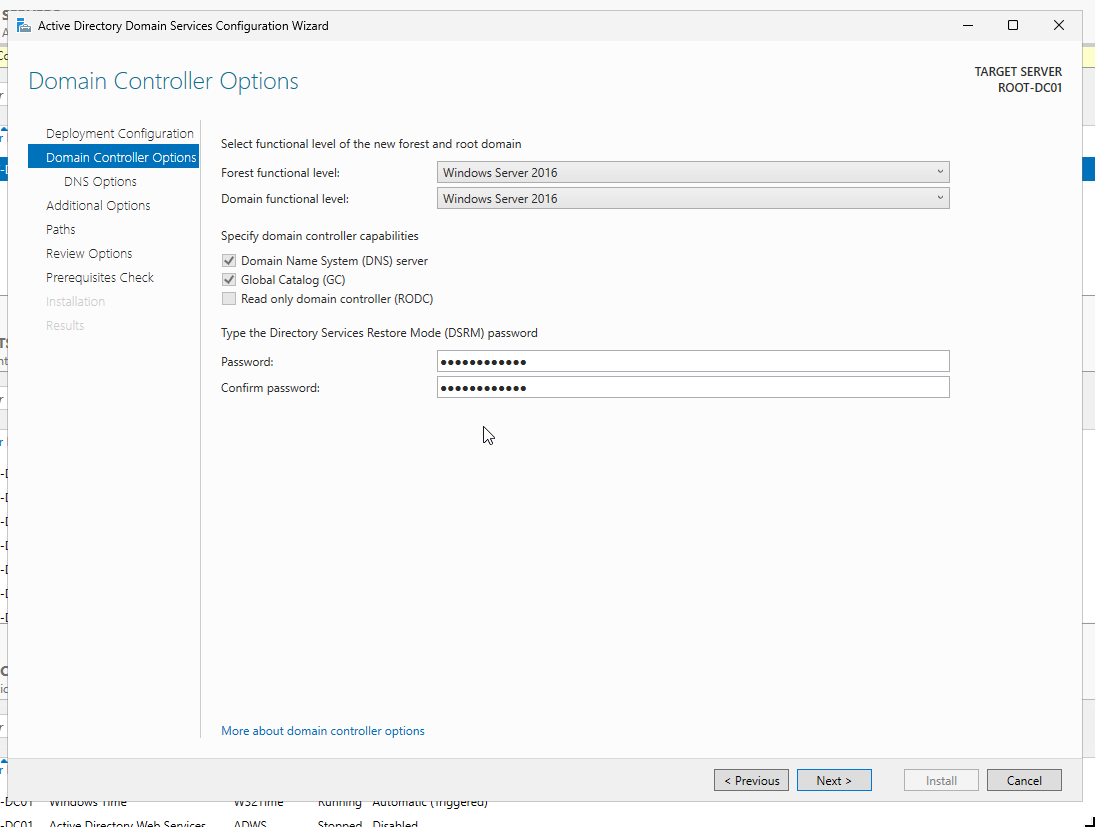
DNS DELEGATION: We can delegate a subdomain to another DNS server, keep it unchecked.
NetBIOS DOMAIN NAME: Name it as the domain name ,SAMYAK for ad.samyak.org, not as AD as it doesn’t identify the organization.
PATHS
DATABASE FOLDER: The ntds.dit the full AD database like all objects, SIDs, password hashes, references to group policies, etc.
LOG FILES: Obvious
NOTE: In a very large production environment we must think about disk operation overloading. hard disk recovery ,etc . So we might like to put all these three on separate disks.
Now, Install the Active Directory Domain services.
Restart the server after the installation is complete.
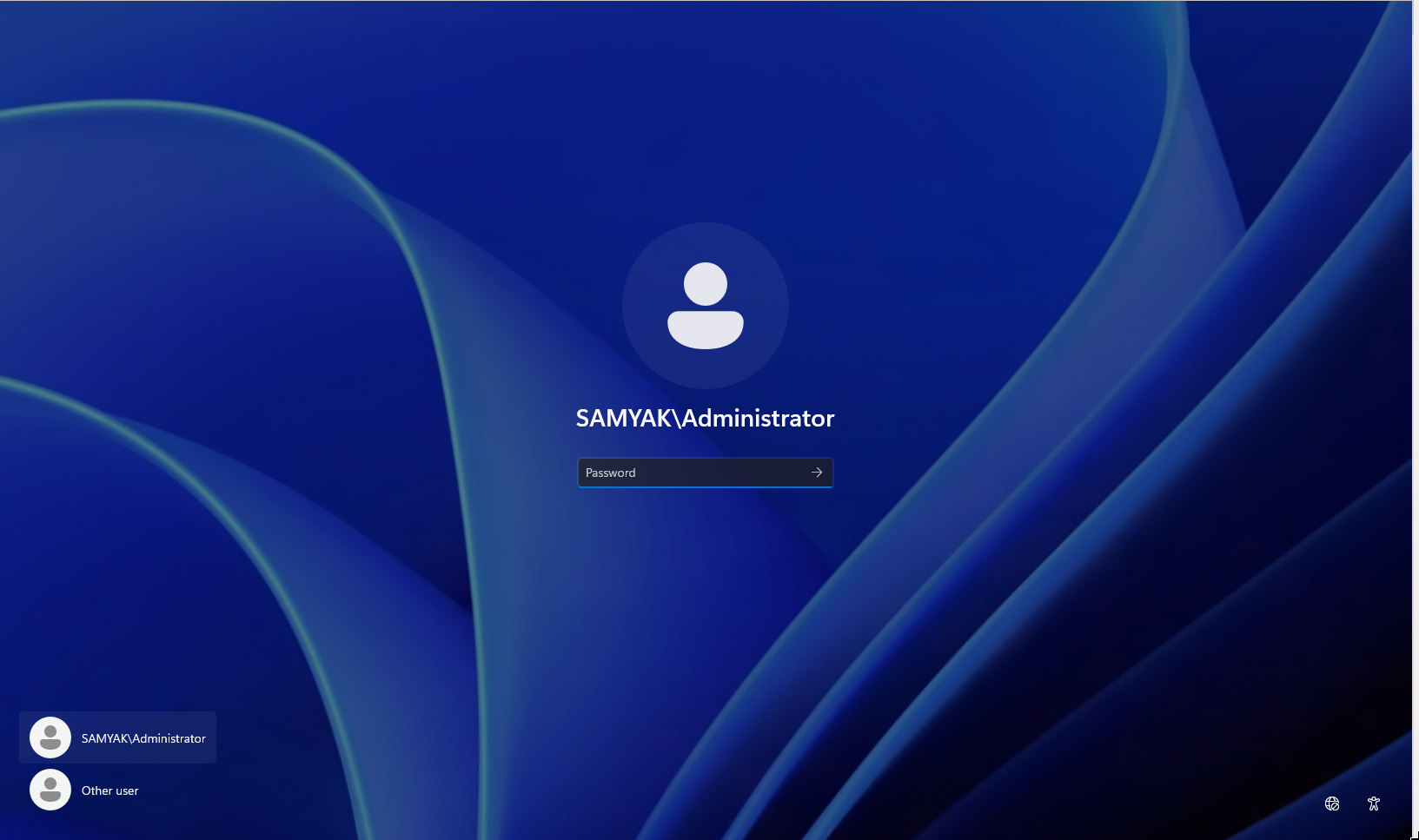
Now we will login as SAMYAK\Adminstrator , SAMYAK\ will be required to login into this domain’s accounts.
DNS
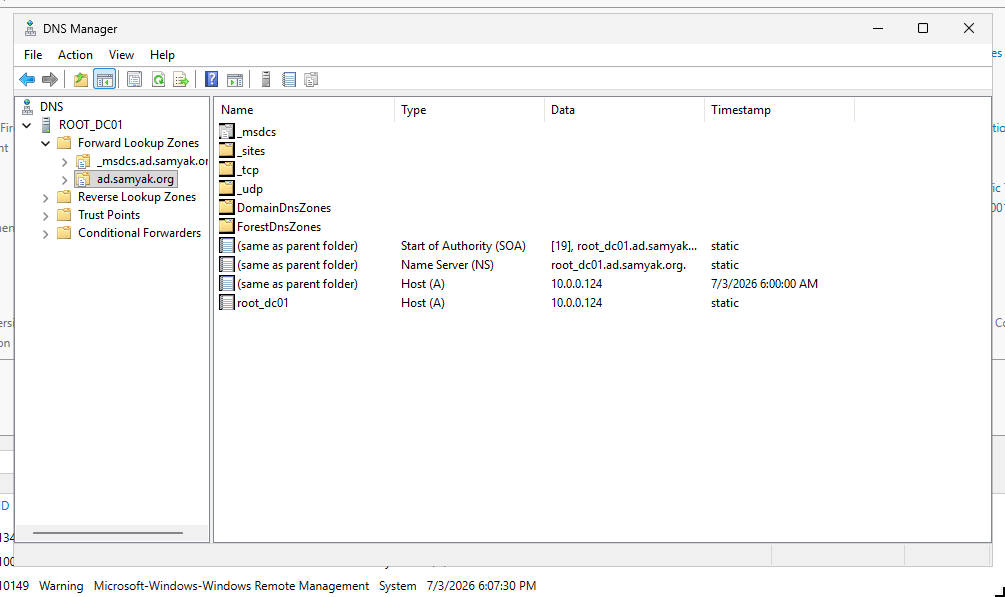
Tools > DNS
When this server was promoted to a domain controller these records should already be present.
These are necessary for other hosts to find this domain controller on the network, so don’t modify these.
MANUAL ADDING ANOTHER DNS ZONE
ZONE TYPE
- PRIMARY ZONE: Creates a new zone file, exactly what we want.
- SECONDARY ZONE: Creates a copy of another DNS server for load balancing / fault tolerance reasons.
- STUB ZONE: Copy only one kind of records (NS, SOA, TXT, etc).
FORWARD LOOKUP ZONE translate DNS to IP Addresses not the other way around.
ZONE NAME
Any according to our need.
DYNAMIC UPDATES
If we have another domain controller we can go for “secure dynamic updates”. Turn them off for now.
DHCP
When a device connects to network DHCP not only assigns and IP address, but returns a full configuration like:
- Default DNS server
10.0.0.124. - Subnet mask
255.255.255.0 - DNS domain
ad.samyak.com - Lease time
- Default gateway
10.0.0.251(Firewall) - And more
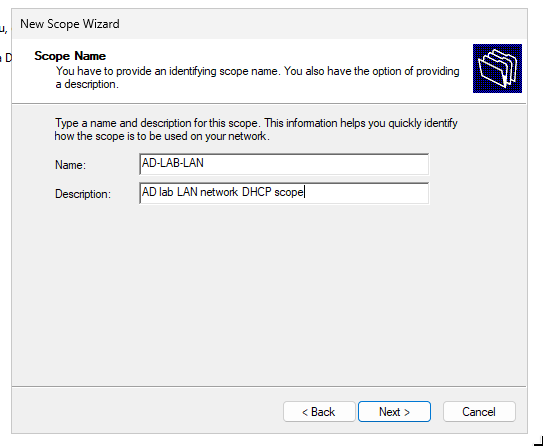
We will reserve some IP out of range for things like Wazuh server, Firewalls, etc.
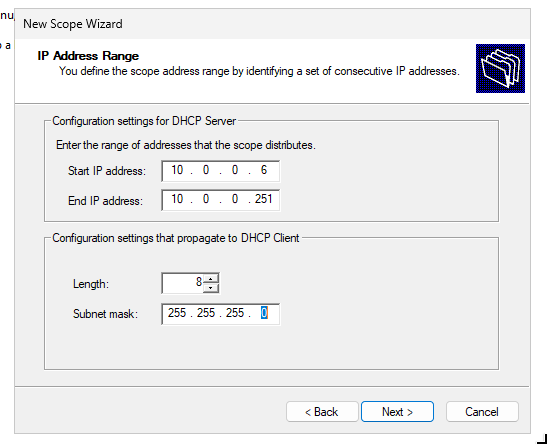
We can exclude IP or ranges, like our Ubuntu IR server running the-hive. (see ECN Lab 5)
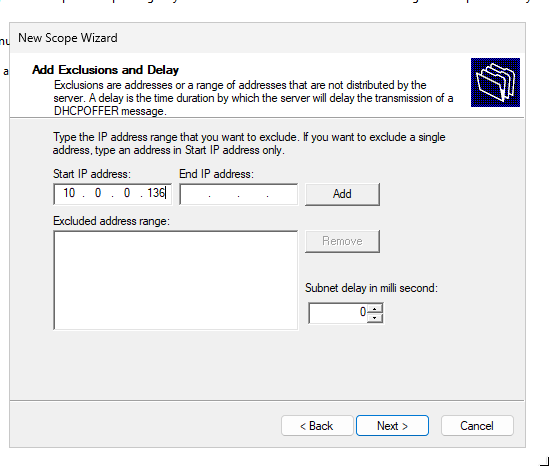
Our firewall 10.0.0.251 will be the router (default gateway). I someone’s using a physical router than they will have to use that.
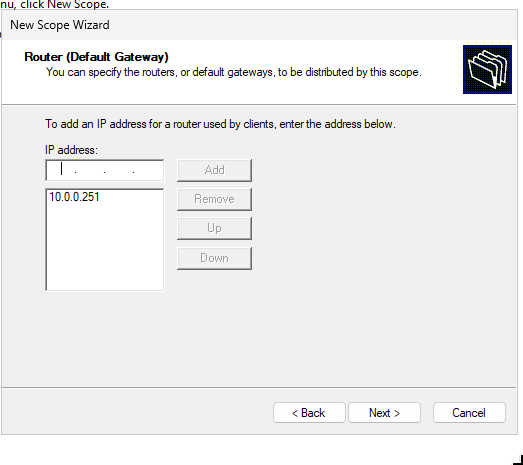
Put our server name ROOT-DC01 here and click resolve the IP will be added.
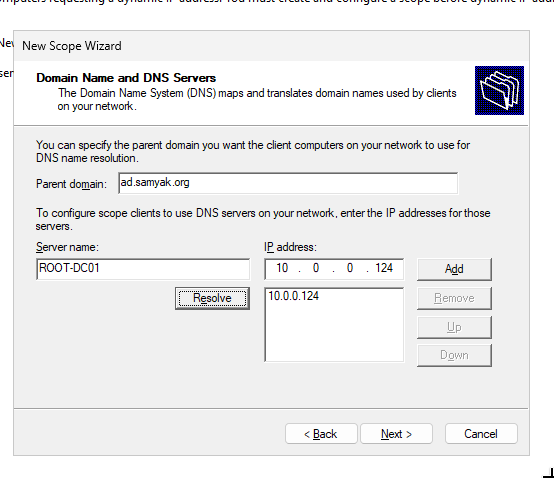
For backward compatibility windows environments are still using NetBIOS, we may leave it empty, but for lab put the ROOT-DC01.
We may even create DHCP server security group and administration accounts from here:
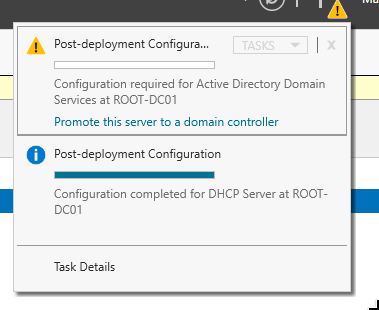
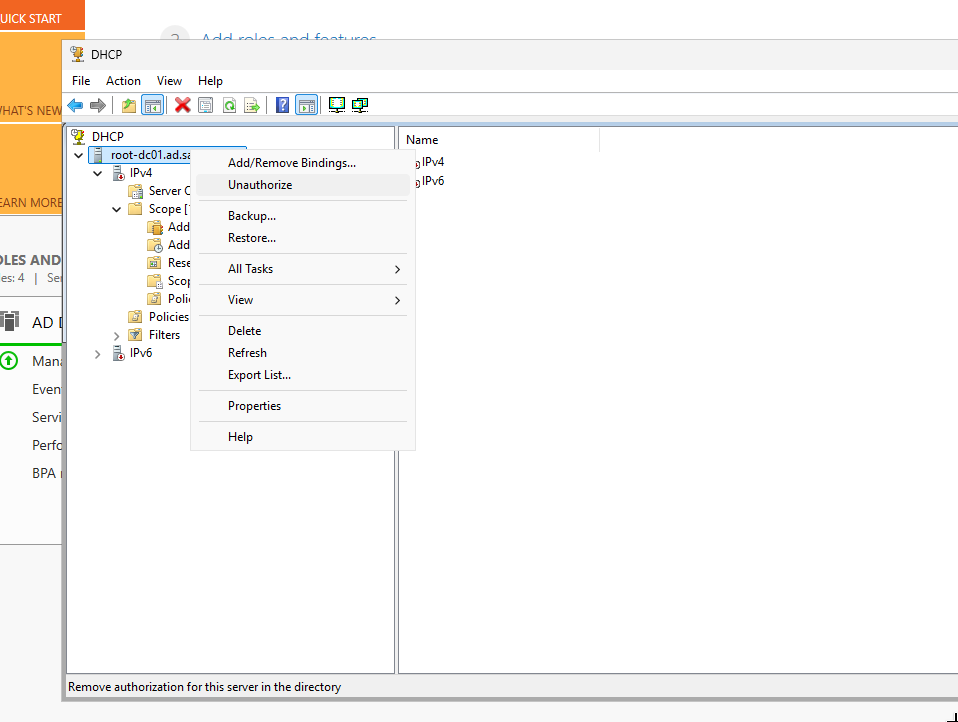
REMEMBER: Authorize the DHCP server to work.
SOME TESTING
Router (Gateway) / internet checking.
1
2
3
4
5
6
7
PS C:\WINDOWS\system32> ping github.com

Pinging github.com [20.207.73.82] with 32 bytes of data:
Reply from 20.207.73.82: bytes=32 time=46ms TTL=127
Reply from 20.207.73.82: bytes=32 time=58ms TTL=127
Reply from 20.207.73.82: bytes=32 time=47ms TTL=127
Reply from 20.207.73.82: bytes=32 time=97ms TTL=127
DHCP TESTING
Start another windows machine on the same LAN network. Turn on Automatic DHCP assignment (if not already).
See it works.
1
2
3
4
5
6
7
8
9
10
11
12
PS C:\Users\WRK1> ipconfig.exe

Windows IP Configuration


Ethernet adapter Ethernet1:

   Connection-specific DNS Suffix  . : ad.samyak.org
   Link-local IPv6 Address . . . . . : fe80::aca3:f9db:dca6:e009%5
   IPv4 Address. . . . . . . . . . . : 10.0.0.6
   Subnet Mask . . . . . . . . . . . : 255.255.255.0
   Default Gateway . . . . . . . . . : 10.0.0.251
From another windows machine:
1
2
3
4
5
6
7
8
9
10
11
12
PS C:\Users\target_user> ipconfig.exe

Windows IP Configuration


Ethernet adapter Ethernet (Kernel Debugger):

   Connection-specific DNS Suffix  . : ad.samyak.org
   Link-local IPv6 Address . . . . . : fe80::649e:c6c:53d:235d%4
   IPv4 Address. . . . . . . . . . . : 10.0.0.7
   Subnet Mask . . . . . . . . . . . : 255.255.255.0
   Default Gateway . . . . . . . . . : 10.0.0.251
Do the DNS and internet checks from windows host too.
DNS TESTING
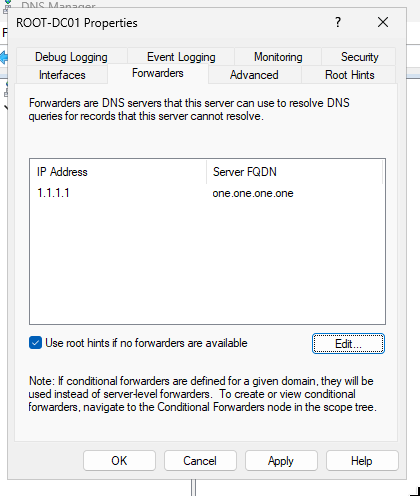
NOTE to make our DNS server query to internet, we generally set forwarders in server properties, but this is working.
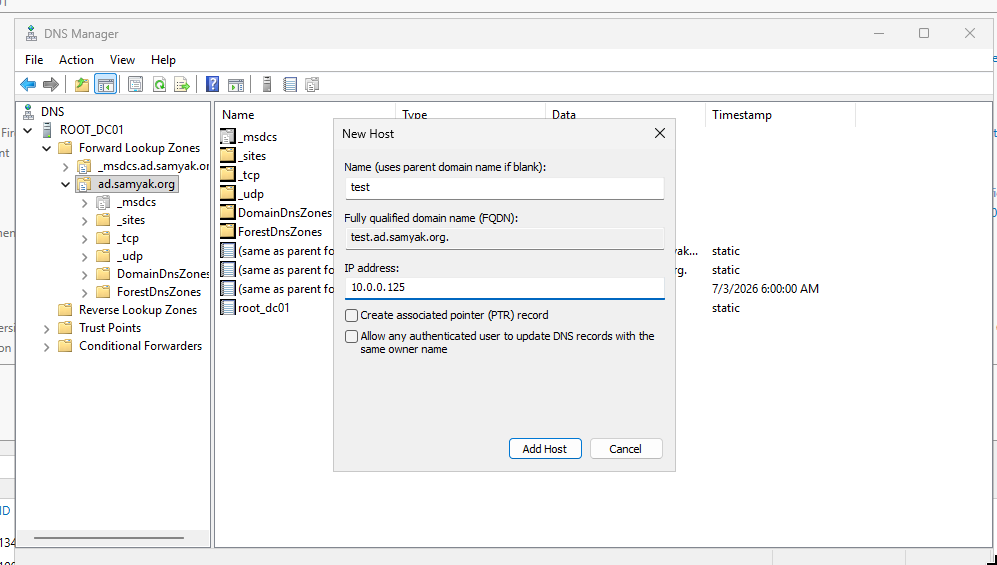
Make a custom A record.
1
2
3
4
5
PS C:\Users\WRK1> Resolve-DnsName test.ad.samyak.org

Name                                           Type   TTL   Section    IPAddress
----                                           ----   ---   -------    ---------
test.ad.samyak.org                             A      3600  Answer     10.0.0.125
A domain that is not on the DNS server.
1
2
3
4
5
6
7
8
9
10
PS C:\Users\WRK1> Resolve-DnsName netflix.com

Name                                           Type   TTL   Section    IPAddress
----                                           ----   ---   -------    ---------
netflix.com                                    AAAA   52    Answer     2a05:d018:76c:b685:c898:aa3a:42c7:9d21
netflix.com                                    AAAA   52    Answer     2a05:d018:76c:b683:e1fe:9fbf:c403:57f1
netflix.com                                    AAAA   52    Answer     2a05:d018:76c:b684:b233:ac1f:be1f:7
netflix.com                                    A      55    Answer     54.246.79.9
netflix.com                                    A      55    Answer     54.170.196.176
netflix.com                                    A      55    Answer     52.214.181.141
This is possible due to forwarders, or root hints if forwarders aren’t configured.
MANAGING GROUPS, USERS AND ORGANIZATIONAL UNITS (OU)
With the windows server setup as active directory, we will have access to some AD tools.
We will start with Active Directory Users and Computers.
There are already a lot of useful builtin groups.
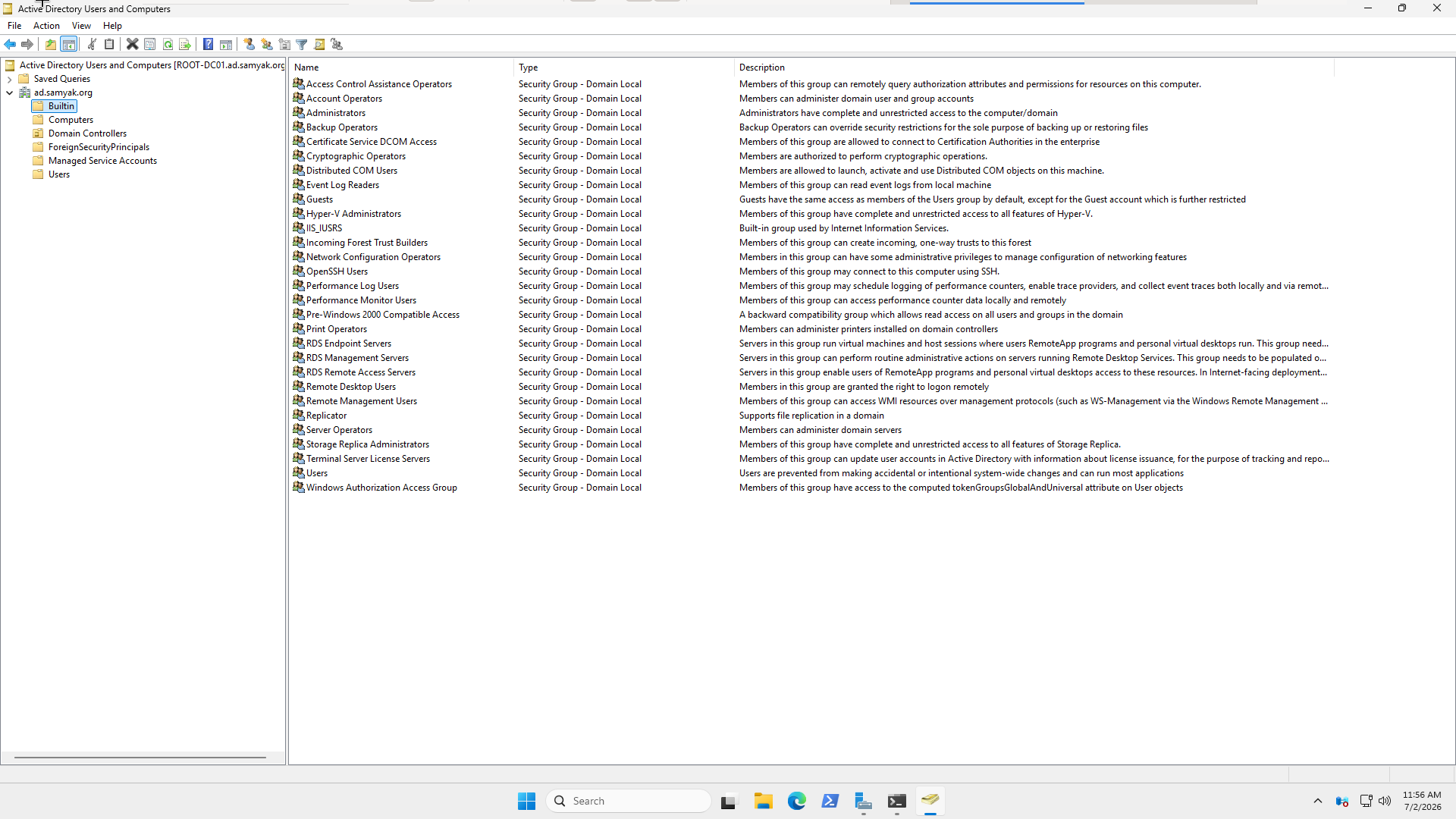
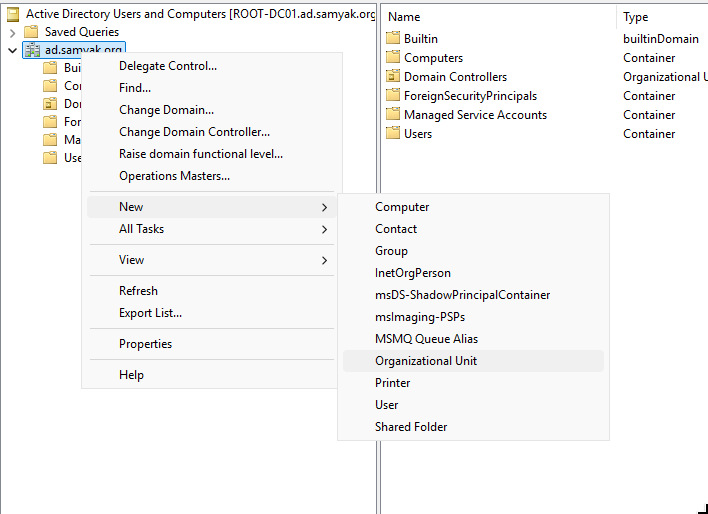
Say in the Rajasthan HQ there are Developers, HR, Finance, IT and Management departments.
A good design will be something like.
1
2
3
4
5
6
7
8
9
10
11
12
13
14
15
16
17
18
19
20
21
22
23
24
25
26
27
28
29
30
31
32
33
34
35
36
samyak.org
│
├── Domain Controllers (default OU)
│
├── Raj-HQ (OU)
│   │
│   ├── Users (OU)
│   │   ├── Developers
│   │   ├── HR
│   │   ├── Finance
│   │   ├── IT
│   │   └── Management
│   │
│   ├── Computers (OU)
│   │   ├── Workstations
│   │   └── Servers
│   │
│   ├── Groups (OU)
│   │   ├── GG_Developers
│   │   ├── GG_HR
│   │   ├── GG_Finance
│   │   ├── GG_IT
│   │   ├── GG_Management
│   │   ├── DL_Developers_RW
│   │   ├── DL_HR_RW
│   │   ├── DL_Finance_RW
│   │   └── DL_Management_RW
│   │   └── DL_IT_Admin
│   │
│   └── Service Accounts (OU)
│       ├── svc_backup
│       ├── svc_web
│       ├── svc_sql
│       └── svc_monitoring
│
└── Other Sites...
Some good naming conventions from Microsoft documentation:
GG are global groups and DL are domain local groups, we will come to group types in a minute.
RW shows Read-Write Access, for read only groups we will use R.
From Microsoft documentation, it’s recommended that the departments should be available both as an OU and a group. For better administration and permissions management.
USER MANAGEMENT
Making a new user in Raj-HQ > Users > Developers.
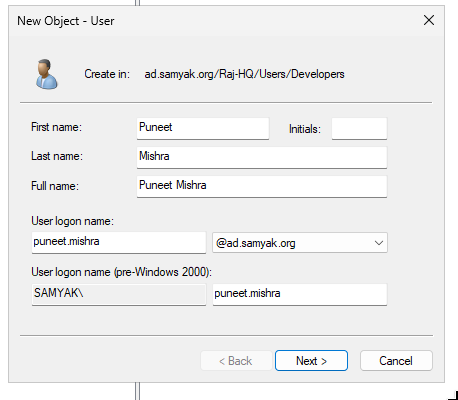
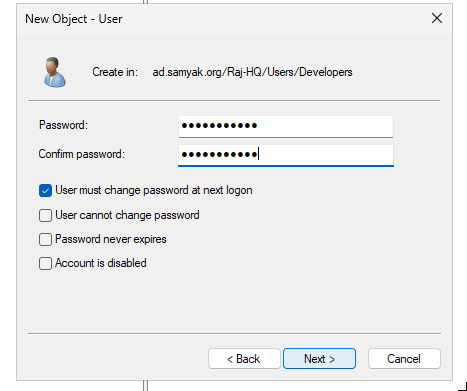
User Cannot change password, Password never expires. These are two security nightmares.
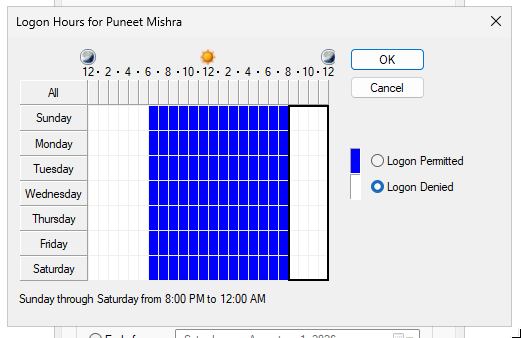
Some of the best administration features are that we can set logon hours of users, the devices they can login to and even account expiration date (for contract based employees).
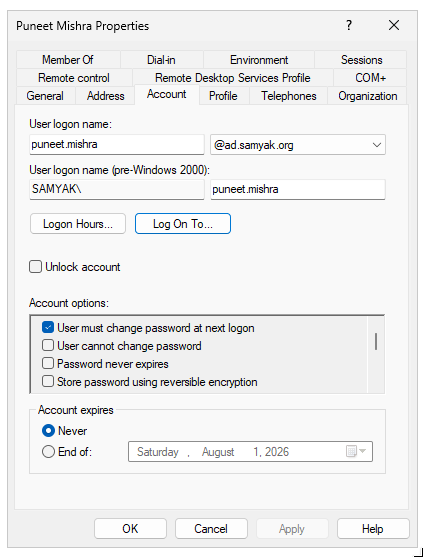
Say the we are running backups on non-working hours and we want to stop remote users from logging in at that time
GROUPS MANAGEMENT
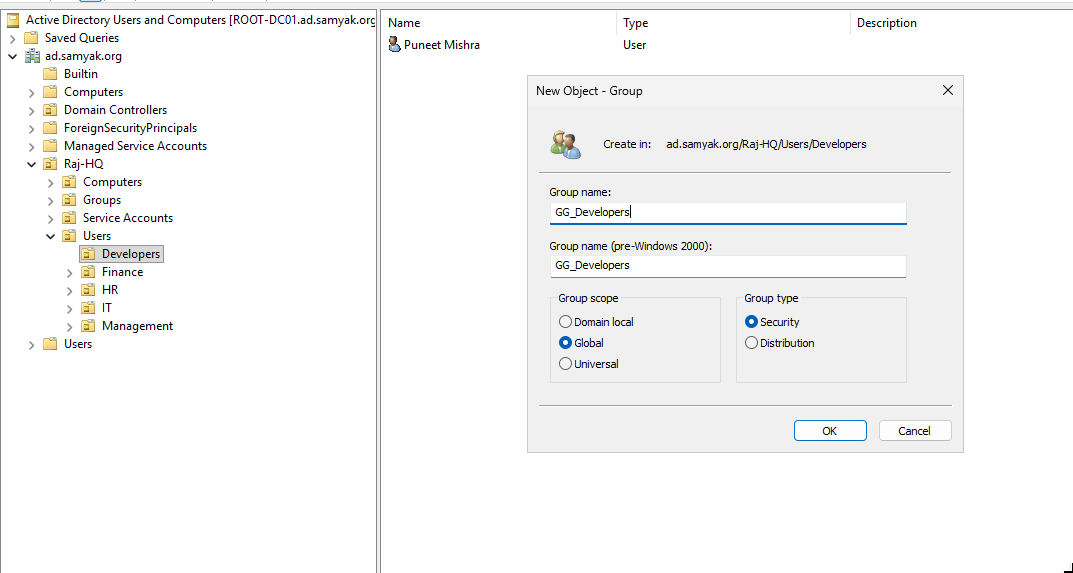
Creating a new group.
SCOPES
DOMAIN LOCAL GROUPS: These groups only reside in our domain.
GLOBAL GROUPS: These groups can exist in multiple domains in the forest, if we have very large organization.
UNIVERSAL GROUPS: Users will be replicated to all the domain in the forest. (a problem is that when such a user logs in they might have to be authenticated from all the Domain controllers, slowing things down).
WHAT TO DO?
Think of a forest with two domains: raj.samyak.corp and london.samyak.corp. Both domains have departments such as Developers, HR, Production, and Management.
For each department, create a Global Group such as GG_Developers, GG_HR, or GG_Production. These groups represent the users’ roles or departments and contain the user accounts.
In both domains we would be able to see:
1
2
3
4
GG_Developers_Raj
GG_Developers_London
GG_HR_Raj
GG_HR_London
Now suppose there is a shared folder called Project_A hosted in the Raj domain. Instead of assigning permissions directly to GG_Developers_Raj, create a Domain Local Group such as DL_Project_A_Modify and grant that group the required NTFS/share permissions on the folder.
Then, make the appropriate Global Groups members of the Domain Local group. For example:
1
2
3
4
5
6
7
8
9
Raj Domain
----------
GG_Developers_Raj
        │
        ▼
DL_Project_A_Modify
        │
        ▼
\\FILE01\Project_A
If developers from the London domain also need access later, simply add GG_Developers_London to the same Domain Local group:
1
2
3
4
5
GG_Developers_Raj
          │
          ├────────► DL_Project_A_Modify
          │
GG_Developers_London
The permissions on the folder never change, we only change the group membership.
This design is known as AGDLP:
- A = Accounts (Users)
- G = Global Groups (Department/Role)
- DL = Domain Local Groups (Resource Permissions)
- P = Permissions
TYPES
Distribution groups are only used to send emails.
Security groups can used to send emails and assign permissions too. (what we need)
ADDING MEMBERS
Just right click on Group > Properties > Members
The best part is type an incomplete name like “Puneet”, and click check names it will auto-complete.
NOTE: I had renamed the group to GG_Developers_Raj. 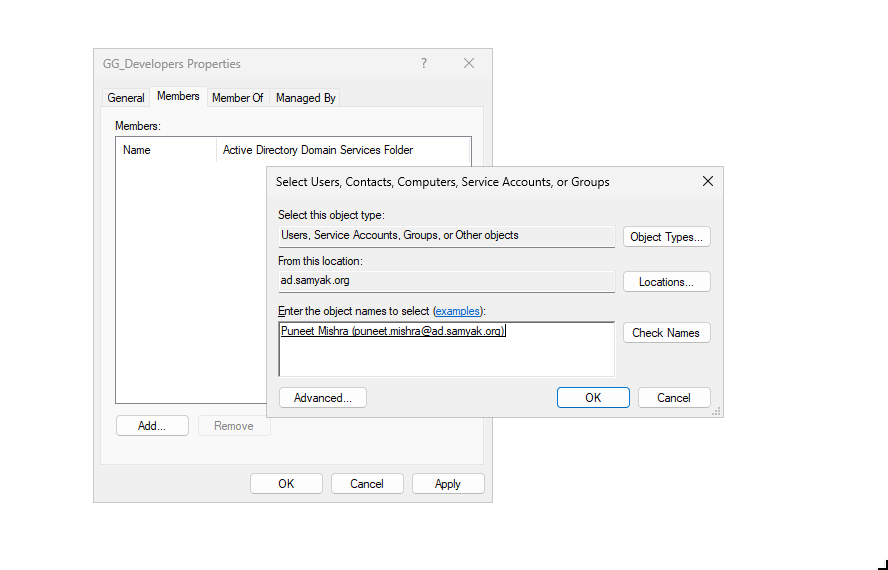
Similarly we can go to the user > Right click > Add to a group
TESTING
We will make a folder PROJECT_A_CODE on our domain controller. Assign full permissions to Project_A_Code Group.
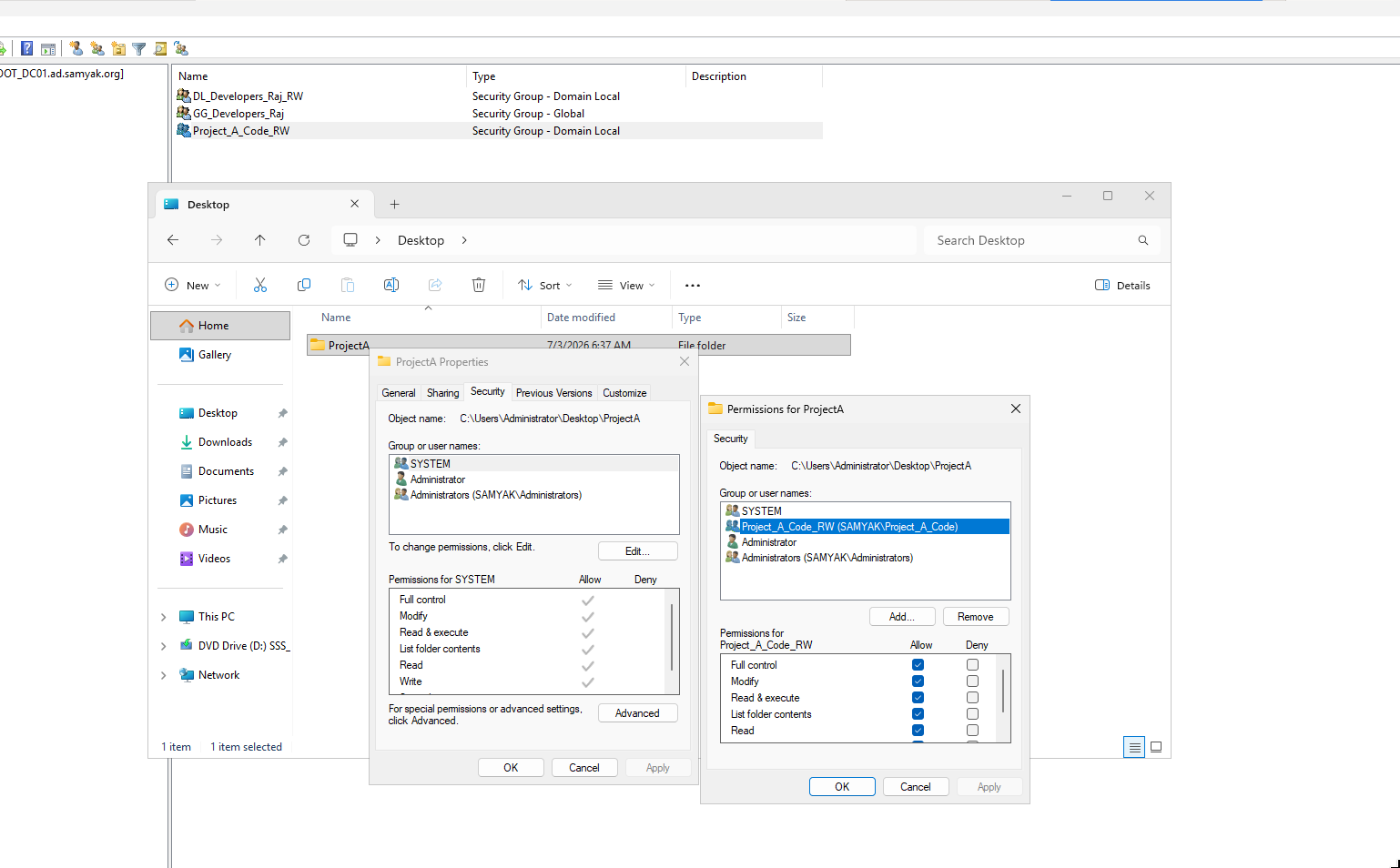
Now add GG_Developers_Raj global-group as a member of Project_A_Code local-group. To give puneet.mishra this folder’s access.
See that the permission is assigned.
Right now we won’t be able to login as
SAMYAK\punnet.mishraand test this folder. because we don’t have the permisions set.
POWERSHELL COMMANDS
It’s important to know powershell commands to query group, user and other information.
As during red teaming / blue teaming even sysadmin a GUI isn’t always available.
List all domain groups, dumping all the properties. (NOTE we are SA)
1
2
3
4
5
6
7
8
9
10
11
12
13
14
15
16
17
18
19
20
21
22
23
24
25
26
27
28
29
30
PS C:\WINDOWS\system32> Get-ADGroup -Filter *

DistinguishedName : CN=Administrators,CN=Builtin,DC=ad,DC=samyak,DC=org
GroupCategory     : Security
GroupScope        : DomainLocal
Name              : Administrators
ObjectClass       : group
ObjectGUID        : 62c0ead2-1b9b-469f-ab53-26b462e72145
SamAccountName    : Administrators
SID               : S-1-5-32-544

DistinguishedName : CN=Users,CN=Builtin,DC=ad,DC=samyak,DC=org
GroupCategory     : Security
GroupScope        : DomainLocal
Name              : Users
ObjectClass       : group
ObjectGUID        : 70c6fdc6-306b-4880-a8c6-5821e967bed8
SamAccountName    : Users
SID               : S-1-5-32-545

DistinguishedName : CN=Guests,CN=Builtin,DC=ad,DC=samyak,DC=org
GroupCategory     : Security
GroupScope        : DomainLocal
Name              : Guests
ObjectClass       : group
ObjectGUID        : b17f4bc1-6c41-409f-a8bd-c87511eb79ed
SamAccountName    : Guests
SID               : S-1-5-32-546

<-- snip -->
Show all properties of a specific group:
1
2
3
4
5
6
7
8
9
10
11
12
13
14
15
16
17
18
19
20
21
22
23
24
25
26
27
28
29
30
31
32
33
34
35
36
37
38
39
40
41
PS C:\WINDOWS\system32> Get-ADGroup "GG_Developers_Raj" -Properties *


CanonicalName                   : ad.samyak.org/RAJ-HQ/Groups/GG_Developers_Raj
CN                              : GG_Developers_Raj
Created                         : 7/3/2026 6:36:08 AM
createTimeStamp                 : 7/3/2026 6:36:08 AM
Deleted                         :
Description                     :
DisplayName                     :
DistinguishedName               : CN=GG_Developers_Raj,OU=Groups,OU=RAJ-HQ,DC=ad,DC=samyak,DC=org
dSCorePropagationData           : {12/31/1600 4:00:00 PM}
GroupCategory                   : Security
GroupScope                      : Global
groupType                       : -2147483646
HomePage                        :
instanceType                    : 4
isDeleted                       :
LastKnownParent                 :
ManagedBy                       :
member                          : {CN=Puneet Mishra,OU=Developers,OU=Users,OU=RAJ-HQ,DC=ad,DC=samyak,DC=org}
MemberOf                        : {}
Members                         : {CN=Puneet Mishra,OU=Developers,OU=Users,OU=RAJ-HQ,DC=ad,DC=samyak,DC=org}
Modified                        : 7/3/2026 6:40:24 AM
modifyTimeStamp                 : 7/3/2026 6:40:24 AM
Name                            : GG_Developers_Raj
nTSecurityDescriptor            : System.DirectoryServices.ActiveDirectorySecurity
ObjectCategory                  : CN=Group,CN=Schema,CN=Configuration,DC=ad,DC=samyak,DC=org
ObjectClass                     : group
ObjectGUID                      : 67d66645-a339-46f3-9cdb-122977a8757e
objectSid                       : S-1-5-21-3428901173-3144367710-215545366-1105
ProtectedFromAccidentalDeletion : False
SamAccountName                  : GG_Developers_Raj
sAMAccountType                  : 268435456
sDRightsEffective               : 15
SID                             : S-1-5-21-3428901173-3144367710-215545366-1105
SIDHistory                      : {}
uSNChanged                      : 12868
uSNCreated                      : 12846
whenChanged                     : 7/3/2026 6:40:24 AM
whenCreated                     : 7/3/2026 6:36:08 AM
List members of a group:
1
2
3
4
Get-ADGroupMember "GG_Developers"

# Filter for users in output
Get-ADGroupMember "GG_Developers" | Where-Object objectClass -eq "user"
Find parent groups of a group:
1
Get-ADGroup "GG_Developers" -Properties MemberOf |Select -ExpandProperty MemberOf
A small cheat-sheet:
1
2
3
4
5
6
7
8
9
10
11
12
13
14
15
16
17
18
19
20
# List all groups
Get-ADGroup -Filter *

# Show group details
Get-ADGroup "GG_Developers" -Properties *

# List group members
Get-ADGroupMember "GG_Developers"

# Expand nested memberships
Get-ADGroupMember "DL_Project_A_Modify" -Recursive

# List groups a user belongs to
Get-ADPrincipalGroupMembership rahul

# List all Global Groups
Get-ADGroup -Filter 'GroupScope -eq "Global"'

# List all Domain Local Groups
Get-ADGroup -Filter 'GroupScope -eq "DomainLocal"'
There are a lot of useful commands , powershell scripts we can find online.
ADDING DEVICES TO DOMAIN
Add a computer in our AD from “Users and computers”.
Allow Domain Admin on it.
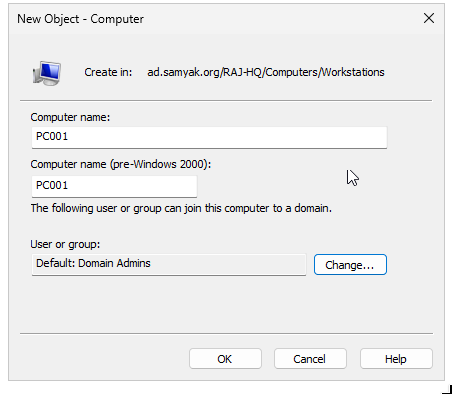
Add another Windows 10 PC to the LAN network, make sure that DHCP and DNS are working from the “testing” section above.
Also verify the domain controller is found by the host.
1
2
3
4
5
6
7
8
9
10
PS C:\Users\WRK1> nltest /dsgetdc:ad.samyak.org
           DC: \\ROOT_DC01.ad.samyak.org
      Address: \\10.0.0.124
     Dom Guid: 1ac7076d-620a-4058-8402-f9846304c9c0
     Dom Name: ad.samyak.org
  Forest Name: ad.samyak.org
 Dc Site Name: Default-First-Site-Name
Our Site Name: Default-First-Site-Name
        Flags: PDC GC DS LDAP KDC TIMESERV GTIMESERV WRITABLE DNS_DC DNS_DOMAIN DNS_FOREST CLOSE_SITE FULL_SECRET WS DS_8 DS_9 DS_10 KEYLIST 0x40000
The command completed successfully
Rename the PC from Settings > About, to something like PC001 or RAJ-PC001 a meaningful name.
Go to Rename this PC (Advanced): PC001
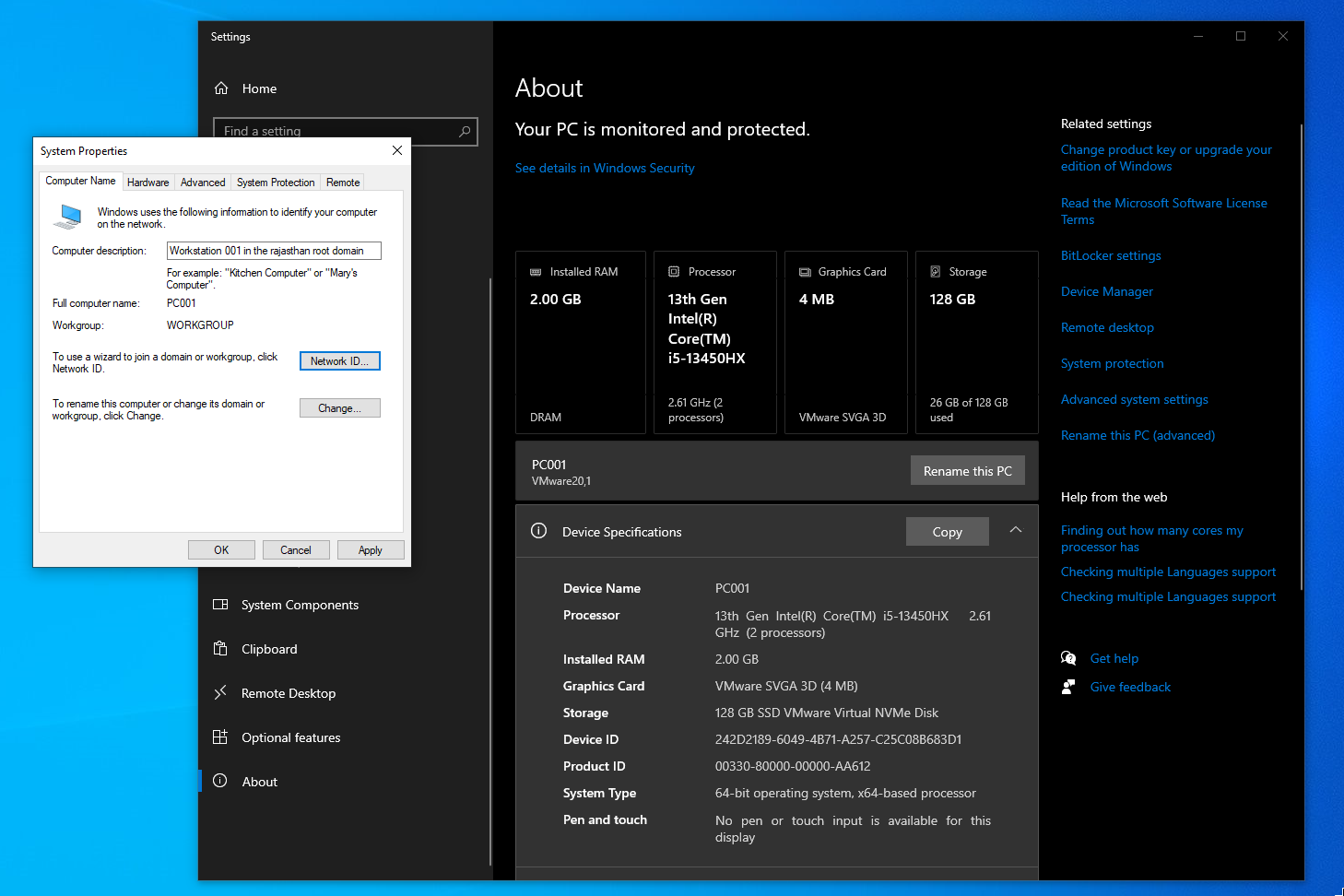
Click network ID > select business computer > network with domain
Add the credentials of a domain user allowed to access this PC (Administrator).
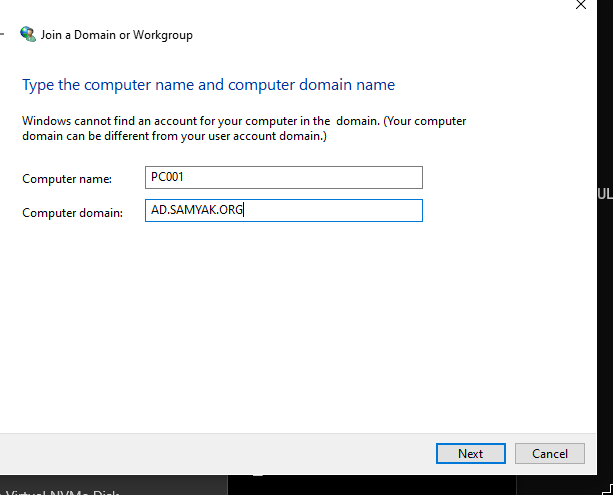
Put the domain credentials again.
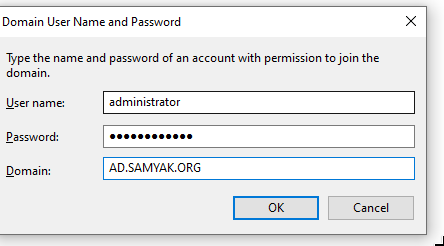
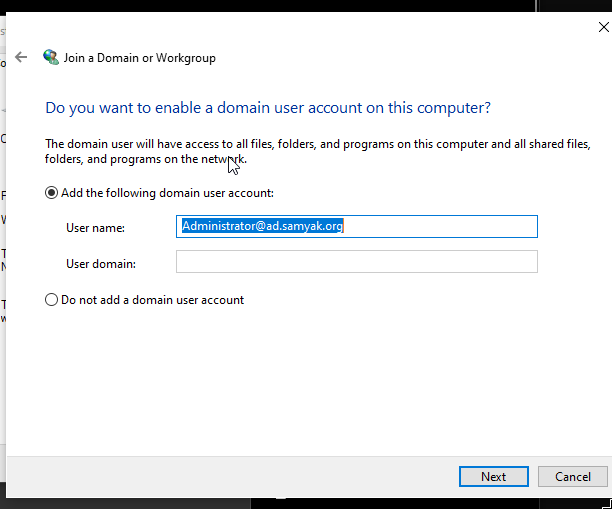
Yes we want to access this workstation using this user.
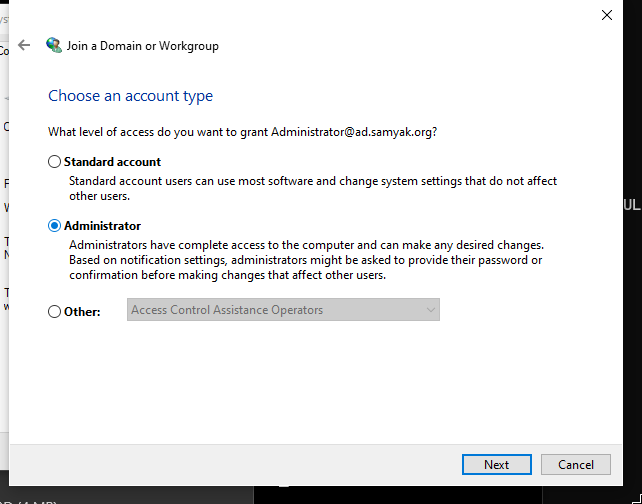
Do we want this domain account to be a standard user, Admin or Other. I will select Administrator now.
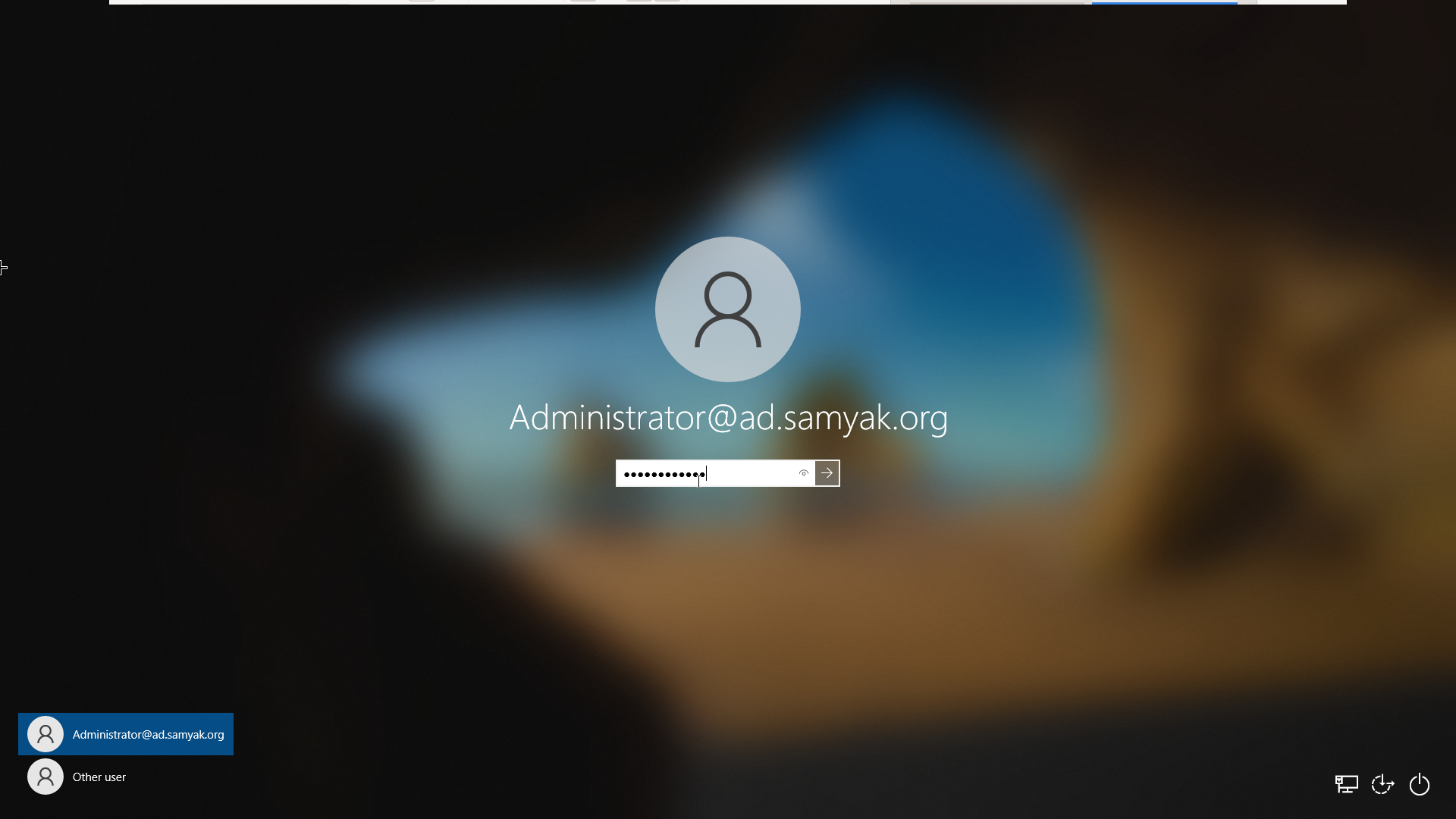
On the next boot.
CONCLUSION
We covered a lot of ground in this blog, next we will see accessing machines and servers remotely using RDP and SSH.
And we will deploy and authenticate to other windows services like IIS.