ECN Lab 3: Multi WAN Architecture - supporting failovers and load balancing
INTRODUCTION
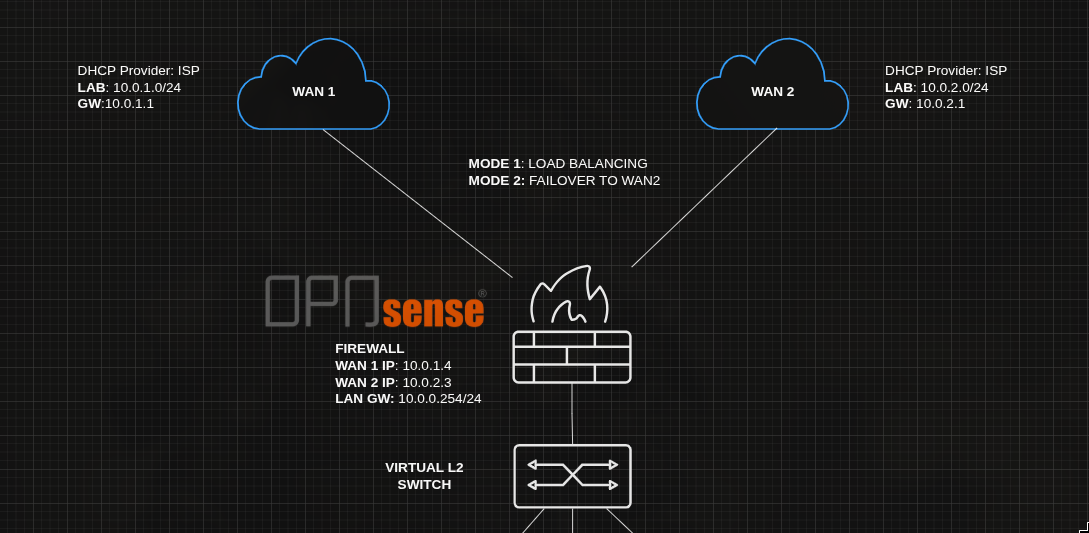
SCENARIO: We are appointed as security engineer to secure a virtual company named “samyak.org”. Currently there have 50+ employees in the company and there are no security measures, no network management, no AD, nothing just all connected to a LAN.
Welcome to the third installment in my “Enterprise Cyber Security and Networking Lab” (ECN Lab) series.
So far we had:
- Isolated the WAN network from Clients using a firewall server and a switch.
- Designed a HA firewall fail-over architecture (for the sake on simplification I will remove that from here).
Now the owner of samyak.org had reported, ISPs are becoming unreliable day by day and if, the WAN network starts to face packet loss all the employees go offline.
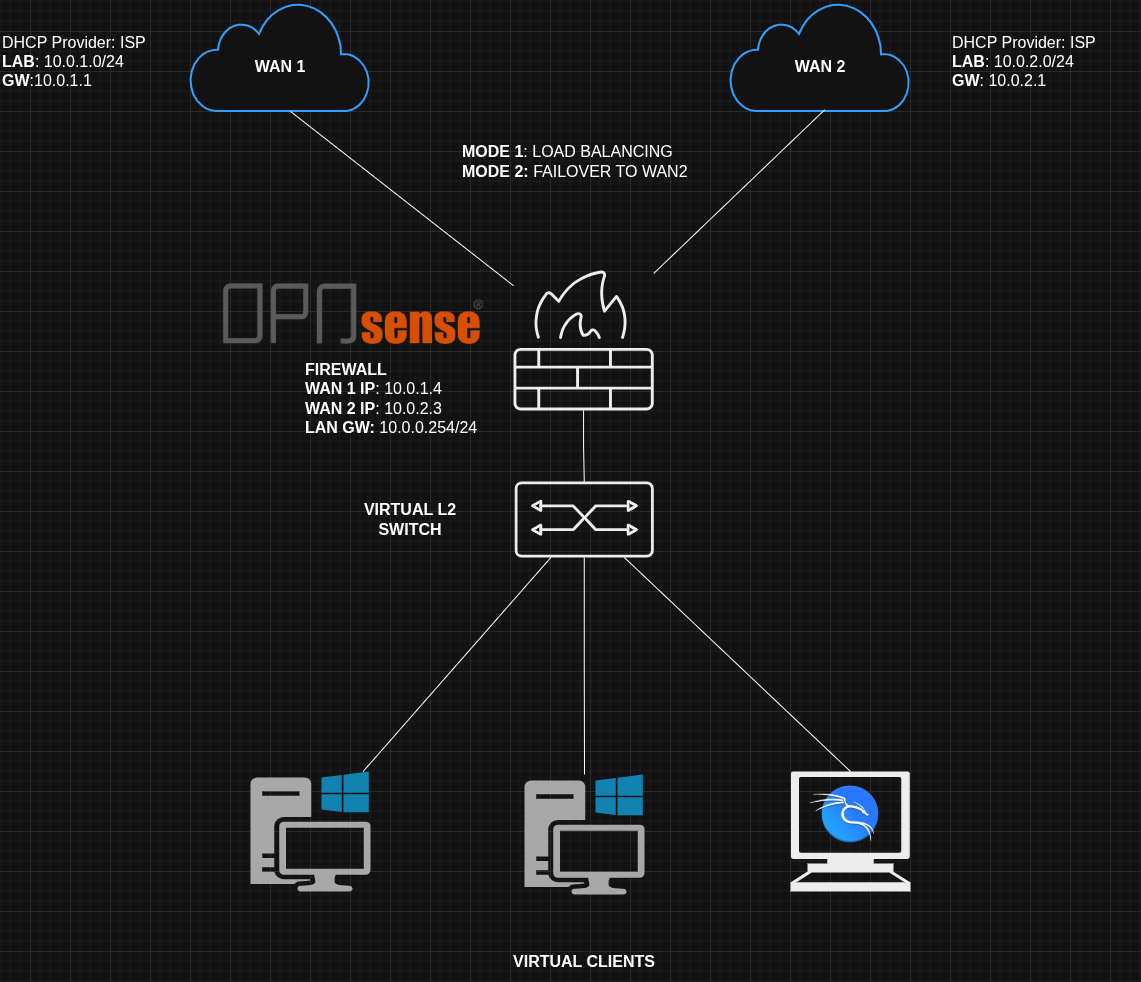
We plan to design a multi WAN fail-over architecture.
One WAN network go down, Firewall will start using other one as the gateway to back it up.
We will also take a look how can we use both together by load balancing. Providing maximum bandwidth to the clients.
SETUP
We will need three interfaces on the Opnsense VM for this lab. And I recommend to make a separate VM for this (don’t use the previous lab VMs).
As always to simulate WAN we will use virtualbox NAT networks, as they have internet connectivity.
Two WAN (NAT networks) and one LAN (internal network) 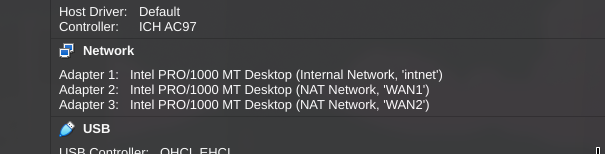
Use the MAC address to identify the em/x interface. 
For my VM:
| NETWORK | INTERFACE NAME | IP | INTERNET |
|---|---|---|---|
| LAN | em0 | 10.0.0.0/24 | NO |
| WAN | em1 | 10.0.1.0/24 | YES |
| WAN 2 | em2 | 10.0.2.0/24 | YES |
NOTE: It’s recommended to connect a linux host on the LAN for this lab (I will be using kali’s ready made VM).
As there’s no DHCP on internal network we will take an IP manually:
1
2
sudo ip addr add 10.0.0.132/24 dev eth0
sudo ip route add default via 10.0.0.254 dev eth0 # set the gateway too
or we can do:
1
2
3
4
sudo nmcli connection modify "Wired connection 1" \
    ipv4.addresses 10.0.0.132/24 \
    ipv4.gateway 10.0.0.254 \
    ipv4.method manual
Just remember, to undo these static IP assignments and get back on DHCP:
1
2
3
4
5
sudo nmcli connection modify "Wired connection 1" \
    ipv4.addresses "" \
    ipv4.gateway "" \
    ipv4.dns "" \
    ipv4.method auto
Now we will go to Opnsense portal, and turn on DHCP on WAN and WAN2 these interfaces will be assigned and IP automatically. Disable IPv6 (for our lab).
To make WAN2 function like another WAN network, block private + block bogon networks on it.
For LAN assign a static IPv4 address 10.0.0.254.
GATEWAY MONITORING
Now the interfaces will need to know that which gateway is online and which is offline. For the failover setup to work.
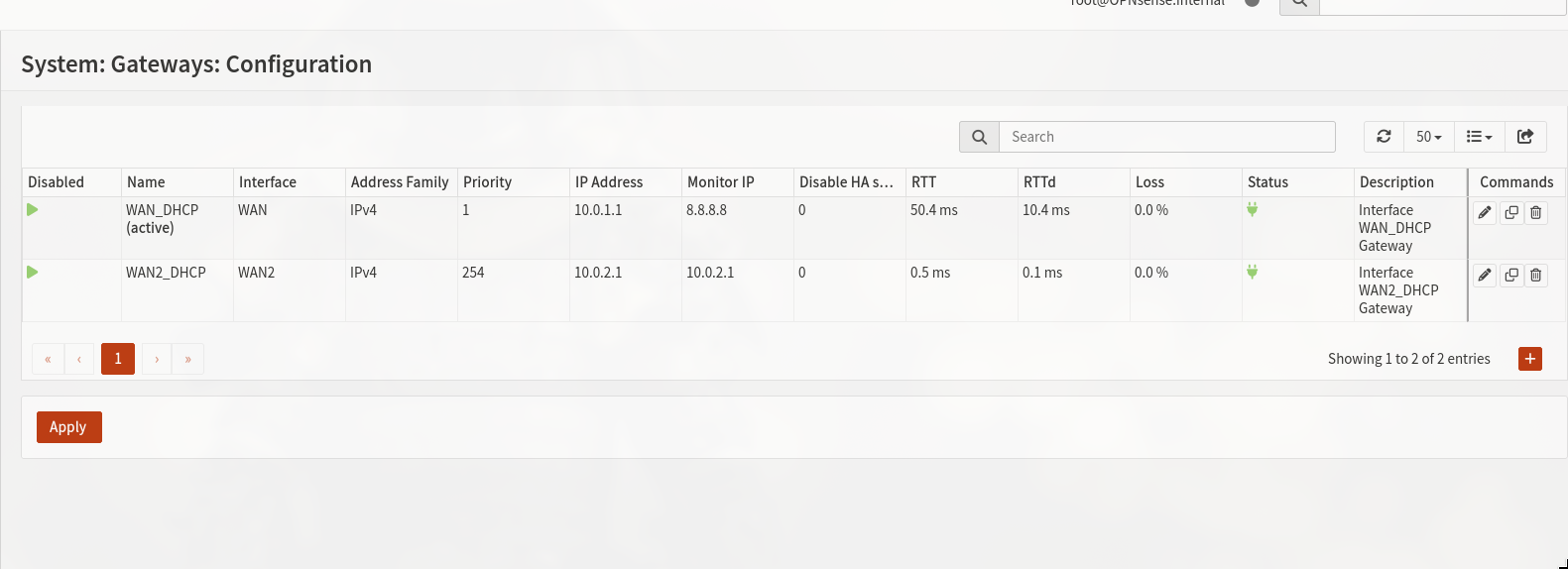
System > Gateways > Configuration
- un-check disable gateway monitoring (if gateway is not being monitored it will be considered up always).
- set IP to 10.0.1.1 and 10.0.2.1 accordingly.
- WAN gateway priority set to 1 and WAN 2 to 254 (lower priority will be default gateway)
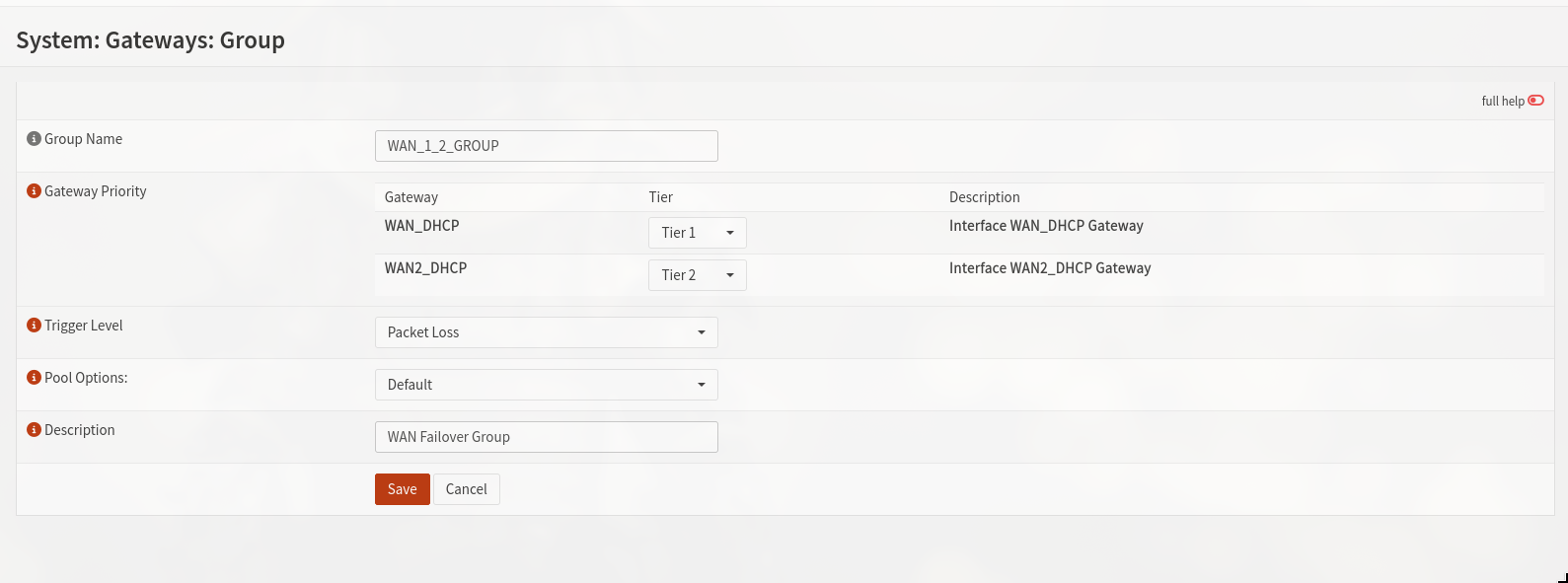
LOAD BALANCER
We can use the firewall as a load balancer, and provide the best bandwidth to our LAN.
For that we will have to assign TIER 1 to both our gateways
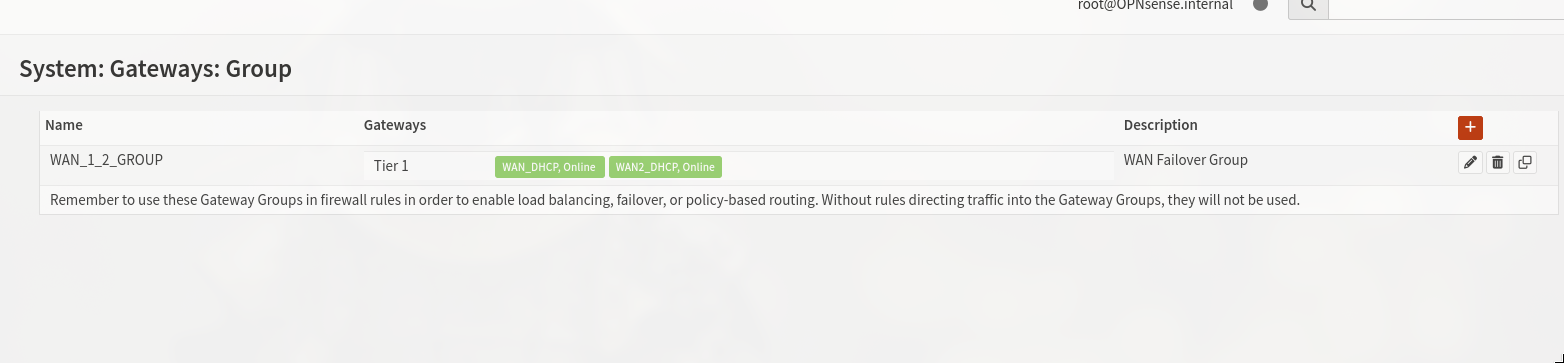
Next we will make configurations like below to utilize the WAN_1_2_GROUP in our network.
I will only be doing failover setup in this blog>
NECESSARY SETTING
Now to make our failover architecture work, we will have to do some tweaks.
Assign seperate DNS servers to both the WAN gateways. And turn on the Allow default gateway switching option.
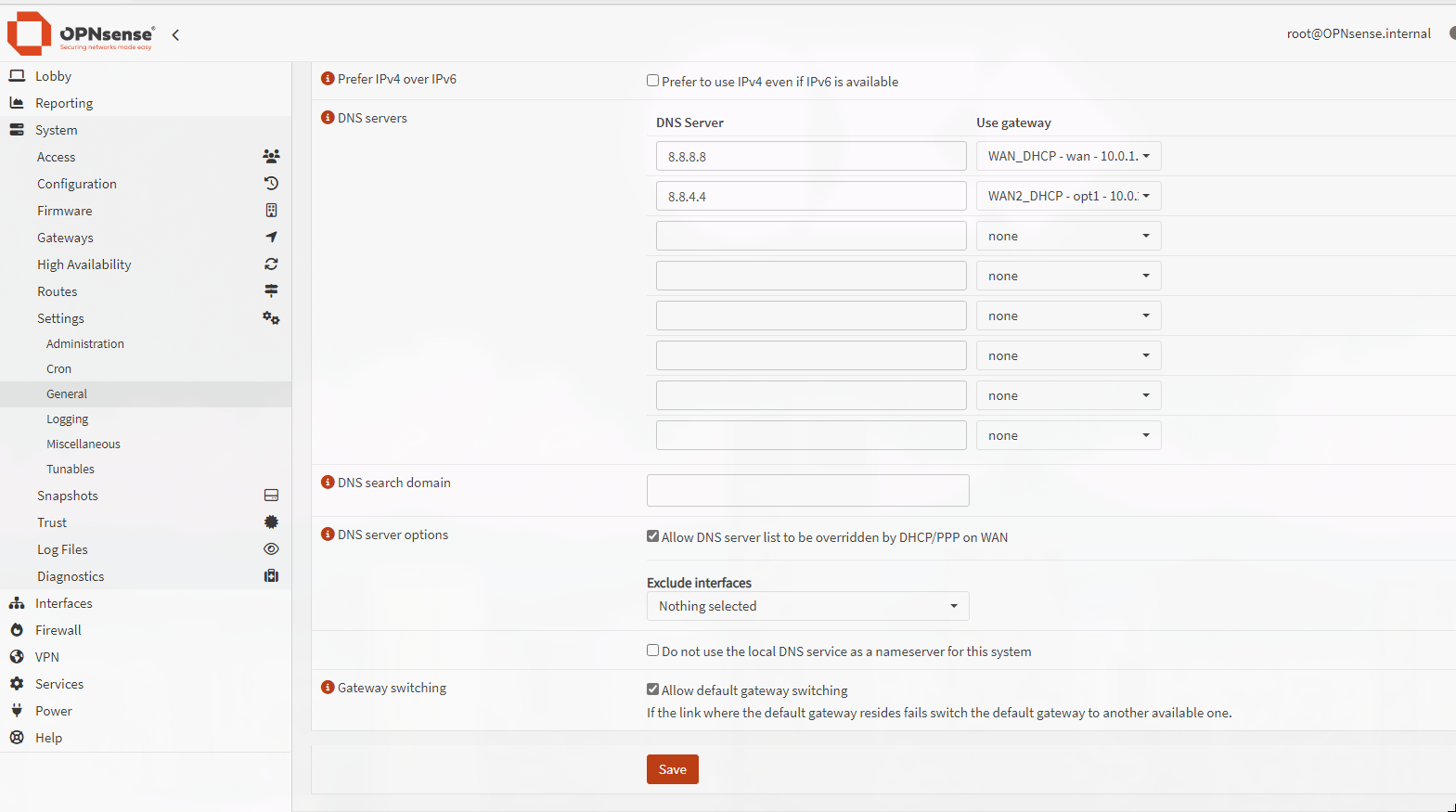
Next, as a rule of thumb we will explicitly define a rule. That will allow any LAN network traffic to pass through our WAN_1_2_GROUP.
We will also make another rule which allow DNS queries on our LAN interface.
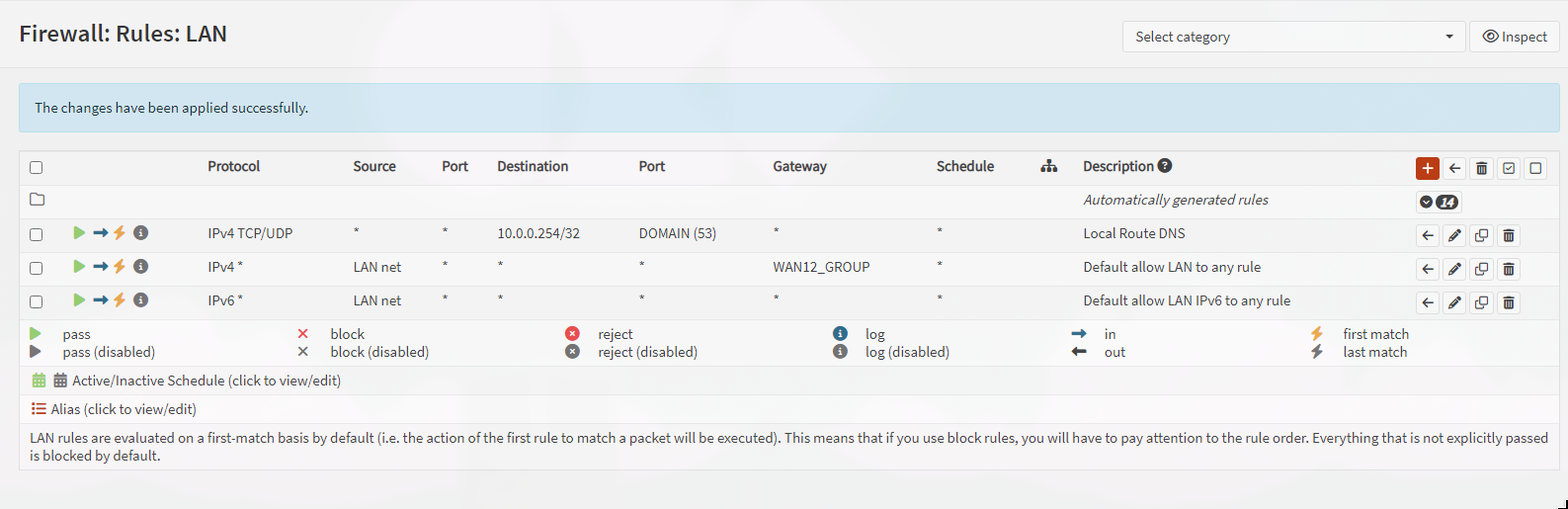
ADVANCED OPTIONS
We also have advanced options.
Gateway > configuration > select any 1 gateway
We can tinker the gateway offline checks from here.
Also if we are using both WAN together as load balancing we may assign each a weight.
Eg. If we have WAN 1 with 100Mbps connection and WAN2 with 200Mbps .Weight WAN 1 will be 1 and WAN2 will be 2.
TROUBLESHOOTING NAT ISSUES
While doing this setup my clients network was lost, I spent hours troubleshooting the issues and rechecking settings and firewall rules.
Finally I found out:
Just after making gateways and groups my outbound NAT rules disappeared
So I made two rules one for each WAN interface:
- WAN: Any traffic from LAN network will be NAT to WAN interface.
- WAN 2: Any traffic from LAN network will be NAT to WAN 2 interface.
Screenshots for reference: 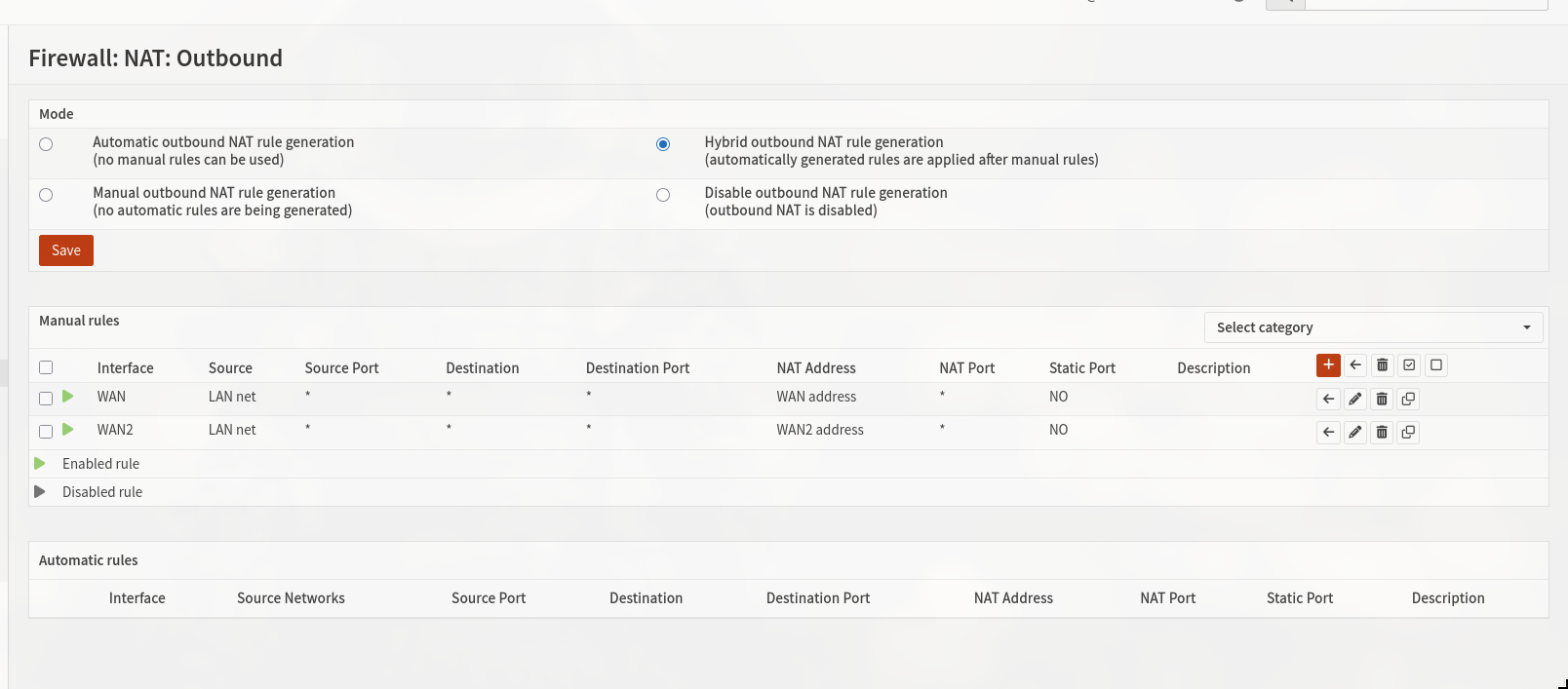
making rule for WAN 1 (WAN interface) 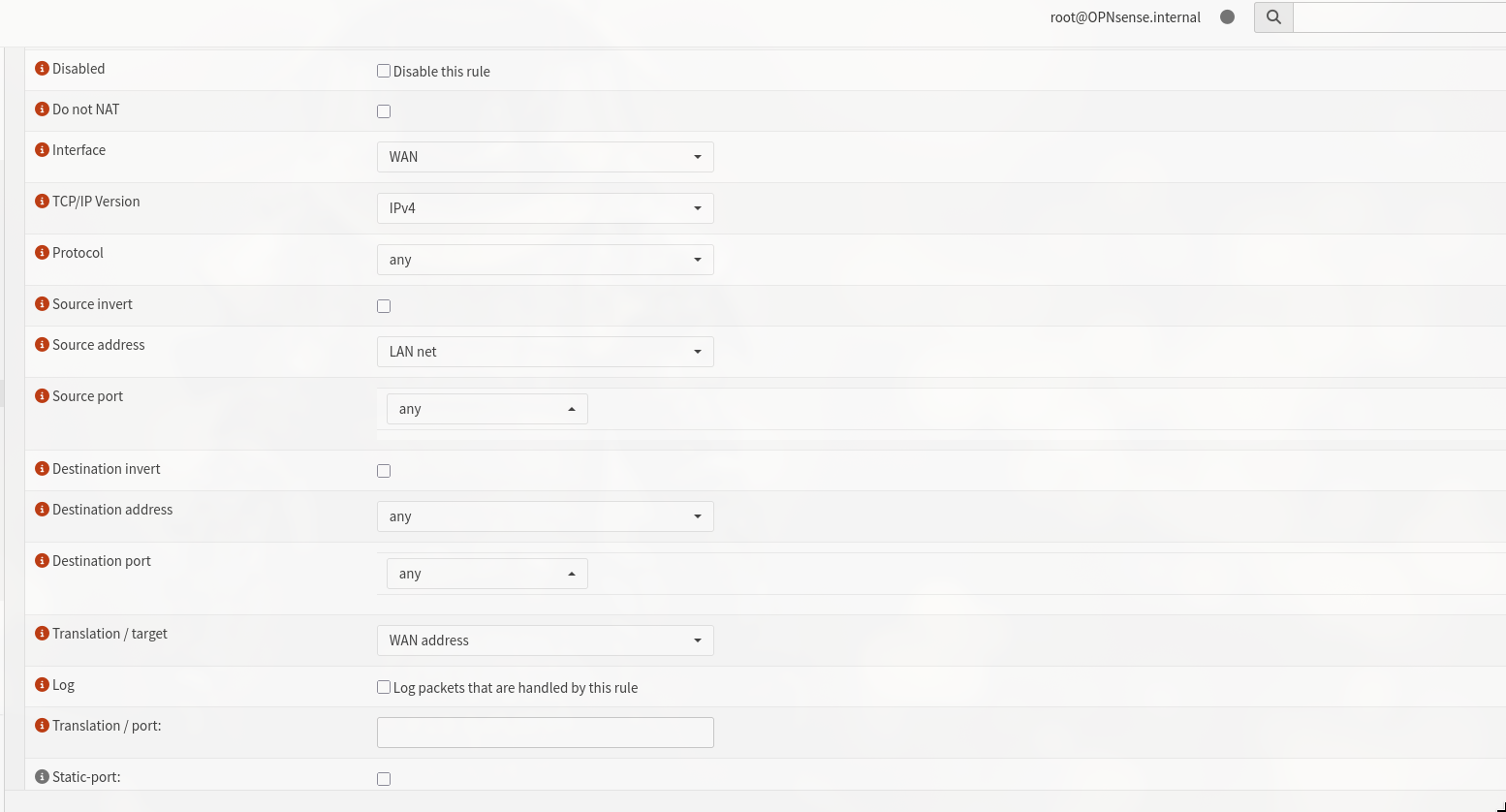
Now test internet connectivity from clients
1
ping -c 4 8.8.8.8
TESTING
By now, both the gateway should be online and WAN1_GW be our active gateway.
Check it out on lobby > dashboard.
Now we test internet connection.
1
ping 8.8.8.8
internet available.
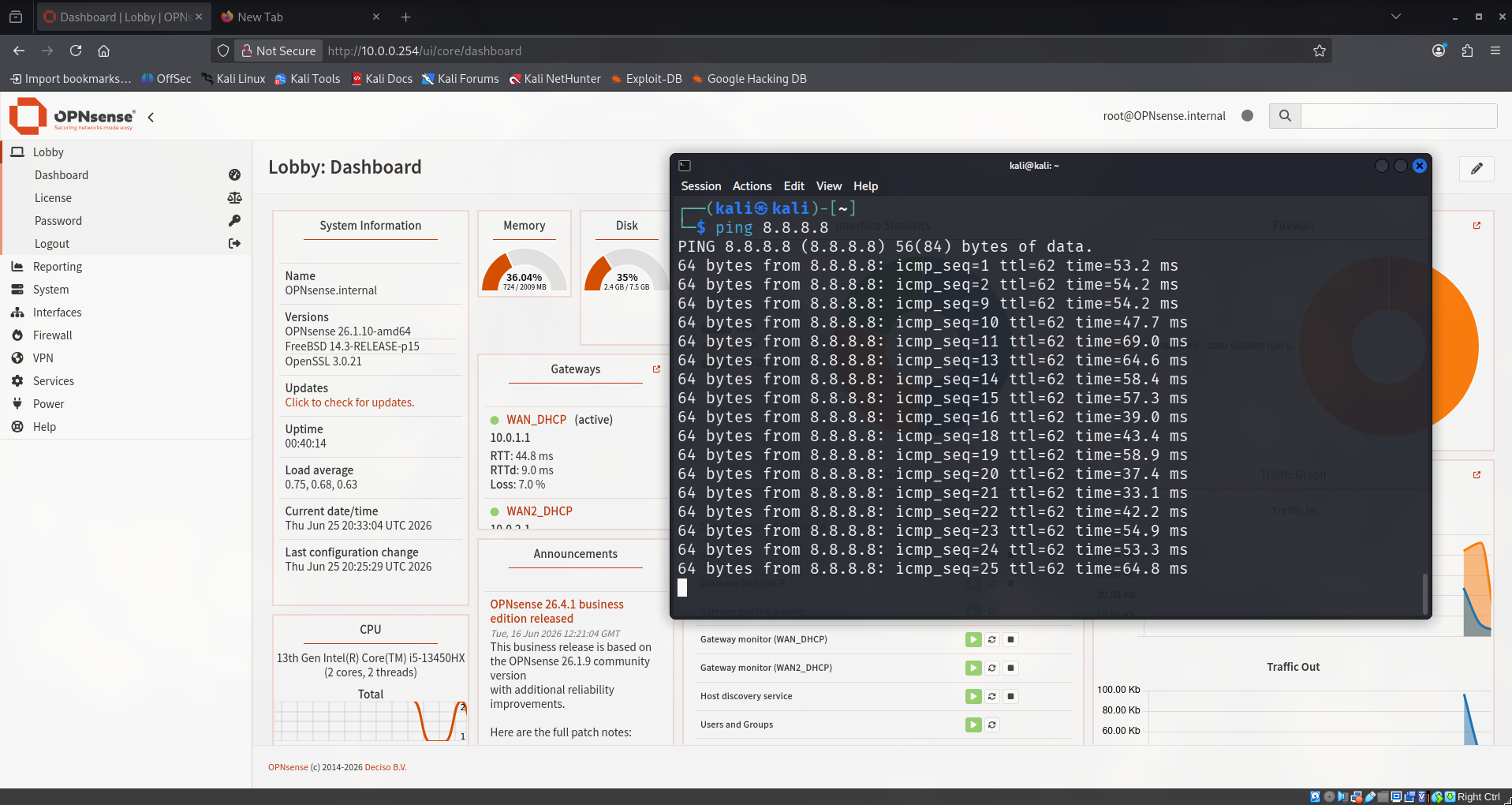
we can trace-route the path:
1
traceroute 4.2.2.2 # or 8.8.8.8 whatever
on line 2 our WAN 1 gateway (IP: 10.0.1.1) can be seen, showing this is the current path.
1
2
3
4
5
6
7
8
9
┌──(kali㉿kali)-[~]
└─$ traceroute 4.2.2.2
traceroute to 4.2.2.2 (4.2.2.2), 30 hops max, 60 byte packets
 1  OPNsense.internal (10.0.0.254)  0.769 ms  0.728 ms  0.712 ms
 2  10.0.1.1 (10.0.1.1)  0.764 ms  0.747 ms  0.697 ms
 3  10.155.101.147 (10.155.101.147)  3.824 ms  3.776 ms  4.036 ms
 4  * * *
 5  192.168.205.241 (192.168.205.241)  44.736 ms 192.168.205.225 (192.168.205.225)  44.676 ms *
 6  * * *
SIMULATING THE FAILOVER CONDITION
We disconnect WAN 1, the firewall should now failover to WAN 2’s gateway.
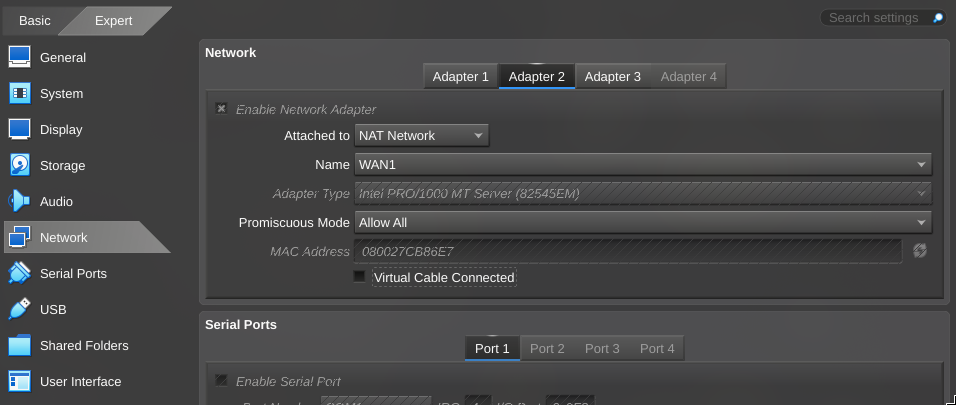
And yes it did. 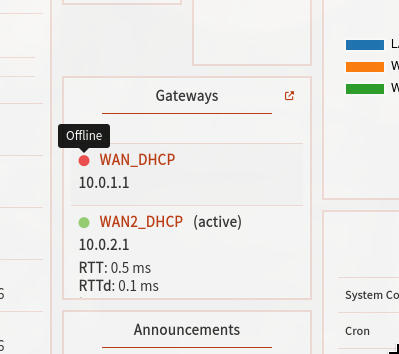
Internet still works!! 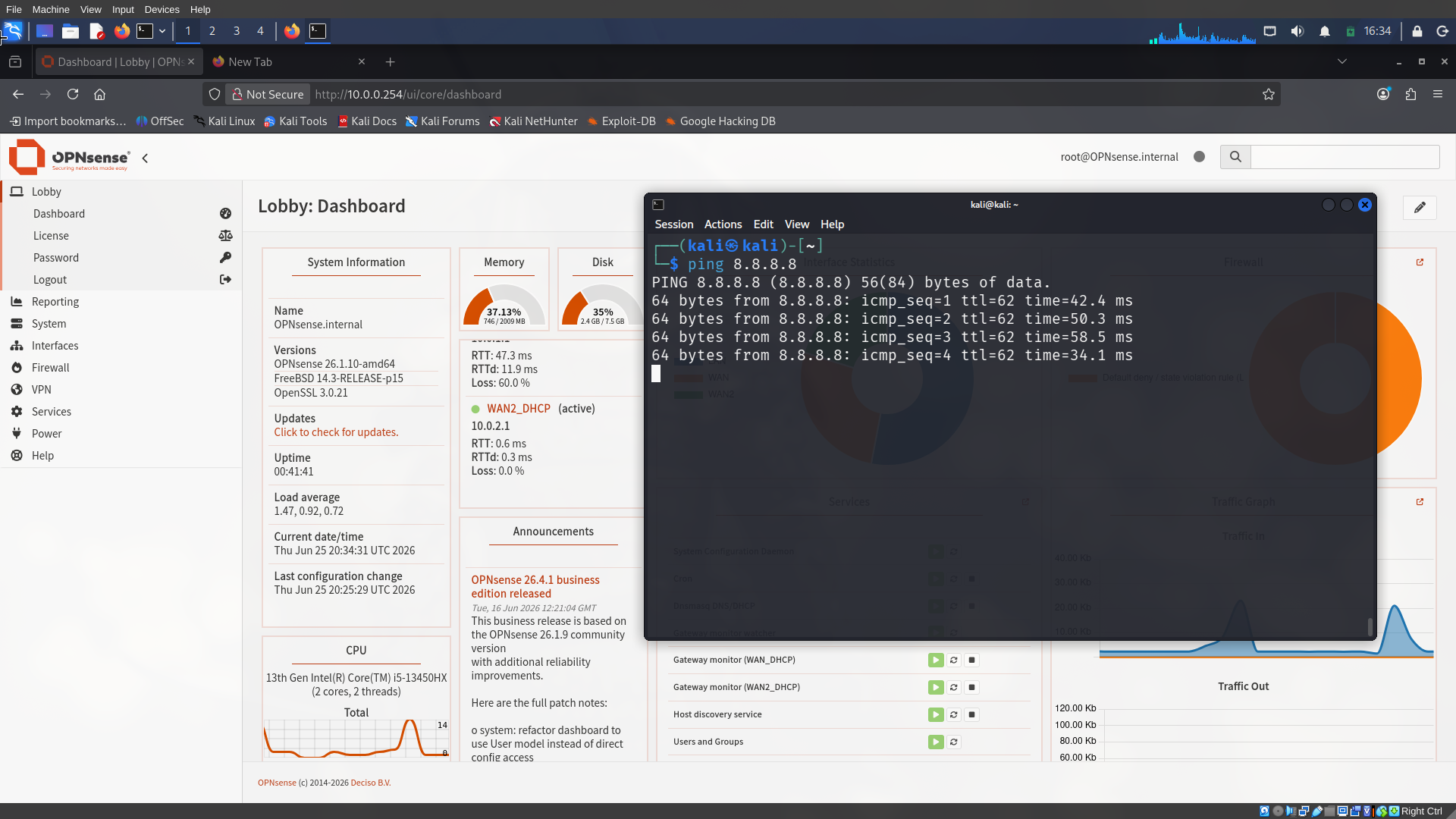
And on line 2 our WAN 2 gateway (10.0.2.1) can be seen, showing it’s being used as the default gateway.
1
2
3
4
5
6
7
8
9
10
11
┌──(kali㉿kali)-[~]
└─$ traceroute 4.2.2.2
traceroute to 4.2.2.2 (4.2.2.2), 30 hops max, 60 byte packets
 1  OPNsense.internal (10.0.0.254)  0.711 ms  0.680 ms  0.674 ms
 2  10.0.2.1 (10.0.2.1)  1.118 ms  1.113 ms  1.107 ms
 3  10.155.101.147 (10.155.101.147)  6.628 ms  6.623 ms  6.934 ms
 4  * * *
 5  * 192.168.205.241 (192.168.205.241)  43.252 ms 192.168.205.225 (192.168.205.225)  43.247 ms
 6  * * *
 7  125.20.118.161 (125.20.118.161)  52.077 ms 125.20.117.93 (125.20.117.93)  51.567 ms 125.20.118.161 (125.20.118.161)  52.097 ms
Now if we cable connect WAN 1 the firewall will fail-back to the WAN 1’s gateway.
Thanks for reading, meet you in the next post.